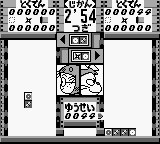
Puzzle Nintama Rantarou (Japan)
0 1 0
Puzzle Nintama Rantarou (Japan) is a classic Game Boy puzzle game that fans of retro handheld titles might enjoy. Its simple mechanics and charming design make it accessible for players of all ages, especially those who like brain-teasing challenges in a nostalgic format. As a Game Boy classic, it offers a straightforward yet engaging puzzle experience that runs directly in your browser, with no need for downloads or setups.
Getting Into Puzzle Nintama Rantarou
The main gameplay of Puzzle Nintama Rantarou involves solving grid-based puzzles that test your pattern recognition and planning skills. The game features a series of static puzzles where you need to match, rearrange, or clear tiles according to certain rules. You pick puzzles from a menu and try to solve them within a set number of moves or time, depending on the mode. There are no complex story elements—just pure puzzle fun that gets more challenging as you go.
Players often spend their time focusing on one puzzle at a time, aiming to meet the puzzle’s conditions efficiently. The interface is simple, with clear visuals that highlight the puzzle grid and keep distractions to a minimum. Since it’s playable in-browser, you can jump right into a puzzle whenever you like, making it easy to start and stop as needed. Its straightforward setup makes it perfect for quick play sessions or longer puzzle marathons.
Standout Features
One of the appealing aspects of Puzzle Nintama Rantarou is its retro graphics and sound, reminiscent of early Game Boy titles. The visuals are pixel-perfect, with clear differences between tile types and a simple, colorful palette that helps with readability. This clarity makes it easier to focus on complex puzzles without confusion, helping you stay engaged with the challenge.
The game’s difficulty ramps up gradually, often introducing new mechanics to keep things interesting. Replay value is high because puzzles can often be approached in multiple ways, and completing them efficiently adds a layer of challenge. The design encourages experimentation, making it rewarding to revisit puzzles and try to improve your previous solutions. Since it’s free and runs in your browser, you can try as many puzzles as you like without any barriers.
Strategy and Tips
Getting good results in Puzzle Nintama Rantarou usually involves planning and patience. Here are some practical tips:
- Take a moment to scan the whole puzzle before making a move; thinking ahead can help avoid mistakes.
- Clear one section completely before moving on to another to reduce clutter and make decisions easier.
- Look for patterns or sequences that can be manipulated in different ways to make the most of your moves.
- For puzzles with a timer, focus on recognizing matching patterns quickly rather than trying to find perfect solutions—speed counts.
- If you get stuck, try approaching the puzzle from a different angle; a fresh perspective can make a difference.
Quick Questions
How do I start a new puzzle in the browser version?
Just pick a new puzzle from the main menu, and it loads right away—no extra steps needed.
What’s a common mistake beginners make in Puzzle Nintama Rantarou?
Many rush their moves without fully scanning the grid, which can lead to dead ends early on.
Can I play this game comfortably on mobile or touch devices?
Yes, since it runs in your browser, it works well with touch controls, making it easy to play on smartphones and tablets.
Puzzle Nintama Rantarou offers a simple puzzle challenge inspired by classic Game Boy design. Its accessibility and gradually increasing difficulty make it a good choice for puzzle fans looking for a nostalgic but engaging experience in your browser.
Related games: you can also try Mouse Trap Hotel (USA) and After Burst (Japan), or browse all other games in the Game Boy category.
How to Play Puzzle Nintama Rantarou (Japan)?
Solve grid puzzles by matching, rearranging, or clearing tiles within a limited number of moves or time. Focus on planning your moves carefully to complete each puzzle efficiently.
Game Controls
Arrow keys act as the D-pad; Enter is Start; other keys handle the action buttons.








Comments (0)
No comments yet. Be the first to comment!