Shanghai Pocket (Japan)
0 1 0
Shanghai Pocket (Japan) is a classic Game Boy puzzle game that combines the charm of traditional Mahjong solitaire with straightforward gameplay suitable for all ages. If you enjoy relaxing yet engaging board games that test your pattern recognition and strategic thinking, this game offers a simple, accessible experience right in your browser. Its origins as a Game Boy title give it a nostalgic feel, making it a great choice for anyone wanting to revisit retro titles in an easy-to-play format.
Getting Into Shanghai Pocket
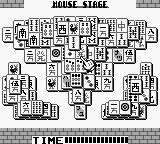
The main gameplay involves clearing Mahjong tiles arranged in complex patterns. Your task is to match pairs of identical tiles and remove them from the board, revealing tiles underneath or next to others. When all pairs are matched and removed, the level is done. The interface is clean and simple, keeping your focus on the tile-matching puzzle. Sessions are usually quick but can get tougher as the tile layouts become more complicated.
There are two main modes. The standard mode offers a series of levels with preset tile arrangements, while a timed mode adds a bit of pressure by limiting how much time you have to clear each board. This simple setup makes it easy to pick up and pause whenever you want, whether you have a few minutes or want to try several rounds. The game doesn’t have elaborate stories or character progressions, focusing instead on solving puzzles and getting better with each attempt.
Standout Features
Visually, Shanghai Pocket stays true to the classic Game Boy style—pixelated tiles with clear symbols. The limited color palette and crisp graphics make the game both nostalgic and easy on the eyes. As you advance, the tile patterns become more detailed, with larger boards and trickier arrangements, slowly raising the challenge and encouraging strategic thinking.
The progression system is simple: each level you finish unlocks the next one. In the standard mode, there are no timers or penalties for mistakes, which makes it great for casual players. You can replay levels to beat your best times or try harder patterns without errors. Since each puzzle is self-contained, you can jump into any stage without needing to play others first, making it easy to practice specific layouts and improve your skills.
Strategy and Tips
Try to expose tiles that unlock the most options for your next moves. Removing tiles that open up multiple matches can keep the puzzle manageable.
- Focus on clearing tiles from the middle of the pattern to reveal hidden matches underneath.
- Work from the top down when possible, removing tiles that block your view of lower layers.
- Use the shuffle feature sparingly; it can help when you’re stuck but might also mess up your plan.
- Pay attention to tiles that are only partially accessible—match them early if you can to avoid getting stuck later.
- If you’re stuck, trying a different pair might open up new options.
Quick Questions
How do I start a new game or level?
Just select the start option on the main menu, and the game will load a new puzzle or continue from where you left off if you’ve saved it.
What’s a common mistake beginners make?
Many try to match tiles right away without thinking about future moves, which can lead to dead ends. Planning a few steps ahead makes things easier.
Can I play Shanghai Pocket on mobile or touch devices?
Yes, since it runs in your browser, you can play on touch screens, making it easy to enjoy on smartphones and tablets.
Playing Shanghai Pocket offers a relaxing puzzle experience based on classic Game Boy gameplay. Its simple rules and mechanics make it accessible for newcomers and nostalgic fans alike. This version is a faithful browser-based version, so you can enjoy the timeless challenge of Shanghai Pocket whenever you like, wherever you are.
Related games: you can also try Q Billion (Japan) and GBKiss Mini Games (Japan), or browse all other games in the Game Boy category.
How to Play Shanghai Pocket (Japan)?
Match and remove pairs of identical Mahjong tiles to clear the board. Continue until all tiles are matched, revealing new tiles and solving the puzzle.
Game Controls
Arrow keys move the cursor; Enter selects or matches tiles.








Comments (0)
No comments yet. Be the first to comment!