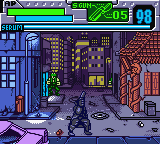
Blade (USA, Europe)
0 8 1
Blade (USA, Europe) is a classic Game Boy Color action-adventure that combines fast-paced combat with exploration. Its pixel art and straightforward gameplay bring back memories for fans of the system’s early titles. If you enjoy games where timing and quick reflexes matter, Blade offers a compact, engaging experience that fits well into handheld gaming routines.
On this browser-based emulation, Blade stays true to the Game Boy Color era, providing a game that’s simple to pick up but tough to master. Its visuals are minimal yet charming, with crisp sprites and a limited color palette that remind players of early portable gaming. The game’s design focuses on action and exploration without complicated stories or mechanics. This makes Blade accessible while still offering enough challenge to keep players coming back for another try.
Why Blade Is Worth Playing
Blade is known for its tight, responsive controls and quick pacing. The gameplay feels immediate, requiring players to react swiftly to enemies and obstacles, which creates a sense of urgency. Its basic adventure elements give a feeling of progress as you move through different screens and face enemies, all in short play sessions. The pixel art is clear, making it easy to tell enemies from the environment—a useful feature on the limited Game Boy Color screen. The sound effects and music are minimal but effective, adding a subtle rhythm to the gameplay without overwhelming it.
What keeps players coming back is the simplicity paired with a fair challenge. There’s no complicated inventory or story to distract from moving, fighting, and surviving. The difficulty level is balanced but unforgiving, requiring precision and patience. It rewards memorization and quick reflexes, making it ideal for quick bursts or longer sessions if you want to improve your skills. Its straightforward design and focus on action make it a good choice for fans of vintage handheld titles who enjoy clean, no-nonsense gameplay.
Tips to Get Ahead
Getting the most out of Blade involves a mix of patience and strategy. Here are some helpful pointers:
- Learn enemy attack patterns so you can anticipate and react more quickly.
- Keep moving to avoid becoming an easy target—staying vigilant and controlling your position helps a lot.
- Familiarize yourself with the level layout to reduce backtracking and avoid unnecessary risks.
- Take down weaker enemies quickly to clear the way for tougher foes.
- Use your weapons and attacks wisely, conserving resources when you can.
- Focus on timing and rhythm, especially during boss fights or tricky sections.
Things to Know Before You Start
How difficult is Blade?
The game offers a moderate challenge typical of Game Boy Color titles—manageable for casual players but enough to test your reflexes and memory. Some trial and error are likely, especially in the later stages.
How long does a session of Blade last?
A typical session can last from 10 to 30 minutes, depending on how familiar you are with the game. It’s designed for quick, accessible play but also works for longer, focused attempts if you’re aiming for high scores or mastery.
Is Blade suitable for casual players?
Yes. Its simple mechanics and short levels make it a good pick for casual gamers, though mastering timing and enemy patterns will appeal to those looking for a real challenge.
Give Blade a try. Its mix of action and exploration on the Game Boy Color platform offers a compact, satisfying experience suited for quick sessions or dedicated practice. The pixel art and straightforward gameplay make it a timeless choice for anyone craving a classic handheld challenge, now playable free in your browser with no hassle.
Related games: you can also try B-Daman Bakugaiden V – Final Mega Tune (Japan) and Bibi und Tina – Fohlen Felix in Gefahr (Germany), or browse all other games in the Game Boy Color category.
How to Play Blade (USA, Europe)?
Move through levels, fight enemies, and avoid hazards using quick reflexes. Clear each screen by defeating foes and exploring to progress, aiming for high scores and better timing.
Game Controls
Arrow keys control movement; action buttons are mapped to other keys for attacking and jumping.
You may be interested in:
-
 Game Boy Color
♥ 43
Zook Hero Z
Game Boy Color
♥ 43
Zook Hero Z -
 Game Boy Color
♥ 1
Zok Zok Heroes (Japan)
Game Boy Color
♥ 1
Zok Zok Heroes (Japan) -
 Game Boy Color
♥ 1
Zoids – Shirogane no Juukishin Liger Zero (Japan)
Game Boy Color
♥ 1
Zoids – Shirogane no Juukishin Liger Zero (Japan) -
 Game Boy Color
♥ 1
Zoids – Jashin Fukkatsu! Genobreaker Hen (Japan)
Game Boy Color
♥ 1
Zoids – Jashin Fukkatsu! Genobreaker Hen (Japan) -
 Game Boy Color
♥ 2
Zoboomafoo – Playtime in Zobooland (USA)
Game Boy Color
♥ 2
Zoboomafoo – Playtime in Zobooland (USA) -
 Game Boy Color
♥ 1
Zidane Football Generation (Europe) (En,Fr,De,Es,It)
Game Boy Color
♥ 1
Zidane Football Generation (Europe) (En,Fr,De,Es,It) -
 Game Boy Color
♥ 1
Zen-Nihon Shounen Soccer Taikai – Mezase Nihon Ichi! (Japan)
Game Boy Color
♥ 1
Zen-Nihon Shounen Soccer Taikai – Mezase Nihon Ichi! (Japan) -
 Game Boy Color
♥ 1
Zebco Fishing! (USA)
Game Boy Color
♥ 1
Zebco Fishing! (USA)
Comments (0)
No comments yet. Be the first to comment!