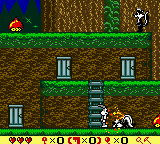
Bugs Bunny in Crazy Castle 4 (USA)
0 10 0
Bugs Bunny in Crazy Castle 4 (USA) is a classic Game Boy Color game that offers simple puzzle-platforming fun. If you enjoy light-hearted, cartoon-themed challenges, this game provides an easy way to get into the genre. It runs directly in your browser, so there’s no need to download anything—just click and play. Its familiar console roots make it easy for fans of the Game Boy Color or newcomers to pick up and enjoy.
Getting Into Bugs Bunny in Crazy Castle 4
The main idea is to move through screens filled with puzzles and obstacles. Your goal is to clear each stage by collecting certain items, avoiding enemies, and solving environmental puzzles. The game has several levels, each with specific objectives you need to complete to move on. As you go further, the puzzles get trickier, calling for better planning and faster reactions.
Usually, you explore the stage, gather items, and use objects to unlock new paths or turn off hazards. The gameplay is straightforward and designed for quick sessions. There aren’t any complicated modes or multiplayer options; instead, you focus on completing levels at your own pace. Timing and careful planning are key, especially when dodging enemies or working with moving parts within each stage.
Standout Features
This classic from the Game Boy Color days features colorful, cartoon-style visuals that bring Bugs Bunny and friends to life. Its sprite graphics are clear and easy to understand, helping you spot hazards and objects quickly. Each level offers new puzzles, encouraging players to replay and find better times or different solutions.
There’s good replay value in trying different strategies and tackling the increasing difficulty. While it doesn’t have branching paths or unlockables, the challenge keeps you coming back to improve your skills or experiment with new approaches. The game is short enough for quick plays but engaging enough to keep you busy if you aim for perfect completion or high scores.
Strategy and Tips
Start by getting familiar with each level before rushing through. Take your time to think about your moves, especially when enemies or moving objects are involved. Patience and careful observation help solve puzzles faster.
- Learn enemy patterns so you can avoid or outsmart them instead of rushing in blindly.
- Use collected items wisely to unlock new paths or turn off hazards.
- Explore each screen thoroughly to spot important items or shortcuts.
- Practice timing when moving objects or dealing with enemies for safer navigation.
- If you get stuck, go back to earlier levels to refine your approach or try different routes.
Quick Questions
How do I start playing Bugs Bunny in Crazy Castle 4?
The game loads instantly in your browser, so you can start playing right away without any setup, making it accessible for newcomers.
What’s a common mistake for beginners?
Many new players try to rush through levels without observing enemy patterns or exploring enough, which can lead to repeated retries or getting stuck.
Can I play Bugs Bunny in Crazy Castle 4 on mobile or touch devices?
Yes, since it runs in your browser via an emulator, you can play on mobile devices. While gameplay works best with a keyboard or controller, touch controls are supported.
Overall, Bugs Bunny in Crazy Castle 4 offers a straightforward puzzle experience with roots in the Game Boy Color era. It’s a simple, enjoyable game that rewards planning and patience, making it a good choice for quick retro gaming sessions or puzzle fans looking for a light challenge in their browser.
Related games: you can also try Barbie – Pet Rescue (Europe) (En,Fr,De,Es,It) and Aventures de Buzz l'Eclair, Les (France), or browse all other games in the Game Boy Color category.
How to Play Bugs Bunny in Crazy Castle 4 (USA)?
Move Bugs Bunny through levels by collecting items, avoiding enemies, and solving puzzles to clear each stage. Explore screens thoroughly and plan your moves to complete objectives efficiently.
Game Controls
Arrow keys control movement; other keys handle actions like jumping or using items.
You may be interested in:
-
 Game Boy Color
♥ 43
Zook Hero Z
Game Boy Color
♥ 43
Zook Hero Z -
 Game Boy Color
♥ 1
Zok Zok Heroes (Japan)
Game Boy Color
♥ 1
Zok Zok Heroes (Japan) -
 Game Boy Color
♥ 1
Zoids – Shirogane no Juukishin Liger Zero (Japan)
Game Boy Color
♥ 1
Zoids – Shirogane no Juukishin Liger Zero (Japan) -
 Game Boy Color
♥ 1
Zoids – Jashin Fukkatsu! Genobreaker Hen (Japan)
Game Boy Color
♥ 1
Zoids – Jashin Fukkatsu! Genobreaker Hen (Japan) -
 Game Boy Color
♥ 2
Zoboomafoo – Playtime in Zobooland (USA)
Game Boy Color
♥ 2
Zoboomafoo – Playtime in Zobooland (USA) -
 Game Boy Color
♥ 1
Zidane Football Generation (Europe) (En,Fr,De,Es,It)
Game Boy Color
♥ 1
Zidane Football Generation (Europe) (En,Fr,De,Es,It) -
 Game Boy Color
♥ 1
Zen-Nihon Shounen Soccer Taikai – Mezase Nihon Ichi! (Japan)
Game Boy Color
♥ 1
Zen-Nihon Shounen Soccer Taikai – Mezase Nihon Ichi! (Japan) -
 Game Boy Color
♥ 1
Zebco Fishing! (USA)
Game Boy Color
♥ 1
Zebco Fishing! (USA)
Comments (0)
No comments yet. Be the first to comment!