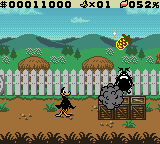
Daffy Duck – Fowl Play (USA)
0 8 3
Daffy Duck – Fowl Play (USA) is a classic Game Boy Color platformer and action game featuring the beloved Looney Tunes character Daffy Duck. It’s a good example of the handheld’s library, combining simple gameplay with bright visuals and easy mechanics. Designed for fans of old-school platformers, it offers light, accessible fun that you can enjoy directly in your browser—no downloads or installations needed.
Daffy Duck – Fowl Play: Gameplay Overview
The main goal is guiding Daffy through levels filled with obstacles, enemies, and platforming challenges. The game focuses on running, jumping, and avoiding hazards, with timing and positioning playing a big role. It encourages players to learn each level’s layout, since quick reactions are often needed to dodge enemies and environmental dangers. Although there’s no complex combat or power-ups, the game emphasizes precise movement and recognizing patterns.
Levels are mostly side-scrolling stages where players help Daffy navigate gaps, moving platforms, and enemy characters. The difficulty increases gradually, introducing new obstacles and enemy placements as you go along. As a platformer, the gameplay involves completing levels efficiently while avoiding damage and aiming for higher scores or faster times. Its straightforward mechanics make it suitable for players of all ages, but patience and timing are important for progressing.
Modes, Levels and Progression
This game from the Game Boy Color era follows a linear path through a series of levels, each getting a bit tougher. There aren’t different modes, but replaying levels to improve scores and master tricky sections is part of the experience. The level designs are varied enough to keep things interesting, with different themes and obstacles. Finishing a level unlocks the next, creating a sense of progression typical of platformers from that time.
The game isn’t very long, making it perfect for quick play sessions. Experienced players can finish it in about 15-30 minutes, and replaying levels for better scores or exploring different routes adds to the fun. Improving your timing and learning each level’s layout can extend how much you get out of it.
Winning Strategies
Getting the timing right when jumping and avoiding enemies is key to doing well in this game.
- Learn enemy patterns and level layouts to anticipate hazards.
- Use small, controlled jumps to cross narrow platforms and prevent falls.
- Try to clear levels quickly for higher scores, but don’t rush into danger.
- Practice tough sections repeatedly to sharpen your reactions.
- Watch for visual clues that hint at upcoming obstacles or enemy moves.
- Explore different routes within levels to find the safest and fastest way through.
Common Questions About Daffy Duck – Fowl Play
How does the difficulty change as I go through levels?
It gets tougher over time with more complex enemy patterns and trickier platform setups, so better timing and memorization are needed as you progress.
Are there multiple modes, or just the main levels?
The game mainly offers a straight path through levels, but replaying for higher scores adds some extra challenge.
How long does it usually take to finish the game?
Depending on your skill, it might take around 15 to 30 minutes to complete, but trying for higher scores can keep you playing longer.
This classic Game Boy Color action-platformer captures the charm of its time and delivers straightforward, skill-based gameplay. Playing Daffy Duck – Fowl Play offers a nostalgic feel with enough challenge to keep things interesting without being overwhelming.
Related games: you can also try All-Star Baseball 2001 (USA) and Bug's Life, A (USA), or browse all other games in the Game Boy Color category.
How to Play Daffy Duck – Fowl Play (USA)?
Guide Daffy through levels by running, jumping, and avoiding enemies and hazards. Complete each stage quickly and carefully to progress and improve your score.
Game Controls
Arrow keys control movement; space or dedicated keys handle jumping and actions.
You may be interested in:
-
 Game Boy Color
♥ 43
Zook Hero Z
Game Boy Color
♥ 43
Zook Hero Z -
 Game Boy Color
♥ 1
Zok Zok Heroes (Japan)
Game Boy Color
♥ 1
Zok Zok Heroes (Japan) -
 Game Boy Color
♥ 1
Zoids – Shirogane no Juukishin Liger Zero (Japan)
Game Boy Color
♥ 1
Zoids – Shirogane no Juukishin Liger Zero (Japan) -
 Game Boy Color
♥ 1
Zoids – Jashin Fukkatsu! Genobreaker Hen (Japan)
Game Boy Color
♥ 1
Zoids – Jashin Fukkatsu! Genobreaker Hen (Japan) -
 Game Boy Color
♥ 2
Zoboomafoo – Playtime in Zobooland (USA)
Game Boy Color
♥ 2
Zoboomafoo – Playtime in Zobooland (USA) -
 Game Boy Color
♥ 1
Zidane Football Generation (Europe) (En,Fr,De,Es,It)
Game Boy Color
♥ 1
Zidane Football Generation (Europe) (En,Fr,De,Es,It) -
 Game Boy Color
♥ 1
Zen-Nihon Shounen Soccer Taikai – Mezase Nihon Ichi! (Japan)
Game Boy Color
♥ 1
Zen-Nihon Shounen Soccer Taikai – Mezase Nihon Ichi! (Japan) -
 Game Boy Color
♥ 1
Zebco Fishing! (USA)
Game Boy Color
♥ 1
Zebco Fishing! (USA)
Comments (0)
No comments yet. Be the first to comment!