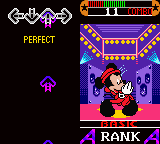
Dance Dance Revolution GB – Disney Mix (Japan)
0 1 1
Dance Dance Revolution GB – Disney Mix (Japan) is a classic Game Boy Color game that brings the rhythm action of the popular dance series to a portable format. Designed for fans of music and rhythm games, it offers a selection of Disney tunes paired with straightforward gameplay that fits into short gaming sessions. As a Game Boy Color title, it captures the handheld’s charm and simplicity, making it a nostalgic choice for those who grew up with the system or want to experience a piece of its musical legacy.
Getting Into Dance Dance Revolution GB – Disney Mix
This game focuses on timing your moves to match on-screen prompts, a core mechanic shared across the Dance Dance Revolution series. The gameplay involves pressing directional buttons in sync with the music’s beat, with each song presenting a sequence of steps players must follow. The game features multiple difficulty levels, allowing beginners to get started easily or challenge themselves with more complex patterns. Typically, a game session involves selecting a song, hitting the start button, and then concentrating on hitting the correct directions at the right moment. As the music plays, visual cues guide your button presses, and performance feedback is given after each song.
Modes include a standard play mode where you pick a song and aim for the highest score, and a practice mode that lets you repeat tricky sections. While it doesn’t have complex storylines or multiplayer features, the gameplay encourages repeated attempts to improve timing and accuracy. Its steady pace makes it suitable for quick sessions or longer efforts to master specific tracks, whether you’re new to rhythm games or more experienced.
Standout Features
A key aspect of Dance Dance Revolution GB – Disney Mix is its selection of Disney songs, which add a cheerful soundtrack to the game. The visuals are simple but colorful, with animated backgrounds and clear step prompts that keep the rhythm engaging without overwhelming the player. The progression system involves unlocking new songs and difficulty levels, motivating players to replay familiar tracks and improve their scores. Thanks to the Game Boy Color platform, load times are quick, and the game offers a portable experience that you can enjoy anywhere, whether during a quick break or on a commute.
Replay value comes from the challenge of perfecting timing and unlocking more content. Its straightforward mechanics make it easy for newcomers to pick up, but mastering harder songs takes practice. The Disney music selection makes it especially appealing to younger players or Disney fans, but the core rhythm gameplay stays engaging for all ages. As a browser-based emulator, it’s accessible without needing installation, making it convenient to enjoy a classic dance game on modern devices.
Strategy and Tips
If you’re just starting out, focus on listening to the beat before pressing the buttons. Accuracy matters more than speed at first, so take your time to learn each song’s rhythm. Playing on easier difficulty levels can boost your confidence and help develop good timing habits. Keep your eyes on the prompts rather than the background animations to react faster. Use practice mode to repeat tricky sections until they feel natural. Remember to stay relaxed and avoid rushing—timing beats speed every time.
- Begin with simpler songs to build your sense of rhythm and accuracy before trying more difficult ones.
- Pay attention to the beat rather than individual prompts to keep your timing consistent.
- Use practice mode to work on complicated sections and build muscle memory.
- Keep your hands steady and avoid rushing your presses for better scores.
- Listen to the music without distractions to anticipate prompts better.
- Take short breaks if your timing slips or your hands tire.
Quick Questions
How do I get started with the game?
Select a song, pick your difficulty, and press start. Focus on matching the prompts to the beat as they appear on screen.
What is a common mistake beginners make?
Trying to press buttons too early or too late instead of waiting for the right prompt can hurt your score; patience helps.
Can I play this on mobile or touch devices?
This version runs in your browser, so it’s designed for keyboard or controller input, not touch screens. It works well on desktop browsers with keyboard controls.
Dance Dance Revolution GB – Disney Mix offers a simple, fun rhythm experience that captures the spirit of the series on a handheld console. Its easy gameplay and Disney soundtrack make it a charming choice for fans of classic Game Boy Color titles and music games alike.
Related games: you can also try 720 Degrees (USA, Europe) and Bibi Blocksberg – Im Bann der Hexenkugel (Germany), or browse all other games in the Game Boy Color category.
How to Play Dance Dance Revolution GB – Disney Mix (Japan)?
Press the directional keys in time with the music to match on-screen prompts and score points. Choose a song, start, and follow the cues to improve your timing and unlock new content.
Game Controls
Arrow keys act as the D-pad; Enter is Start; other keys handle menu navigation.
You may be interested in:
-
 Game Boy Color
♥ 43
Zook Hero Z
Game Boy Color
♥ 43
Zook Hero Z -
 Game Boy Color
♥ 1
Zok Zok Heroes (Japan)
Game Boy Color
♥ 1
Zok Zok Heroes (Japan) -
 Game Boy Color
♥ 1
Zoids – Shirogane no Juukishin Liger Zero (Japan)
Game Boy Color
♥ 1
Zoids – Shirogane no Juukishin Liger Zero (Japan) -
 Game Boy Color
♥ 1
Zoids – Jashin Fukkatsu! Genobreaker Hen (Japan)
Game Boy Color
♥ 1
Zoids – Jashin Fukkatsu! Genobreaker Hen (Japan) -
 Game Boy Color
♥ 2
Zoboomafoo – Playtime in Zobooland (USA)
Game Boy Color
♥ 2
Zoboomafoo – Playtime in Zobooland (USA) -
 Game Boy Color
♥ 1
Zidane Football Generation (Europe) (En,Fr,De,Es,It)
Game Boy Color
♥ 1
Zidane Football Generation (Europe) (En,Fr,De,Es,It) -
 Game Boy Color
♥ 1
Zen-Nihon Shounen Soccer Taikai – Mezase Nihon Ichi! (Japan)
Game Boy Color
♥ 1
Zen-Nihon Shounen Soccer Taikai – Mezase Nihon Ichi! (Japan) -
 Game Boy Color
♥ 1
Zebco Fishing! (USA)
Game Boy Color
♥ 1
Zebco Fishing! (USA)
Comments (0)
No comments yet. Be the first to comment!