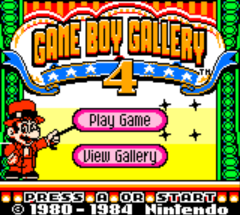
Game Boy Gallery 4 (Australia)
0 2 0
Game Boy Gallery 4 (Australia) is a collection of classic Game Boy Color games, bringing together a variety of small, fun titles from the handheld’s library. This browser version lets players enjoy a nostalgic look at gaming history without needing a physical cartridge or console. Fans of retro action, strategy, and mini-games will find enough variety here to stay entertained. It’s a solid choice for anyone wanting to revisit some of the simpler, yet still enjoyable, titles from the Game Boy Color era.
Getting Into Game Boy Gallery 4
The main idea behind Game Boy Gallery 4 is choosing and playing different mini-games, each with its own challenge or puzzle. Once you start, you pick from the available titles, which often involve quick reflexes, strategic thinking, or recognizing patterns. The game is meant for short sessions, making it great for quick gaming breaks or casual play. Your goal is to finish each mini-game successfully, earning points or progressing through a simple system.
The interface is straightforward, with each mini-game having its own rules and mechanics. After finishing a game, you can replay it to improve your score or switch to another challenge. There are no lengthy storylines or big levels—just a variety of gameplay styles in small, manageable pieces. This keeps things fresh and easy to pick up, especially if you enjoy quick, satisfying challenges rather than long campaigns.
Standout Features
The visuals stay true to the original Game Boy Color style—bright, simple, and pixelated, which adds to the nostalgic feel. The menu is clean and simple, making it easy to switch between different mini-games. Your scores track your progress, encouraging you to beat your personal bests. The variety of game types caters to different tastes and skill levels.
This compilation offers a different experience each time you play, whether you prefer action, puzzles, or strategy. Since it’s a browser emulator, it runs smoothly without needing downloads or setup. Short play sessions make it perfect for quick bursts of fun, but spending time to master each mini-game can keep you coming back. Its mix of simplicity and variety makes it a reliable source of retro entertainment that’s easy to revisit whenever you want.
Strategy and Tips
Getting the most out of Game Boy Gallery 4 is about quick decisions and understanding each mini-game’s mechanics. Here are some ideas to help improve your gameplay:
- Start with the mini-games you find easiest to build confidence and boost your scores early on.
- Watch for patterns or timing cues that can help you perform actions more smoothly.
- Replay your favorite games to learn the best strategies for beating high scores.
- Use short sessions to focus on mastering specific mini-games instead of rushing through everything.
- Keep track of your progress to motivate yourself to improve with each try.
Quick Questions
How do I access the mini-games in Game Boy Gallery 4?
You select from the mini-games listed on the main menu once the game loads in your browser. No extra steps needed.
What is the typical difficulty level for these mini-games?
The difficulty varies, but most are friendly for beginners, with challenges getting tougher as you get better.
Can I play this on mobile or touch devices?
Yes, the browser emulator works well on mobile devices with touch controls, so you can enjoy it on the go without any extra setup.
Game Boy Gallery 4 offers a simple but enjoyable collection of classic mini-games from the Game Boy Color era. Playing directly in your browser makes it easy to experience old-school gaming without any fuss.
Related games: you can also try Deja Vu I & II – The Casebooks of Ace Harding (Japan) and Game Boy Color Promotional Demo (USA, Europe), or browse all other games in the Game Boy Color category.
How to Play Game Boy Gallery 4 (Australia)?
Choose a mini-game, complete its challenge by using quick reflexes or strategy, then try to beat your high score or switch to another game for more fun.
Game Controls
Arrow keys control movement or selection; other keys perform actions as indicated on the screen.
You may be interested in:
-
 Game Boy Color
♥ 43
Zook Hero Z
Game Boy Color
♥ 43
Zook Hero Z -
 Game Boy Color
♥ 1
Zok Zok Heroes (Japan)
Game Boy Color
♥ 1
Zok Zok Heroes (Japan) -
 Game Boy Color
♥ 1
Zoids – Shirogane no Juukishin Liger Zero (Japan)
Game Boy Color
♥ 1
Zoids – Shirogane no Juukishin Liger Zero (Japan) -
 Game Boy Color
♥ 1
Zoids – Jashin Fukkatsu! Genobreaker Hen (Japan)
Game Boy Color
♥ 1
Zoids – Jashin Fukkatsu! Genobreaker Hen (Japan) -
 Game Boy Color
♥ 2
Zoboomafoo – Playtime in Zobooland (USA)
Game Boy Color
♥ 2
Zoboomafoo – Playtime in Zobooland (USA) -
 Game Boy Color
♥ 1
Zidane Football Generation (Europe) (En,Fr,De,Es,It)
Game Boy Color
♥ 1
Zidane Football Generation (Europe) (En,Fr,De,Es,It) -
 Game Boy Color
♥ 1
Zen-Nihon Shounen Soccer Taikai – Mezase Nihon Ichi! (Japan)
Game Boy Color
♥ 1
Zen-Nihon Shounen Soccer Taikai – Mezase Nihon Ichi! (Japan) -
 Game Boy Color
♥ 1
Zebco Fishing! (USA)
Game Boy Color
♥ 1
Zebco Fishing! (USA)
Comments (0)
No comments yet. Be the first to comment!