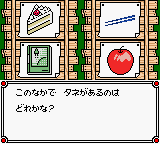
Guruguru Town Hanamaru-kun (Japan)
0 1 0
Guruguru Town Hanamaru-kun (Japan) is a classic Game Boy Color game that’s now playable directly in your browser, offering a simple and charming experience rooted in the handheld’s golden era. Its controls are easy to pick up, making it accessible for newcomers, while still offering enough charm for longtime fans. If you remember what it felt like to play on a Game Boy Color, this game brings that nostalgic vibe to your modern device without any downloads or installations.
What Is Guruguru Town Hanamaru-kun?
This game fits into the puzzle and adventure genres typical of the Game Boy Color days. The main goal is to explore a colorful, cute world, solve puzzles, and complete tasks that involve pattern recognition and exploration. It encourages quick thinking and good timing, making each session engaging without feeling overwhelming. Its design suits short gaming bursts, perfect for quick breaks or casual play.
Guruguru Town Hanamaru-kun keeps things simple with minimal story complexity, focusing on the gameplay itself. The visuals are bright and pixelated, with clear graphics that match the platform’s capabilities. The rules are straightforward: move through levels by solving puzzles or completing specific tasks, with difficulty gradually increasing but never becoming too hard. It’s a good pick for players after a relaxing, pick-up-and-play experience with a nostalgic touch.
What Keeps You Coming Back
A big part of the game’s appeal is its cheerful pixel art and lively soundtrack, which create a welcoming atmosphere. There are multiple ways to solve puzzles, encouraging experimentation and adding to its replay value. As you get familiar with the patterns and mechanics, you’ll find yourself coming back to improve your scores or try new solutions, making each run feel worthwhile.
The game offers puzzles that get a bit trickier over time, which keeps things interesting without frustrating you. Its quick sessions make it easy to jump in and out, but the variety of puzzles and the cute world make it tempting to return. Plus, with its simple design, you can start playing anytime—great for casual players or newcomers to puzzle games.
Handy Tips
If you want to enjoy Guruguru Town Hanamaru-kun, here are some tips:
- Watch the patterns and timing of puzzle elements to solve challenges more smoothly.
- If you’re stuck, try different approaches—there’s usually more than one way to get through a puzzle.
- Finish puzzles quickly to score higher, but don’t sacrifice accuracy just to go faster.
- Use hints sparingly until you understand the mechanics, especially in the later levels.
- Start with the early puzzles—they build skills that help with the more complex stages.
- The game runs smoothly in your browser, so you can pause and take breaks without losing progress.
Player FAQ
Is Guruguru Town Hanamaru-kun easy for young children to understand?
Yes, its simple controls and bright visuals make it suitable for younger players, with no complicated story or mechanics.
Can I play Guruguru Town Hanamaru-kun offline or without an internet connection?
Since it runs right in your browser, you can enjoy it anytime without needing to connect online.
Is Guruguru Town Hanamaru-kun accessible for players unfamiliar with puzzle games?
Definitely. Its straightforward gameplay and gentle difficulty make it easy for newcomers to pick up and enjoy.
Guruguru Town Hanamaru-kun offers a charming, easy-to-start puzzle adventure that works well for casual gaming. Its simple mechanics and nostalgic look make it a nice addition to any collection of classic Game Boy Color titles played right in your browser.
Related games: you can also try ECW Hardcore Revolution (USA) and Doraemon no Study Boy – Kanji Yomikaki Master (Japan), or browse all other games in the Game Boy Color category.
How to Play Guruguru Town Hanamaru-kun (Japan)?
Move around the colorful world, solve puzzles by recognizing patterns and timing your actions correctly to complete tasks and progress through levels.
Game Controls
Arrow keys control movement; other keys handle actions and menu navigation.
You may be interested in:
-
 Game Boy Color
♥ 1
Suzuki Alstare Extreme Racing (Europe) (En,Fr,De,Es,It,Nl)
Game Boy Color
♥ 1
Suzuki Alstare Extreme Racing (Europe) (En,Fr,De,Es,It,Nl) -
 Game Boy Color
♥ 2
Survival Kids 2 – Dasshutsu!! Futago Shima! (Japan)
Game Boy Color
♥ 2
Survival Kids 2 – Dasshutsu!! Futago Shima! (Japan) -
 Game Boy Color
♥ 3
Survival Kids (USA)
Game Boy Color
♥ 3
Survival Kids (USA) -
 Game Boy Color
♥ 1
Survival Kids – Kotou no Boukensha (Japan)
Game Boy Color
♥ 1
Survival Kids – Kotou no Boukensha (Japan) -
 Game Boy Color
♥ 1
Supreme Snowboarding (Europe) (En,Fr,De)
Game Boy Color
♥ 1
Supreme Snowboarding (Europe) (En,Fr,De) -
 Game Boy Color
♥ 1
Supercross Freestyle (Europe) (En,Fr,De,Es,It)
Game Boy Color
♥ 1
Supercross Freestyle (Europe) (En,Fr,De,Es,It) -
 Game Boy Color
♥ 1
Super Robot Taisen – Link Battler (Japan)
Game Boy Color
♥ 1
Super Robot Taisen – Link Battler (Japan) -
 Game Boy Color
♥ 1
Super Robot Pinball (Japan)
Game Boy Color
♥ 1
Super Robot Pinball (Japan)
Comments (0)
No comments yet. Be the first to comment!