Logical (Europe)
0 1 0
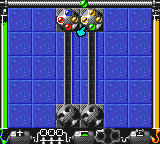
Logical (Europe) is a classic Game Boy Color puzzle game that mixes action with strategy, providing a simple yet tough challenge. It’s designed for players who enjoy thinking through carefully planned moves. Since it’s a Game Boy Color game emulated directly in your browser, you can enjoy this nostalgic title without any setup, so you can try it out whenever you like.
Getting Into Logical
The main idea of Logical is solving puzzles that test your ability to plan and carry out sequences of actions. The game features levels where you need to move objects or avoid obstacles using a limited number of moves. Each puzzle requires analyzing the layout and then figuring out the best sequence of moves to reach the goal. There’s no rush, so you can take your time to think through each step.
Progression happens gradually—solving one puzzle opens up the next, often with more complexity or new mechanics added in. The game doesn’t have different modes but keeps challenging you through its levels, encouraging you to refine your strategies. Since it’s all about puzzles, most sessions involve trying different approaches, learning from mistakes, and improving your solutions over time.
Standout Features
The visuals in Logical are simple but clear, typical of late-90s Game Boy Color titles. The pixel art is sharp enough to tell different objects and obstacles apart, with a clean interface that keeps the focus on solving puzzles. As you progress, levels get harder and introduce new elements, keeping things fresh without overwhelming new players.
Replay value comes from trying to find the most efficient solutions and completing levels with the fewest moves. Because puzzles are designed to be solvable through logic, it’s common to go back and improve your previous solutions or experiment with different strategies. Its straightforward style makes it good for quick sessions or longer playthroughs if you want to test your problem-solving skills repeatedly.
Strategy and Tips
Having a clear plan from the start helps avoid unnecessary moves. Take your time analyzing each puzzle before acting.
- Understand what each level’s goal is before making a move.
- Look for patterns in obstacles to find the most efficient route.
- Use trial and error to see what happens with different actions, but keep track of your best solutions.
- Don’t rush; patience often helps you find the best move or sequence.
- Go back to earlier levels to improve your solutions or try new strategies.
- If you get stuck, step back and look at the puzzle from a different angle to find new options.
Quick Questions
How do I get started if I’ve never played Logical before?
Start with the first few levels slowly, focusing on understanding how everything works. Take your time and think through each move.
What’s a common mistake for new players?
Trying to solve puzzles without analyzing them fully first often wastes moves. It’s better to plan each step carefully.
Can I play this comfortably on a mobile device or touchscreen?
Since it runs in your browser, it works well on touch screens, letting you tap and drag objects just like you would with controls on a Game Boy Color.
Logical offers a straightforward puzzle experience that relies on careful planning and strategic thinking. Its simple design and structured levels make it accessible but still challenging, making it a good choice for puzzle fans who want to test their logical skills on a classic platform.
Related games: you can also try Dogz – Your Virtual Petz Palz (Europe) and 720 Degrees (USA, Europe), or browse all other games in the Game Boy Color category.
How to Play Logical (Europe)?
Solve puzzles by moving objects and avoiding obstacles within a limited number of moves to reach the goal. Analyze each level carefully and plan your steps to find the most efficient solution.
Game Controls
Arrow keys control movement; other keys handle actions, similar to a Game Boy controller.
You may be interested in:
-
 Game Boy Color
♥ 2
Missile Command (USA)
Game Boy Color
♥ 2
Missile Command (USA) -
 Game Boy Color
♥ 2
Missile Command (Europe)
Game Boy Color
♥ 2
Missile Command (Europe) -
 Game Boy Color
♥ 1
Minnie & Friends – Yume no Kuni o Sagashite (Japan)
Game Boy Color
♥ 1
Minnie & Friends – Yume no Kuni o Sagashite (Japan) -
 Game Boy Color
♥ 0
Minna no Shougi – Shokyuu Hen (Japan)
Game Boy Color
♥ 0
Minna no Shougi – Shokyuu Hen (Japan) -
 Game Boy Color
♥ 1
Millennium Winter Sports (USA)
Game Boy Color
♥ 1
Millennium Winter Sports (USA) -
 Game Boy Color
♥ 4
Microsoft Puzzle Collection (USA)
Game Boy Color
♥ 4
Microsoft Puzzle Collection (USA) -
 Game Boy Color
♥ 1
Microsoft Puzzle Collection (Europe) (En,Fr,De,Es,It)
Game Boy Color
♥ 1
Microsoft Puzzle Collection (Europe) (En,Fr,De,Es,It) -
 Game Boy Color
♥ 1
Microsoft Pinball Arcade (USA)
Game Boy Color
♥ 1
Microsoft Pinball Arcade (USA)
Comments (0)
No comments yet. Be the first to comment!