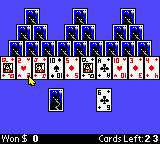
Microsoft Entertainment Pack (USA)
0 1 0
The Microsoft Entertainment Pack (USA) is a classic from the Game Boy Color era, featuring a collection of mini-games that test your quick thinking and problem-solving skills. Its portable design and simple controls evoke memories of early handheld gaming, bringing the charm of Windows-style entertainment onto the small screen. Focused on mental agility, it offers short, engaging sessions perfect for quick breaks or casual play—no downloads needed, all accessible directly in your browser.
Step Into the World of Microsoft Entertainment Pack
This Game Boy Color version captures the spirit of the original set of puzzle and strategy titles, wrapped in a colorful, compact style. The graphics are simple, with pixel-art icons and backgrounds that feel clear and easy to follow. The sound is minimal but effective, with cheerful beeps and gentle melodies that keep the mood light without distracting from the gameplay. Playing in your browser, it’s like flipping through a digital collection of puzzles—familiar and inviting, with a nostalgic feel.
The atmosphere is one of quiet focus. The menus are straightforward to navigate, making it easy to jump into a game or pick your favorite challenge. The emulator preserves the feel of the Game Boy Color hardware, offering a tactile sense of that era’s limitations and charm—all while being instantly playable in your browser for a hassle-free experience.
How the Gameplay Hooks You
The game involves quick puzzles and strategy challenges, each designed to test your mental agility. The pace is lively, encouraging quick thinking and decisions under time pressure. As you complete puzzles, you get immediate feedback and small wins, sharpening your skills for the next round. With a variety of mini-games, there’s always something new to solve, keeping the experience fresh and engaging.
The focus is on short, focused play sessions. Its simple mechanics let you pick it up, solve a puzzle or two, then move on—perfect for quick gaming breaks. The challenge is balancing speed with accuracy, rewarding efficient strategies and quick reflexes. Its straightforward gameplay makes it accessible for all ages, while still offering enough depth to keep puzzle fans coming back over multiple sessions.
Pro Tips for Microsoft Entertainment Pack
Here are some quick tips to make the most of your time with the game:
- Start with easier puzzles to build confidence before tackling the tougher ones.
- Look for patterns; many puzzles reward recognizing recurring solutions.
- Stay calm during timed sections to avoid rushing mistakes.
- Use trial and error to quickly eliminate unlikely solutions.
- Work on decision speed—developing quick choices can boost your overall score.
- Take short breaks to keep your mind sharp during longer sessions.
Frequently Asked Questions
Does Microsoft Entertainment Pack work well for quick, short sessions?
Yes, its bite-sized puzzles are perfect for quick gaming breaks.
Is the game suitable for all ages or only puzzle fans?
The simple visuals and mechanics are accessible to players of all ages, though the strategic challenge appeals most to puzzle enthusiasts.
Will the game get repetitive after a while?
While the core gameplay is straightforward, the variety of puzzles and increasing difficulty help keep things interesting over multiple sessions.
This browser-based version of Microsoft Entertainment Pack provides a nostalgic glimpse into classic handheld puzzle strategy. Its straightforward gameplay, combined with the charm of the Game Boy Color, makes it a good choice for casual players looking for a quick mental challenge.
Related games: you can also try Beatmania GB (Japan) and Legend of the River King 2 (Europe), or browse all other games in the Game Boy Color category.
How to Play Microsoft Entertainment Pack (USA)?
Solve quick puzzles by matching patterns or completing tasks within a time limit to earn points and progress through different mini-games.
Game Controls
Arrow keys for movement; Enter and other keys for actions; all controls are mapped to your keyboard.
You may be interested in:
-
 Game Boy Color
♥ 1
Monsters, Inc. (Europe) (En,Es,Nl)
Game Boy Color
♥ 1
Monsters, Inc. (Europe) (En,Es,Nl) -
 Game Boy Color
♥ 1
Monster Traveler (Japan) (Rev A)
Game Boy Color
♥ 1
Monster Traveler (Japan) (Rev A) -
 Game Boy Color
♥ 1
Monster Rancher Explorer (USA)
Game Boy Color
♥ 1
Monster Rancher Explorer (USA) -
 Game Boy Color
♥ 5
Monster Rancher Battle Card GB (USA)
Game Boy Color
♥ 5
Monster Rancher Battle Card GB (USA) -
 Game Boy Color
♥ 2
Monster Race 2 (Japan)
Game Boy Color
♥ 2
Monster Race 2 (Japan) -
 Game Boy Color
♥ 2
Monster Farm Battle Card GB (Japan)
Game Boy Color
♥ 2
Monster Farm Battle Card GB (Japan) -
 Game Boy Color
♥ 1
Monster AG, Die (Germany)
Game Boy Color
♥ 1
Monster AG, Die (Germany) -
 Game Boy Color
♥ 2
Monkey Puncher (Europe)
Game Boy Color
♥ 2
Monkey Puncher (Europe)
Comments (0)
No comments yet. Be the first to comment!