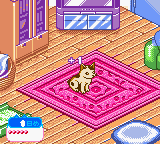
Nakayoshi Pet Series 4 – Kawaii Koneko (Japan)
0 1 0
Nakayoshi Pet Series 4 – Kawaii Koneko (Japan) is a charming Game Boy Color classic that invites players into a simple pet-raising simulation set in a cute, anime-inspired world. Designed for handheld nostalgia, this game offers a relaxed experience suitable for those who enjoy caring for virtual pets and exploring gentle gameplay mechanics. Its straightforward design makes it accessible for all ages, especially for fans of pixel-art pet sims from the late 1990s and early 2000s.
Getting Into Nakayoshi Pet Series 4 – Kawaii Koneko
This game is about caring for a small, adorable cat, with gameplay focused on feeding, playing, and tending to its needs. The main activity involves interacting with the pet through simple menu choices and mini-games that keep the cat happy and healthy. Sessions usually last around 10 to 15 minutes, making it easy to pick up and put down without losing progress or feeling overwhelmed.
Players often check in to see how their Kawaii Koneko is doing, respond to its needs, and sometimes customize its environment. There aren’t any complex levels or challenges; instead, it emphasizes routine and affection. Each session is an opportunity to get to know the pet’s personality and preferences. Since it’s a single-pet simulation, the focus stays on building a bond rather than managing multiple characters or tasks.
Standout Features
The visuals of Nakayoshi Pet Series 4 – Kawaii Koneko are bright and colorful, with pixel art that captures the playful, cute style of Japanese pet sims from the GBC era. The animations are simple but effective, bringing expressions and movements to life. This style creates a cozy, friendly atmosphere that encourages longer play without feeling cluttered or overwhelming.
Progress depends on the pet’s happiness and health, which players influence through interactions. While there isn’t a complex leveling system, the game rewards consistent care with small customization options or special interactions. Its replay value comes from trying different approaches to pet care and seeing how the Kawaii Koneko reacts over time, making it appealing for fans of casual, low-stakes simulation gameplay.
Strategy and Tips
Consistent care is key—check on your pet often to keep it from becoming unhappy or hungry. Use mini-games and activities to boost its happiness and keep it engaged.
- Watch the pet’s mood indicators and respond quickly to its needs to prevent unhappy states.
- Try different interaction patterns to discover what makes your Kawaii Koneko happiest.
- Keep sessions short and frequent to build a steady bond without feeling overwhelmed.
- Notice which actions lead to the best reactions for better care routines.
- Work on unlocking all the available customization options by caring consistently over multiple play sessions.
Quick Questions
How do I start with Nakayoshi Pet Series 4 – Kawaii Koneko?
Just turn on the game and follow the initial prompts to begin caring for your pet. Basic tutorials introduce the core gameplay loop.
What’s a common mistake for beginners?
Neglecting your pet’s needs can cause unhappiness or health problems; checking in regularly helps avoid this.
Can I play this comfortably on mobile or touch devices?
The game runs through an emulator in your browser, so it’s playable on touch screens, making it easy to enjoy on smartphones or tablets.
Nakayoshi Pet Series 4 – Kawaii Koneko offers a gentle, approachable pet-raising experience with a pixel-perfect GBC style. Its simple mechanics and adorable look make it a good choice for anyone wanting a relaxing virtual pet experience, and it runs smoothly right in your browser without needing any downloads.
Related games: you can also try Hamster Club 2 (Japan) and Medarot 5 – Susutake Mura no Tenkousei – Kuwagata Version (Japan), or browse all other games in the Game Boy Color category.
How to Play Nakayoshi Pet Series 4 – Kawaii Koneko (Japan)?
Feed, play with, and care for your cute cat to keep it happy and healthy. Use simple menu choices and mini-games to build a bond over short, relaxing sessions.
Game Controls
Arrow keys act as the D-pad; Enter is Start; action buttons are mapped to on-screen keys.
You may be interested in:
-
 Game Boy Color
♥ 1
NFL Blitz 2001 (USA)
Game Boy Color
♥ 1
NFL Blitz 2001 (USA) -
 Game Boy Color
♥ 1
NFL Blitz 2000 (USA)
Game Boy Color
♥ 1
NFL Blitz 2000 (USA) -
 Game Boy Color
♥ 1
NFL Blitz (USA) (Rev A)
Game Boy Color
♥ 1
NFL Blitz (USA) (Rev A) -
 Game Boy Color
♥ 1
NFL Blitz (USA)
Game Boy Color
♥ 1
NFL Blitz (USA) -
 Game Boy Color
♥ 11
New Batman Adventures, The – Chaos in Gotham (USA)
Game Boy Color
♥ 11
New Batman Adventures, The – Chaos in Gotham (USA) -
 Game Boy Color
♥ 4
New Batman Adventures, The – Chaos in Gotham (Europe) (En,Fr,De,Es,It,Nl)
Game Boy Color
♥ 4
New Batman Adventures, The – Chaos in Gotham (Europe) (En,Fr,De,Es,It,Nl) -
 Game Boy Color
♥ 1
New Adventures of Mary-Kate & Ashley, The (USA)
Game Boy Color
♥ 1
New Adventures of Mary-Kate & Ashley, The (USA) -
 Game Boy Color
♥ 6
New Addams Family Series, The (Europe) (En,Fr,De,Es,It,Pt)
Game Boy Color
♥ 6
New Addams Family Series, The (Europe) (En,Fr,De,Es,It,Pt)
Comments (0)
No comments yet. Be the first to comment!