Pocket Densha 2 (Japan)
0 1 0
Pocket Densha 2 (Japan) is a classic Game Boy Color game that captures the charm of train simulation and makes it accessible through your browser. If you like simple, nostalgic gameplay that emphasizes timing and route management, this game offers a straightforward yet engaging experience. It’s a good option for fans of retro titles who want to enjoy a bit of handheld gaming history without needing to download anything.
Getting Into Pocket Densha 2
The main gameplay of Pocket Densha 2 involves controlling a train on a fixed track layout. You manage the train’s movement, making sure it stops at the right stations and keeps to the schedule. The game runs in real-time, requiring you to press buttons at just the right moments to accelerate, slow down, or stop the train. It’s a rhythm-based challenge that tests your timing and focus.
Most of the time, you choose a route, start the train, and respond to signals and station indicators. There aren’t complicated mechanics or many modes; the real challenge is in keeping things running smoothly across several stops. The pacing is steady, making it suitable for quick sessions or longer play when you want to improve your timing and route management skills.
Standout Features
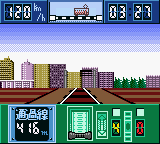
Visually, Pocket Densha 2 sticks to the pixel art style of the Game Boy Color, with simple, colorful sprites and clear station signs. The minimal design helps you easily spot signals and station stops, which is key for timing your actions correctly. The interface keeps things straightforward, showing all the important info at a glance, so even newcomers can pick it up easily.
Progress comes from successfully completing routes and improving your timing. While there isn’t a story or unlockable content, the replay value comes from trying to beat your previous scores or perfecting your train operation. As a game from the Game Boy Color era, it encourages repeat play to sharpen your skills, making it a compact yet addictive experience for fans of retro gaming.
Strategy and Tips
Getting the most out of Pocket Densha 2 means paying close attention to signals and station cues. Timing is key; rushing or hesitating can cause delays or missed stops. Here are some tips to help you improve your gameplay:
- Watch the signals carefully and anticipate when to slow down or speed up.
- Practice your timing to get a feel for when to press buttons, especially at busy stops.
- If you play multiple times, try to memorize route patterns to become more efficient.
- Stay calm during longer routes to keep your control steady.
- Start slowing down early rather than rushing at the last second to avoid overshooting stops.
- If you make a mistake, restart and focus on improving your timing rather than rushing to finish fast.
Quick Questions
Is Pocket Densha 2 easy for beginners to pick up?
Yes, the controls are simple, and it introduces basic timing mechanics that are easy for new players to understand.
How long does a typical session last?
Most routes take just a few minutes, making it good for quick play or practicing specific parts.
Can I play Pocket Densha 2 on a mobile device or touch screen?
This browser version works directly in your browser, with controls suited for keyboard or touchscreen, so it runs smoothly on mobile devices without needing extra apps.
Overall, Pocket Densha 2 offers a compact dose of train control simulation wrapped in a nostalgic package. Its straightforward gameplay and focus on timing make it a charming choice for fans of retro titles and train enthusiasts alike. Have fun controlling your train and perfecting your routes in this classic Game Boy Color experience, now available to play free in your browser.
Related games: you can also try Jack no Daibouken – Daimaou no Gyakushuu (Japan) and Magical Drop (USA), or browse all other games in the Game Boy Color category.
How to Play Pocket Densha 2 (Japan)?
Control the train to stop at stations on time by pressing buttons at the right moments. Manage your route smoothly to complete runs and improve your timing.
Game Controls
Arrow keys or WASD for movement; space or Enter to control the train.
You may be interested in:
-
 Game Boy Color
♥ 43
Zook Hero Z
Game Boy Color
♥ 43
Zook Hero Z -
 Game Boy Color
♥ 1
Zok Zok Heroes (Japan)
Game Boy Color
♥ 1
Zok Zok Heroes (Japan) -
 Game Boy Color
♥ 1
Zoids – Shirogane no Juukishin Liger Zero (Japan)
Game Boy Color
♥ 1
Zoids – Shirogane no Juukishin Liger Zero (Japan) -
 Game Boy Color
♥ 1
Zoids – Jashin Fukkatsu! Genobreaker Hen (Japan)
Game Boy Color
♥ 1
Zoids – Jashin Fukkatsu! Genobreaker Hen (Japan) -
 Game Boy Color
♥ 2
Zoboomafoo – Playtime in Zobooland (USA)
Game Boy Color
♥ 2
Zoboomafoo – Playtime in Zobooland (USA) -
 Game Boy Color
♥ 1
Zidane Football Generation (Europe) (En,Fr,De,Es,It)
Game Boy Color
♥ 1
Zidane Football Generation (Europe) (En,Fr,De,Es,It) -
 Game Boy Color
♥ 1
Zen-Nihon Shounen Soccer Taikai – Mezase Nihon Ichi! (Japan)
Game Boy Color
♥ 1
Zen-Nihon Shounen Soccer Taikai – Mezase Nihon Ichi! (Japan) -
 Game Boy Color
♥ 1
Zebco Fishing! (USA)
Game Boy Color
♥ 1
Zebco Fishing! (USA)
Comments (0)
No comments yet. Be the first to comment!