Pocket Monsters Geum (Korea)
0 5 0
Pocket Monsters Geum (Korea) is a small piece of gaming history from the Game Boy Color days. It offers a simple quest that draws players into a world filled with creatures waiting to be found and caught. The pixel art and chiptune tunes bring back memories of early handheld gaming, where straightforward gameplay and exploration were key. This classic runs right in your browser, so you can jump in anytime without fuss—perfect for quick sessions or revisiting a familiar style of game.
Step Into the World of Pocket Monsters Geum
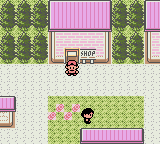
The game features a colorful, pixelated landscape with forests, towns, and routes linking different areas. Its visual style sticks to the limited palette and sprite design typical of late 90s handhelds, but what stands out is the lively animations and detailed touches. The sound design is simple but catchy, with looping tunes and basic sound effects that add to the feeling of adventure. As you move through towns and wilderness, there’s a light-hearted mood mixed with the excitement of discovering new pocket monsters.
The atmosphere balances innocence with curiosity, capturing that feeling of uncovering creatures in a magical world. The menus and icons are easy to navigate, keeping the focus on exploring and collecting rather than complicated mechanics or cluttered visuals. Playing in your browser keeps the nostalgic pixelated look alive on modern screens, giving you a taste of the original hardware.
How the Gameplay Hooks You
The main loop is simple: explore the map, find pocket monsters, and catch them to grow your collection. Each new area offers fresh creatures and challenges. Progressing involves catching monsters, leveling them up, and battling rival trainers or wild encounters. This setup encourages continued exploration because every new discovery feels rewarding and keeps you wanting more.
The game is easy to pick up—whether you have a few minutes or want to spend longer. Battles are turn-based, requiring some strategy but never feeling overwhelming. The core of the game is about discovering and collecting, which keeps the experience fun and relaxed. Exploring every corner and gathering every monster you see makes for a laid-back, bite-sized adventure that fits into any gaming routine.
Pro Tips for Pocket Monsters Geum
To get the most out of the game, it helps to understand its pacing and mechanics. Here are some tips:
- Explore every route thoroughly to find rare monsters.
- Level up your starter monsters early to get ready for tougher fights.
- Pay attention to type advantages to win battles more easily.
- Save often so you don’t lose valuable monsters.
- Use weaker monsters to help capture new ones instead of risking your stronger ones.
- Keep a balanced team to handle different types of encounters.
Frequently Asked Questions
Does the game have a story, or is it mainly about catching monsters?
It focuses more on exploration and gathering creatures than on a complex story. It’s designed for casual play and quick adventures.
Does Pocket Monsters Geum get repetitive after a while?
The core gameplay stays the same—exploring, battling, capturing—but the variety of monsters and locations help keep it interesting over multiple sessions.
Can I play this offline, or do I need the browser?
This version runs straight in your browser, so no downloads are necessary. You can play it anytime, whether you’re connected or not, and it’s good for short or longer playtimes depending on your mood.
With its pixel art and straightforward gameplay, Pocket Monsters Geum offers a nostalgic revisit to the Game Boy Color era. Its simple mechanics and cozy feel make it a nice choice for fans of classic handheld adventures, easy to pick up whenever you want a quick monster-collecting fix.
Related games: you can also try Megaman Xtreme 2 (USA, Europe) and Croc 2 (USA), or browse all other games in the Game Boy Color category.
How to Play Pocket Monsters Geum (Korea)?
Explore the map to find and catch pocket monsters, then level them up and battle other trainers to expand your collection and progress through different areas.
Game Controls
Arrow keys move, space or enter interacts and confirms actions, other keys handle menu navigation.
You may be interested in:
-
 Game Boy Color
♥ 2
Pokemon Picross (Japan) (Proto)
Game Boy Color
♥ 2
Pokemon Picross (Japan) (Proto) -
 Game Boy Color
♥ 5
Pokemon Picross (English)
Game Boy Color
♥ 5
Pokemon Picross (English) -
 Game Boy Color
♥ 38
Pokemon Perfect Crystal (2020 Update)
Game Boy Color
♥ 38
Pokemon Perfect Crystal (2020 Update) -
 Game Boy Color
♥ 4
Pokemon Orange beta nightly
Game Boy Color
♥ 4
Pokemon Orange beta nightly -
 Game Boy Color
♥ 10
Pokemon Orange Beta 1.0
Game Boy Color
♥ 10
Pokemon Orange Beta 1.0 -
 Game Boy Color
♥ 1
Pokemon Jade Version (Unl)
Game Boy Color
♥ 1
Pokemon Jade Version (Unl) -
 Game Boy Color
♥ 4
Pokemon Fool’s Gold 1.3.2
Game Boy Color
♥ 4
Pokemon Fool’s Gold 1.3.2 -
 Game Boy Color
♥ 11
Pokemon Fool’s Gold 1.3
Game Boy Color
♥ 11
Pokemon Fool’s Gold 1.3
Comments (0)
No comments yet. Be the first to comment!