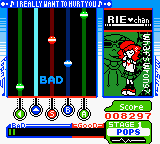
Pop’n Music GB (Japan)
0 3 0
Pop’n Music GB (Japan) is a classic Game Boy Color game that brings the rhythm-based gameplay of the popular series to the small screen of a portable console. It offers a straightforward music game experience that fans of handheld gaming and rhythm games will enjoy. It’s a nostalgic piece for those who grew up with the GBC and want to experience its charm through a browser.
Getting Into Pop’n Music GB
The main idea behind Pop’n Music GB is matching musical notes with prompts on the screen. Players listen to short, catchy tunes and press buttons in time with the beat, trying to be accurate. The game features a variety of songs and difficulty levels, making it accessible for beginners while providing a challenge for more experienced players. Usually, you pick a song, set the difficulty, and try to hit the notes as they scroll across the screen.
There are different modes to keep things interesting, but the core focus remains on the rhythm challenge. As music plays, notes appear in a sequence that players need to match with the corresponding button presses. Timing matters—pressing too early or too late results in misses and lower scores. The game grades your accuracy, and you can try again to improve your scores. Since it runs in your browser, you can jump into a quick session whenever you want, whether for some short practice or just a bit of fun.
Standout Features
Pop’n Music GB has simple but colorful visuals, with clear note indicators and animated backgrounds that add a bit of flair without cluttering the screen. The straightforward interface helps players focus on the notes and timing, making it easy to get started but still offering enough challenge to stay interesting. Progress comes from unlocking new songs and difficulty modes, encouraging repeated play and mastery of the rhythm patterns.
The variety of songs and difficulty levels gives players reasons to improve their scores or try different tracks. The game rewards precise timing and consistency, pushing players to sharpen their skills. Being a classic from the Game Boy Color era, it’s designed for quick, pick-up-and-play sessions that are perfect for portable gaming or browser fun without any downloads needed.
Strategy and Tips
To get the most out of Pop’n Music GB, focus on timing and becoming familiar with the songs. Practice each one to learn the note patterns and improve your rhythm. Don’t rush your presses—accuracy usually beats speed. Adjust the difficulty if the game feels too hard or too easy, matching your skill level. Listening closely to the music can help you anticipate notes and react more quickly.
- Start with the easiest difficulty to learn the note patterns before trying harder levels.
- Follow the beat of the music, not just the notes—this helps with timing and accuracy.
- Use short practice sessions to build your rhythm skills gradually without getting tired.
- Pay attention to visual cues and try to memorize note sequences for your favorite songs.
- If a song feels too tough, switch to a lower difficulty and build up your skills step by step.
Quick Questions
What’s the best way to get started with Pop’n Music GB?
Pick a song at an easy difficulty and listen closely to the rhythm to get familiar with the timing.
What’s a common mistake beginners make?
Pressing notes too early or too late, which hurts your accuracy and score.
Can I play Pop’n Music GB on a mobile device or touchscreen?
Yes, since it runs directly in your browser, you can enjoy it on touchscreens. Using a keyboard or controller might help with timing and comfort.
Pop’n Music GB offers a compact rhythm experience that’s perfect for quick sessions and practice. Playing it in your browser means you can enjoy this classic anytime without downloading anything, making it a good pick for fans of music games or those craving a nostalgic GBC feel.
Related games: you can also try Mickey's Speedway USA (USA) (En,Fr,De,Es) and Gaiamaster Duel – Card Attackers (Japan), or browse all other games in the Game Boy Color category.
How to Play Pop’n Music GB (Japan)?
Listen to the music and press the correct buttons as notes scroll across the screen, aiming for precise timing to score points and unlock new songs.
Game Controls
Arrow keys and other keyboard buttons act as the game controller for note input.
You may be interested in:
-
 Game Boy Color
♥ 1
Pumuckl’s Abenteuer bei den Piraten (Germany)
Game Boy Color
♥ 1
Pumuckl’s Abenteuer bei den Piraten (Germany) -
 Game Boy Color
♥ 1
Puchi Carat (Japan)
Game Boy Color
♥ 1
Puchi Carat (Japan) -
 Game Boy Color
♥ 1
Puchi Carat (Europe)
Game Boy Color
♥ 1
Puchi Carat (Europe) -
 Game Boy Color
♥ 1
Project S-11 (USA)
Game Boy Color
♥ 1
Project S-11 (USA) -
 Game Boy Color
♥ 1
Pro Pool (USA) (En,Fr,De)
Game Boy Color
♥ 1
Pro Pool (USA) (En,Fr,De) -
 Game Boy Color
♥ 1
Pro Mahjong Tsuwamono GB2 (Japan)
Game Boy Color
♥ 1
Pro Mahjong Tsuwamono GB2 (Japan) -
 Game Boy Color
♥ 1
Pro Mahjong Tsuwamono GB (Japan)
Game Boy Color
♥ 1
Pro Mahjong Tsuwamono GB (Japan) -
 Game Boy Color
♥ 1
Pro Mahjong Kiwame GB II (Japan)
Game Boy Color
♥ 1
Pro Mahjong Kiwame GB II (Japan)
Comments (0)
No comments yet. Be the first to comment!