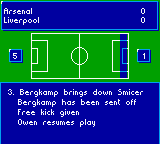
Soccer Manager (Europe) (En,Fr,De,Es)
0 1 2
Soccer Manager (Europe) (En,Fr,De,Es) is a classic Game Boy Color game that puts you in charge of a soccer team, offering a straightforward managerial experience from that era of portable gaming. If you prefer sports strategy games that focus on team management rather than fast-paced action, this game provides a nostalgic challenge that’s easy to pick up and enjoy. It’s great for quick sessions of tactical decision-making rather than intense gameplay.
Getting Into Soccer Manager
The main gameplay involves managing a soccer team—setting lineups, planning strategies, and handling transfers. You start by selecting a team to manage, then decide on formations and tactics before matches. During games, the game simulates the action based on your choices, giving you an overview instead of direct control of players. After each match, you review results, tweak your tactics, and plan your next move. It’s a cycle of strategic planning and reacting to what happens on the field.
The game is limited to single-season campaigns, where your goal is to improve your team’s ranking through wins and smart transfers. It emphasizes planning, resource management, and reacting to match results. Because it’s turn-based on the Game Boy Color, the pace feels different from real-time sports titles, with most sessions lasting around 10 to 15 minutes.
Standout Features
The visuals are simple pixel art typical of the Game Boy Color, with easy-to-navigate menus and basic icons representing teams. It doesn’t aim for realism but keeps things functional, so you can quickly check team stats and manage your squad. Progression depends on how well you improve your team over multiple seasons, encouraging repeated play to test different strategies.
Replay value comes from its straightforward management style and the variety of teams and tactics you can try. Each session can unfold differently based on your decisions, and experimenting with different formations or transfer plans can extend your enjoyment. Its simplicity makes it accessible for newcomers, yet it offers enough depth for players interested in fine-tuning their team over multiple attempts.
Strategy and Tips
Starting with a balanced lineup helps prevent early losses. Get to know your team’s strengths and weaknesses before making big changes. It’s wise to develop young players and build team chemistry instead of rushing into expensive transfers early on.
- Adjust your tactics depending on your opponent’s style, whether that’s focusing on defense or attack.
- Keep an eye on your team’s stamina and morale, as these influence how well they perform in matches.
- Save your transfer budget for mid-season improvements rather than spending it all upfront.
- Try different formations to see what works best with your players’ skills.
- Carefully review match results to spot patterns and refine your tactics accordingly.
Quick Questions
How do I get started with Soccer Manager?
Choose a team and familiarize yourself with the menus for tactics and transfers before your first match.
What’s a common mistake for beginners?
Trying to change too many tactics at once or splurging on transfers early can upset team chemistry and lead to poor results.
Can I play Soccer Manager on a mobile device or touchscreen?
This game runs on the browser emulator provided here. It’s simple to use but may not be optimized for touch controls, so using a mouse or keyboard is recommended for navigation.
Soccer Manager offers a straightforward yet engaging managerial experience perfect for quick sessions. Its focus on strategy over fast action makes it a good choice for anyone interested in managing a soccer team through their browser, giving off a nostalgic feel akin to classic Game Boy Color titles.
Related games: you can also try Legend of the River King GB (Europe) and Harvest Moon GB (Europe), or browse all other games in the Game Boy Color category.
How to Play Soccer Manager (Europe) (En,Fr,De,Es)?
Manage your soccer team by setting lineups, choosing tactics, and making transfers. Watch matches unfold based on your decisions, then adjust your strategy to improve your team's ranking over a single season.
Game Controls
Arrow keys for navigation; Enter to select; other keys for menu options.
You may be interested in:
-
 Game Boy Color
♥ 4
Star Wars – Yoda Stories (USA, Europe)
Game Boy Color
♥ 4
Star Wars – Yoda Stories (USA, Europe) -
 Game Boy Color
♥ 1
Star Ocean – Blue Sphere (Japan)
Game Boy Color
♥ 1
Star Ocean – Blue Sphere (Japan) -
 Game Boy Color
♥ 1
Spy vs. Spy (Europe) (En,Fr,De,Es,It,Nl,Sv)
Game Boy Color
♥ 1
Spy vs. Spy (Europe) (En,Fr,De,Es,It,Nl,Sv) -
 Game Boy Color
♥ 24
SpongeBob SquarePants – Legend of the Lost Spatula (USA)
Game Boy Color
♥ 24
SpongeBob SquarePants – Legend of the Lost Spatula (USA) -
 Game Boy Color
♥ 2
Spirou Robbedoes – The Robot Invasion (Europe) (En,Fr,De,Es,It,Nl,Da)
Game Boy Color
♥ 2
Spirou Robbedoes – The Robot Invasion (Europe) (En,Fr,De,Es,It,Nl,Da) -
 Game Boy Color
♥ 17
Spider-Man 2 – The Sinister Six (USA)
Game Boy Color
♥ 17
Spider-Man 2 – The Sinister Six (USA) -
 Game Boy Color
♥ 14
Spider-Man (USA, Europe)
Game Boy Color
♥ 14
Spider-Man (USA, Europe) -
 Game Boy Color
♥ 8
Spider-Man (Japan)
Game Boy Color
♥ 8
Spider-Man (Japan)
Comments (0)
No comments yet. Be the first to comment!