Toy Story Racer (USA)
0 5 0
Toy Story Racer (USA) is a classic Game Boy Color game blending adventure and racing into a cheerful, kid-friendly package. Designed for fans of simple, accessible gameplay, it offers a nostalgic glimpse of the handheld’s era with familiar characters and straightforward mechanics. If you enjoyed games from the late 1990s or early 2000s, this one provides a lighthearted racing experience that’s easy to pick up and play right in your browser, no download needed.
Getting Into Toy Story Racer
The main gameplay involves racing through various tracks using Toy Story characters as your drivers. You choose from a series of races, aiming to finish in top positions to move forward. Each race has a track with simple obstacles and turns, and the key is to keep your speed up while avoiding crashes. It doesn’t have complex features like power-ups or weapons—just timing and steering accuracy matter most.
Races tend to be quick, making it perfect for short sessions. Different characters can be chosen, each with slightly different handling or speed. Progression is straightforward: as you win races, you unlock new tracks and characters. This keeps things interesting, especially for younger players or anyone looking for a simple racing challenge. No multiplayer options are included; it’s a single-player game meant for casual fun.
Standout Features
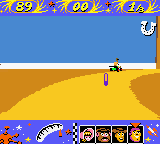
The visuals reflect the game’s era with bright, colorful sprites and playful backgrounds inspired by the Toy Story universe. Characters are recognizable and move with simple, charming animations that appeal to kids. Tracks are designed with a cheerful look, and the overall feel is friendly and inviting, even with the limited hardware of the Game Boy Color.
When you complete races, you unlock new content, giving a sense of achievement. Trying to beat your best times or race with different characters adds replay value. The game’s straightforward design makes it accessible for all ages, especially newcomers to racing games or Toy Story fans. Its simplicity encourages repeated play without feeling overwhelming.
Strategy and Tips
If you’re just starting out, focus on mastering steering and braking to avoid unnecessary crashes. Good timing on your turns helps keep your speed up. Here are some tips:
- Choose a character that’s comfortable to control; handling can differ between drivers.
- Practice turning to avoid losing speed on sharp corners.
- Watch out for obstacles, even if they seem simple, to prevent surprises.
- Use brief pauses between races to plan your next move or pick a different character.
- Try different characters to see which one suits your style best.
- Prioritize finishing in high positions to unlock more content faster.
Quick Questions
How do I start a race in Toy Story Racer?
Just select a track and character from the main menu, then press start to race.
What’s a common mistake beginners make?
Many players crash into obstacles or take turns too sharply, losing valuable speed and time.
Can I play Toy Story Racer on mobile or touch devices?
Yes, it runs in your browser here, so you can play on mobile devices with touch screens, though controls are best with a keyboard or gamepad emulation.
Playing Toy Story Racer offers a simple, fun racing experience rooted in the design style of its time. It’s easy to jump in and enjoy, making it a good choice for casual gaming or a nostalgic look back at the Game Boy Color days.
Related games: you can also try Kanji Boy 2 (Japan) and Lode Runner – Domudomu Dan no Yabou (Japan), or browse all other games in the Game Boy Color category.
How to Play Toy Story Racer (USA)?
Choose a Toy Story character and race through colorful tracks, avoiding obstacles and sharp turns to finish in top positions. Win races to unlock new characters and tracks for more fun.
Game Controls
Arrow keys control movement; other keys handle racing actions as mapped in the emulator.
You may be interested in:
-
 Game Boy Color
♥ 43
Zook Hero Z
Game Boy Color
♥ 43
Zook Hero Z -
 Game Boy Color
♥ 1
Zok Zok Heroes (Japan)
Game Boy Color
♥ 1
Zok Zok Heroes (Japan) -
 Game Boy Color
♥ 1
Zoids – Shirogane no Juukishin Liger Zero (Japan)
Game Boy Color
♥ 1
Zoids – Shirogane no Juukishin Liger Zero (Japan) -
 Game Boy Color
♥ 1
Zoids – Jashin Fukkatsu! Genobreaker Hen (Japan)
Game Boy Color
♥ 1
Zoids – Jashin Fukkatsu! Genobreaker Hen (Japan) -
 Game Boy Color
♥ 2
Zoboomafoo – Playtime in Zobooland (USA)
Game Boy Color
♥ 2
Zoboomafoo – Playtime in Zobooland (USA) -
 Game Boy Color
♥ 1
Zidane Football Generation (Europe) (En,Fr,De,Es,It)
Game Boy Color
♥ 1
Zidane Football Generation (Europe) (En,Fr,De,Es,It) -
 Game Boy Color
♥ 1
Zen-Nihon Shounen Soccer Taikai – Mezase Nihon Ichi! (Japan)
Game Boy Color
♥ 1
Zen-Nihon Shounen Soccer Taikai – Mezase Nihon Ichi! (Japan) -
 Game Boy Color
♥ 1
Zebco Fishing! (USA)
Game Boy Color
♥ 1
Zebco Fishing! (USA)
Comments (0)
No comments yet. Be the first to comment!