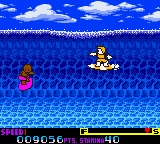
Ultimate Surfing (Europe)
0 1 0
Ultimate Surfing (Europe) is a classic Game Boy Color game that puts players in the role of a surfer aiming to ride waves and score points. As a nostalgic throwback to the handheld’s era, it offers straightforward, arcade-style gameplay perfect for quick sessions. Fans of surfing or skill-based games from the late 90s or early 2000s will probably enjoy this title, especially if you like simple yet challenging sports-themed games.
Getting Into Ultimate Surfing
The gameplay mainly focuses on timing and accuracy. You control a surfer who has to stay on their board while riding a series of waves. The game keeps going as you try to perform tricks, build up speed, and avoid obstacles. Each run starts with a wave, and your aim is to get the highest score possible by pulling off tricks and riding as long as you can without wiping out. The controls are easy to learn but require good timing to succeed, which makes it accessible yet tricky to master.
Usually, you pick a wave and then navigate through jumps and tricks. As your skills improve, the waves get faster and more challenging, with hazards like rocks or debris appearing. Your score is tracked so you’ll want to keep trying to improve your best. The short play sessions are ideal for quick bursts of fun, with each run lasting just a few minutes—great for a quick break or casual play.
Standout Features
Graphically, Ultimate Surfing sticks to what the Game Boy Color can do but still manages to show clear, colorful sprites and simple animations that fit the surfing vibe. The environments are minimal but effective, highlighting the waves and the surfer. The focus on high scores rather than a story or levels means players are encouraged to get better and aim for higher points each time. That keeps the game fresh, as there’s always a new score to beat or trick to master.
Despite its straightforward arcade style, the game keeps replaying well thanks to the scoring system and increasing difficulty. You can try different tricks and techniques to refine your runs, making each attempt different from the last. Its simple design makes it easy for newcomers to pick up, but enough challenge remains to keep experienced players coming back to improve their best scores.
Strategy and Tips
Getting the most out of Ultimate Surfing depends on good timing and watching wave conditions. Here are some tips:
- Try to time tricks when the waves are at their peak for more points.
- Learn the rhythm of the waves to know when to jump or do tricks.
- Keep an eye out for obstacles; quick reactions help avoid wipeouts.
- Riding longer waves boosts your score, but don’t push too far if it risks losing control.
- Experiment with different angles and tricks to find what gives the best results.
- Shorter, controlled runs are useful for practicing specific tricks and building consistency.
Quick Questions
How do I get started with Ultimate Surfing?
Just pick a wave, and the game starts. No complicated menus—jump right in and start riding waves.
What’s a common mistake for beginners?
Trying tricks without timing them right, which often leads to wipeouts and lower scores.
Can I play this on mobile or touch devices?
Yes, it runs directly in your browser, so you can enjoy it on any device with a browser—perfect for quick sessions without needing to install anything.
Ultimate Surfing offers a simple, accessible surfing game that captures the fun of wave riding. Its straightforward gameplay and focus on scoring make it a good pick for quick, skill-based gaming right from your browser.
Related games: you can also try Atsumete Asobu Kuma no Pooh-san – Mori no Takaramono (Japan) and Kawaii Pet Shop Monogatari (Japan), or browse all other games in the Game Boy Color category.
How to Play Ultimate Surfing (Europe)?
Ride waves, perform tricks, and avoid obstacles to score points. Keep surfing as long as possible and aim for the highest score by timing jumps and tricks correctly.
Game Controls
Arrow keys control movement and tricks; spacebar or action key to jump or perform tricks.
You may be interested in:
-
 Game Boy Color
♥ 1
Wizardry Empire (Japan) (Rev A)
Game Boy Color
♥ 1
Wizardry Empire (Japan) (Rev A) -
 Game Boy Color
♥ 1
Wizardry Empire (Japan)
Game Boy Color
♥ 1
Wizardry Empire (Japan) -
 Game Boy Color
♥ 1
Wizardry Empire – Fukkatsu no Tsue (Japan)
Game Boy Color
♥ 1
Wizardry Empire – Fukkatsu no Tsue (Japan) -
 Game Boy Color
♥ 3
Winnie the Pooh – Adventures in the 100 Acre Wood (USA)
Game Boy Color
♥ 3
Winnie the Pooh – Adventures in the 100 Acre Wood (USA) -
 Game Boy Color
♥ 1
Winnie the Pooh – Adventures in the 100 Acre Wood (Europe) (En,Fr,De,Es,It,Nl,Da)
Game Boy Color
♥ 1
Winnie the Pooh – Adventures in the 100 Acre Wood (Europe) (En,Fr,De,Es,It,Nl,Da) -
 Game Boy Color
♥ 2
Wings of Fury (USA)
Game Boy Color
♥ 2
Wings of Fury (USA) -
 Game Boy Color
♥ 1
Wings of Fury (Europe) (En,Fr,De)
Game Boy Color
♥ 1
Wings of Fury (Europe) (En,Fr,De) -
 Game Boy Color
♥ 3
Wild Thornberrys, The – Rambler (USA)
Game Boy Color
♥ 3
Wild Thornberrys, The – Rambler (USA)
Comments (0)
No comments yet. Be the first to comment!