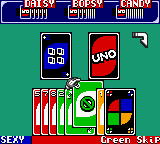
Uno (Europe) (En,Fr,De,Es,It,Nl)
0 1 0
Uno (Europe) (En,Fr,De,Es,It,Nl) is a classic Game Boy Color game that brings the popular card game to your handheld console. Its simple rules and straightforward gameplay make it easy for new players to pick up and enjoy right away. Since it runs perfectly in your browser, you can experience this nostalgic version without any downloads or installations, making it convenient for quick sessions or longer play.
What Is Uno?
Uno is a digital take on the well-known card game where matching colors and numbers helps you get rid of all your cards first. The game uses a deck designed specifically for Uno, with special action cards that add strategic twists. The goal is to minimize your cards while making opponents draw or skip turns through clever use of these action cards. The pace is quick, with each round lasting just a few minutes—great for casual gaming.
This version on the Game Boy Color offers familiar gameplay that’s easy to learn but still rewards strategic thinking. The interface is clean, displaying your hand clearly and showing the current card on the pile. It captures the social vibe of the game, offering a fun, competitive experience whether you’re playing solo against AI or passing the device around with friends. The mechanics stay true to the physical game, making it a reliable digital version.
What Keeps You Coming Back
This classic game appeals because of its quick-to-learn rules and the unpredictability of each match. With simple mechanics, players can focus on strategy without getting overwhelmed by complex rules. The AI offers enough challenge to keep you interested, especially as you try to outthink opponents with well-timed plays and clever use of action cards.
Replayability comes from the variety of hand combinations and the randomness of the draw deck. Every game feels different, and the competitive element encourages improving your tactics over time. Playing with friends, even just passing the device, keeps things fresh. Its straightforward rules and accessibility make it suitable for all ages, so you might find yourself coming back for another round whenever you want a quick card game.
Handy Tips
Playing Uno? Keep these tips in mind to improve your chances:
- Save wild and action cards for key moments to disrupt opponents or change the color when needed.
- Pay attention to opponents’ card counts and their likely strategies to anticipate their moves.
- Try to finish with fewer cards, but don’t rush—use action cards wisely to make opponents draw more.
- If you have multiple cards of the same color, play them early to reduce your hand quickly.
- Watch the last played card’s color and number so you can plan your next move better.
Player FAQ
Is Uno easy enough for younger players or complete beginners?
Yes, the rules are simple, making it suitable for younger players and those new to card games. The digital version has clear visuals and prompts to help new players learn as they go.
Can I play Uno offline or without an internet connection?
This game runs right in your browser, so you can enjoy it offline once it loads. It’s perfect for quick sessions wherever you are.
Is Uno accessible for players with visual or motor impairments?
The game has a straightforward interface with large, clear cards, but it doesn’t include specific accessibility features. It’s best suited for players comfortable with standard controls and visuals.
Playing Uno here offers a simple, nostalgic experience that captures the spirit of the classic card game. Its easy mechanics and fun gameplay make it a good choice for casual players of all ages, ready whenever you want to have a quick round of cards.
Related games: you can also try Itsudemo Pachinko GB – CR Monster House (Japan) and GB Memory Multi Menu (Japan) (NP), or browse all other games in the Game Boy Color category.
How to Play Uno (Europe) (En,Fr,De,Es,It,Nl)?
Match colors or numbers to get rid of all your cards first, using action cards to disrupt opponents and change game flow. Play strategically to minimize your cards and outsmart your opponents.
Game Controls
Arrow keys for navigation; Enter or space to select and confirm actions.
You may be interested in:
-
 Game Boy Color
♥ 1
Watashi no Kitchen (Japan) (Rev A)
Game Boy Color
♥ 1
Watashi no Kitchen (Japan) (Rev A) -
 Game Boy Color
♥ 1
Watashi no Kitchen (Japan)
Game Boy Color
♥ 1
Watashi no Kitchen (Japan) -
 Game Boy Color
♥ 2
Warriors of Might and Magic (USA) (En,Fr,De)
Game Boy Color
♥ 2
Warriors of Might and Magic (USA) (En,Fr,De) -
 Game Boy Color
♥ 2
Warlocked (USA)
Game Boy Color
♥ 2
Warlocked (USA) -
 Game Boy Color
♥ 5
Wario Land 3: Golfless
Game Boy Color
♥ 5
Wario Land 3: Golfless -
 Game Boy Color
♥ 51
Wario Land 3 (World) (En,Ja)
Game Boy Color
♥ 51
Wario Land 3 (World) (En,Ja) -
 Game Boy Color
♥ 6
Wario Land 2 (Japan)
Game Boy Color
♥ 6
Wario Land 2 (Japan) -
 Game Boy Color
♥ 7
Wario Land 2 – Enhanced Graphics
Game Boy Color
♥ 7
Wario Land 2 – Enhanced Graphics
Comments (0)
No comments yet. Be the first to comment!