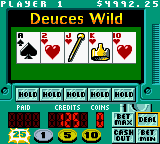
Vegas Games (USA)
0 1 0
Vegas Games (USA) is a classic Game Boy Color title that brings the thrill of casino-style gaming to your handheld, now playable directly in your browser. Its simple mechanics and familiar gambling themes make it easy for newcomers to jump in and start playing right away. This game captures the feel of vintage gaming with straightforward controls and quick sessions, perfect for a short break or casual gaming during downtime.
What Is Vegas Games?
Vegas Games is a collection of traditional casino-style games designed for the Game Boy Color, offering familiar gambling options like slots, poker, and other mini-games. The main goal is to simulate the excitement of winning in a virtual casino, relying on luck and basic strategy. Its gameplay is built around quick rounds, making it accessible for players of all skill levels who want a relaxed experience.
Playing Vegas Games feels like a digital visit to a vintage casino, with a simple interface and recognizable mechanics. Since it’s a Game Boy Color classic, the controls are tight and easy to understand, and the gameplay is suited for short, engaging sessions. It’s a good choice for those wanting a nostalgic taste of gambling entertainment without real money or complicated rules.
What Keeps You Coming Back
The appeal of Vegas Games is in its variety of mini-games, each with different rules and strategies. The randomness of outcomes keeps things fresh, encouraging multiple tries to beat your scores or unlock new modes. Its straightforward gameplay makes it easy to pick up again after a break, while small differences in game modes add enough challenge to keep things interesting over time.
Beyond the variety, the game’s replay value comes from a sense of competition—whether trying to beat your own high scores or testing your luck repeatedly. Its retro look and simple sound design evoke nostalgia, making each session feel like a small visit to an old-school arcade or casino. The quick rounds mean you can enjoy a few sessions without a big time commitment, encouraging you to improve your results or try different gambling options.
Handy Tips
Start with smaller bets to extend your playtime and avoid losing everything quickly. Take the time to learn the rules of each mini-game before betting big. Keep track of your chips and manage your bankroll carefully. If you hit a losing streak, stepping away for a bit can help reset your luck. Try different game modes to find what you enjoy most, and don’t chase losses—knowing when to stop is key.
- Practice each mini-game to understand the rules and strategies involved.
- Use small bets early on to maximize your playing time and reduce risk.
- Watch for patterns or tendencies in game outcomes, even if luck seems random.
- Set limits for wins or losses to keep your gaming controlled and fun.
- Take breaks if you’re on a losing streak to stay focused and avoid frustration.
Player FAQ
Is Vegas Games suitable for young players or beginners?
Yes, Vegas Games is easy to pick up, with simple mechanics that don’t require prior experience. It works well for younger players interested in casual gambling-style games thanks to its straightforward rules and intuitive controls.
Can I play Vegas Games offline or without an internet connection?
Absolutely. Since it runs directly in your browser on this site, no internet connection beyond initial access is needed. You can play anytime you want, with no downloads necessary.
How long does a typical session last?
Sessions are usually brief, often just a few minutes. The game is designed for quick, casual play, making it perfect for short breaks or when you only have a little time to enjoy some gambling fun.
Closing
Vegas Games offers a fun way to enjoy classic casino games right from your browser. Its nostalgic charm and simple gameplay make it ideal for casual players and those wanting to revisit vintage gaming styles. This collection of mini-games delivers quick entertainment and a nostalgic trip into old-school Vegas, all on your device.
Related games: you can also try Trade & Battle Card Hero (Japan) and Gex – Enter the Gecko (USA, Europe), or browse all other games in the Game Boy Color category.
How to Play Vegas Games (USA)?
Choose a mini-game like slots or poker, place your bets, and try to win chips by matching symbols or winning hands. Keep playing to beat your high scores or unlock new modes.
Game Controls
Arrow keys for movement and selection; Enter to confirm or spin; other keys for actions as shown on screen.
You may be interested in:
-
 Game Boy Color
♥ 1
Watashi no Kitchen (Japan) (Rev A)
Game Boy Color
♥ 1
Watashi no Kitchen (Japan) (Rev A) -
 Game Boy Color
♥ 1
Watashi no Kitchen (Japan)
Game Boy Color
♥ 1
Watashi no Kitchen (Japan) -
 Game Boy Color
♥ 2
Warriors of Might and Magic (USA) (En,Fr,De)
Game Boy Color
♥ 2
Warriors of Might and Magic (USA) (En,Fr,De) -
 Game Boy Color
♥ 2
Warlocked (USA)
Game Boy Color
♥ 2
Warlocked (USA) -
 Game Boy Color
♥ 5
Wario Land 3: Golfless
Game Boy Color
♥ 5
Wario Land 3: Golfless -
 Game Boy Color
♥ 51
Wario Land 3 (World) (En,Ja)
Game Boy Color
♥ 51
Wario Land 3 (World) (En,Ja) -
 Game Boy Color
♥ 6
Wario Land 2 (Japan)
Game Boy Color
♥ 6
Wario Land 2 (Japan) -
 Game Boy Color
♥ 7
Wario Land 2 – Enhanced Graphics
Game Boy Color
♥ 7
Wario Land 2 – Enhanced Graphics
Comments (0)
No comments yet. Be the first to comment!