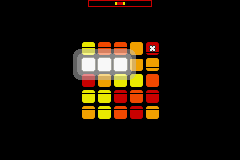
Bit Generations – Coloris (J)(Caravan)
0 2 1
Bit Generations – Coloris (J)(Caravan) is a classic Game Boy Advance puzzle game that challenges players to create colorful sequences by carefully placing and matching tiles. Designed for quick sessions, it appeals to those who enjoy simple yet addictive mechanics and visually engaging gameplay. If you like puzzle games with a straightforward approach and a focus on pattern recognition, this game offers a satisfying experience right in your browser.
Getting Into Bit Generations – Coloris
The main idea is arranging falling tiles to form lines of matching colors. Each turn introduces a new set of tiles you need to position on the grid, aiming to complete lines either horizontally or vertically. As you clear lines, the game speeds up gradually, making things more challenging and requiring quick thinking. There are no complicated modes—just a continuous puzzle to solve, with your goal being to clear as many lines as possible before the grid fills up.
Playing a session involves managing the falling tiles, positioning them to maximize line clears, and avoiding stacking tiles too high. The game emphasizes pattern recognition and quick decisions, with controls that feel intuitive—just place tiles where they fit best. It’s easy to pick up, but mastering the timing and placement takes practice. The game continues until the grid is full, and your score depends on how many lines you clear, encouraging you to beat your previous best.
Standout Features
The visuals of Bit Generations – Coloris are clean and minimalistic, with bright, distinct colors that make individual tiles easy to tell apart. The simple look suits the gameplay, avoiding clutter and helping players focus on pattern matching. The progression is straightforward—each successful line clear slightly increases the game’s speed, pushing players to improve their reaction times.
Replay value comes from wanting to beat your high score and the arcade-style challenge it offers. Since the game is based on a continuous, endless pattern-matching mechanic, it encourages repeated tries and strategy refinement. Its simplicity makes short sessions engaging, whether you’re just trying to improve or enjoying a quick break.
Strategy and Tips
Getting the most out of the game means recognizing and placing tiles quickly. Focus on building clear lines efficiently without overloading the grid. Here are some tips to help you improve:
- Prioritize completing lines that give you the most points but avoid gaps that make placing future tiles harder.
- Keep an eye on upcoming tiles to plan your moves early, especially when tricky color combos appear.
- Speed up your decisions as the game speeds up to keep pace.
- Set up the grid to clear multiple lines at once whenever possible.
- Stay calm when the grid gets crowded—panicking leads to mistakes. Focus on clearing lines and maintaining control.
- Practicing regularly helps you recognize patterns faster and respond more quickly to falling tiles.
Quick Questions
How do I start playing without any setup?
The game runs directly in your browser, so just load the page and start playing—no downloads or installations needed.
What’s a common mistake beginners make?
Many players try to clear multiple lines at once without planning their moves, which can cause the grid to fill up quickly. Focus on small, controlled clears first.
Can I play this on a mobile device or touch screen?
Yes, the simple controls work well on touch screens, making it easy to enjoy quick, casual play on smartphones or tablets.
The in-browser experience of bit generations – coloris makes it easy to jump in and enjoy quick, accessible gameplay. Its straightforward mechanics and pattern-matching focus make it a fun puzzle game for short, focused sessions.
Related games: you can also try 2 in 1 – Monstres & Cie & Le Monde de Nemo (F)(Eternity) and Battle Network RockMan EXE (J)(Eurasia), or browse all other games in the Game Boy Advance category.
How to Play Bit Generations – Coloris (J)(Caravan)?
Arrange falling tiles to form complete horizontal or vertical lines of matching colors. Clear lines to earn points and prevent the grid from filling up.
Game Controls
Arrow keys move and rotate tiles; spacebar or similar key to place tiles.
You may be interested in:
-
 Game Boy Advance
♥ 2
Zooo (J)(Rising Sun)
Game Boy Advance
♥ 2
Zooo (J)(Rising Sun) -
 Game Boy Advance
♥ 4
Zooo (E)(Trashman)
Game Boy Advance
♥ 4
Zooo (E)(Trashman) -
 Game Boy Advance
♥ 2
ZooCube (U)(Mode7)
Game Boy Advance
♥ 2
ZooCube (U)(Mode7) -
 Game Boy Advance
♥ 1
ZooCube (E)(Blizzard)
Game Boy Advance
♥ 1
ZooCube (E)(Blizzard) -
 Game Boy Advance
♥ 1
Zone of the Enders – The Fist of Mars (U)(Mode7)
Game Boy Advance
♥ 1
Zone of the Enders – The Fist of Mars (U)(Mode7) -
 Game Boy Advance
♥ 1
Zone of the Enders – The Fist of Mars (E)(Cezar)
Game Boy Advance
♥ 1
Zone of the Enders – The Fist of Mars (E)(Cezar) -
 Game Boy Advance
♥ 1
Zoku Bokura no Taiyou – Taiyou Shounen Django (J)(Independent)
Game Boy Advance
♥ 1
Zoku Bokura no Taiyou – Taiyou Shounen Django (J)(Independent) -
 Game Boy Advance
♥ 7
Zoku Bokura no Taiyou – Taiyou Shounen Django (J)(Caravan)
Game Boy Advance
♥ 7
Zoku Bokura no Taiyou – Taiyou Shounen Django (J)(Caravan)
Comments (0)
No comments yet. Be the first to comment!