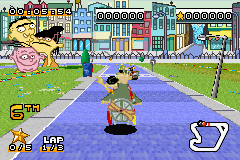
Cartoon Network – Speedway (U)(Venom)
0 5 0
Cartoon Network – Speedway (U)(Venom) is a classic Game Boy Advance racing game that captures the lively, animated spirit of the popular TV network. With bright visuals and energetic sound effects, it offers a straightforward driving experience set in a playful world filled with cartoon characters and colorful tracks. Players find themselves in a fast-paced environment where quick reflexes and good timing are key, all within the charming Cartoon Network universe.
Step Into the World of Cartoon Network – Speedway
The game’s visuals on the Game Boy Advance are bold and colorful, with exaggerated curves and obstacles that reflect the playful chaos of cartoons. The soundtrack features lively tunes and sound effects that boost the feeling of speed and excitement, making each race feel like a quick, animated episode. The combination of visuals and sound creates a cheerful yet competitive vibe. Although it’s a racing game, it focuses on fun and quick play rather than realism or complex mechanics. Its simple graphics and audio make it accessible for all ages, bringing back memories of early 2000s handheld gaming. Playing it through an emulator on your browser makes it easy to jump into this cartoon-inspired racing world anytime, without needing physical cartridges or extra setup.
How the Gameplay Hooks You
The main gameplay loop involves short races that keep players engaged without long waits. Races are quick, often lasting just a few minutes, which makes them perfect for brief gaming sessions. Success centers on timing your acceleration and making good use of simple power-ups that add a bit of strategy without overcomplicating things. As you play, you unlock new tracks and modes, giving a steady sense of progression that encourages multiple plays. While the mechanics are straightforward, the game offers enough variety in tracks and opponents to stay interesting. It rewards good timing and quick reactions, especially for players who learn each track’s layout and anticipate obstacles. It’s easy for newcomers but still offers enough challenge for seasoned players aiming for better times and higher rankings on local or in-game leaderboards. The quick races keep the game fun and appealing after multiple sessions.
Pro Tips for Cartoon Network – Speedway
Getting the most out of this game involves some simple strategies. Here are a few tips:
- Familiarize yourself with the tracks early on to memorize sharp turns and tricky spots.
- Use acceleration thoughtfully; sometimes a quick pause helps you navigate tight corners better.
- Take advantage of power-ups when you see them to boost your speed or slow down opponents.
- Practice timing your start to gain an early lead with quick acceleration.
- Adjust your braking on curves to keep control and maintain momentum.
- Focus on steady lap times rather than just speed, especially if you’re aiming for higher scores.
Frequently Asked Questions
Is Cartoon Network – Speedway good for quick gaming sessions?
Absolutely. Each race is short, making it perfect for quick breaks or casual play.
Does the game get boring after a while?
While the gameplay is simple, the variety of tracks and modes helps keep it interesting over time.
Can I play this game offline or in a browser?
Yes. It runs directly in your browser using an emulator, so no downloads are needed and you can play offline after loading the page.
Overall, Cartoon Network – Speedway offers a charming and accessible racing experience rooted in its era’s style. Its straightforward mechanics and cartoon-inspired visuals make it a good choice for quick races and nostalgic gaming. This classic from the Game Boy Advance still provides a fun, no-fuss way to enjoy racing in a colorful, animated universe.
Related games: you can also try Card Party (J)(Evasion) and Acrobat Kid (J)(Cezar), or browse all other games in the Game Boy Advance category.
How to Play Cartoon Network – Speedway (U)(Venom)?
Race around colorful tracks, avoid obstacles, and use power-ups to finish first in quick, fun races. Focus on timing your acceleration and learning each track for better results.
Game Controls
Arrow keys control movement; other keys handle acceleration and power-ups.
You may be interested in:
-
 Game Boy Advance
♥ 2
Zooo (J)(Rising Sun)
Game Boy Advance
♥ 2
Zooo (J)(Rising Sun) -
 Game Boy Advance
♥ 4
Zooo (E)(Trashman)
Game Boy Advance
♥ 4
Zooo (E)(Trashman) -
 Game Boy Advance
♥ 2
ZooCube (U)(Mode7)
Game Boy Advance
♥ 2
ZooCube (U)(Mode7) -
 Game Boy Advance
♥ 1
ZooCube (E)(Blizzard)
Game Boy Advance
♥ 1
ZooCube (E)(Blizzard) -
 Game Boy Advance
♥ 1
Zone of the Enders – The Fist of Mars (U)(Mode7)
Game Boy Advance
♥ 1
Zone of the Enders – The Fist of Mars (U)(Mode7) -
 Game Boy Advance
♥ 1
Zone of the Enders – The Fist of Mars (E)(Cezar)
Game Boy Advance
♥ 1
Zone of the Enders – The Fist of Mars (E)(Cezar) -
 Game Boy Advance
♥ 1
Zoku Bokura no Taiyou – Taiyou Shounen Django (J)(Independent)
Game Boy Advance
♥ 1
Zoku Bokura no Taiyou – Taiyou Shounen Django (J)(Independent) -
 Game Boy Advance
♥ 7
Zoku Bokura no Taiyou – Taiyou Shounen Django (J)(Caravan)
Game Boy Advance
♥ 7
Zoku Bokura no Taiyou – Taiyou Shounen Django (J)(Caravan)
Comments (0)
No comments yet. Be the first to comment!