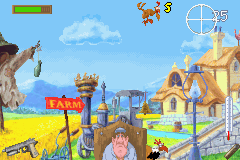
Chicken Shoot (U)(Independent)
0 1 0
Chicken Shoot (U)(Independent) is a classic Game Boy Advance game that you can play right in your browser, bringing a bit of nostalgic arcade action to your screen. Its simple design and pixelated visuals remind you of handheld gaming from the early 2000s, offering a straightforward yet fun experience that doesn’t require downloads or installations. Perfect for quick gaming sessions or a casual break, this game delivers pure arcade excitement at your fingertips.
Step Into the World of Chicken Shoot
Once you start Chicken Shoot, you’re greeted with a colorful pixel-art scene that calls to mind old-school arcade shooters. The visuals are intentionally simple, featuring bright, exaggerated chickens against a plain background to keep the focus on the action. The sound design is minimal but effective, with sharp gunfire and cheerful beeps that create a lively atmosphere. The overall vibe is lighthearted, emphasizing quick reflexes over complicated stories.
Even with its simplicity, the game’s pace keeps you engaged. The rhythm of targets popping up encourages fast reactions, and the clear, cartoonish visuals make it easy to spot enemies and aim accurately. Short bursts of gameplay make it ideal for quick sessions, and its colorful style helps maintain a fun, approachable feel for players of all ages. It’s a lively, action-packed experience that brings back arcade memories and can be played directly in your browser.
How the Gameplay Hooks You
Chicken Shoot focuses on fast shooting mechanics. Targets—animated chickens—appear in different patterns, requiring quick aiming and shooting. The game moves quickly, with new targets constantly coming up, so staying alert and precise is key. As you progress, the game gets tougher with more chickens or faster movements, putting your reflexes and focus to the test.
Every successful shot gives immediate feedback, making each hit satisfying. Designed around short bursts of intense action, you can jump in for a few minutes, rack up a high score, and then step away. Its simple, fast-paced loop makes it easy to pick up and put down, with enough challenge to keep you coming back for better scores and accuracy.
Pro Tips for Chicken Shoot
Start by focusing on accuracy rather than speed—hitting chickens consistently earns more points. Recognize target patterns to improve your reaction time. Keep your aim steady, especially as speed picks up. If you miss shots in the chaos, pause briefly to realign your aim. Patience often pays off as you get more familiar with how targets move.
- Target the easier ones first before aiming for the faster-moving chickens.
- Use controlled bursts to stay accurate when things get hectic.
- Stay calm during intense waves to keep your reflexes sharp.
- Take advantage of moments when fewer chickens are on screen to reset your aim.
- Try to memorize common patterns so you can anticipate shots better.
Frequently Asked Questions
Is Chicken Shoot a long game or good for quick play sessions?
It’s built for short, intense rounds. Perfect when you want a quick break or a bit of casual gaming during a few spare minutes.
Does the game become repetitive after a while?
The basic gameplay stays the same, but increasing difficulty and chasing higher scores bring enough variation for short-term fun. Playing extensively without difficulty upgrades might get repetitive, but it’s still enjoyable in small doses.
Can I play Chicken Shoot offline or on mobile devices?
This version runs directly in your browser, no downloads needed. It works on any device with a web browser, including desktops, tablets, and smartphones, once it’s loaded, you don’t need an internet connection.
Chicken Shoot offers classic arcade shooting action with simple mechanics and colorful visuals. It’s easy to pick up and enjoy, whether you’re aiming for high scores or just passing the time. Playing this old-school game in your browser delivers quick bursts of fun without any fuss.
Related games: you can also try 2 in 1 – Sonic Advance & Sonic Battle (J)(sUppLeX) and Beyblade VForce – Ultimate Blader Jam (E)(Rising Sun), or browse all other games in the Game Boy Advance category.
How to Play Chicken Shoot (U)(Independent)?
Aim and shoot the chickens as they appear quickly on the screen. Hit as many as possible before they disappear to score points and beat your high score.
Game Controls
Use the keyboard to aim and shoot; specific keys replace the original game controller.
You may be interested in:
-
 Game Boy Advance
♥ 2
Zooo (J)(Rising Sun)
Game Boy Advance
♥ 2
Zooo (J)(Rising Sun) -
 Game Boy Advance
♥ 4
Zooo (E)(Trashman)
Game Boy Advance
♥ 4
Zooo (E)(Trashman) -
 Game Boy Advance
♥ 2
ZooCube (U)(Mode7)
Game Boy Advance
♥ 2
ZooCube (U)(Mode7) -
 Game Boy Advance
♥ 1
ZooCube (E)(Blizzard)
Game Boy Advance
♥ 1
ZooCube (E)(Blizzard) -
 Game Boy Advance
♥ 1
Zone of the Enders – The Fist of Mars (U)(Mode7)
Game Boy Advance
♥ 1
Zone of the Enders – The Fist of Mars (U)(Mode7) -
 Game Boy Advance
♥ 1
Zone of the Enders – The Fist of Mars (E)(Cezar)
Game Boy Advance
♥ 1
Zone of the Enders – The Fist of Mars (E)(Cezar) -
 Game Boy Advance
♥ 1
Zoku Bokura no Taiyou – Taiyou Shounen Django (J)(Independent)
Game Boy Advance
♥ 1
Zoku Bokura no Taiyou – Taiyou Shounen Django (J)(Independent) -
 Game Boy Advance
♥ 7
Zoku Bokura no Taiyou – Taiyou Shounen Django (J)(Caravan)
Game Boy Advance
♥ 7
Zoku Bokura no Taiyou – Taiyou Shounen Django (J)(Caravan)
Comments (0)
No comments yet. Be the first to comment!