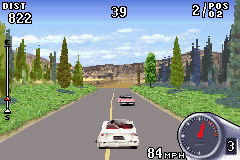
Corvette (U)(Independent)
0 3 0
Corvette (U)(Independent) is a classic Game Boy Advance racing game that’s surprisingly easy to pick up and enjoy. Its simple controls and clear goals make it accessible for players of all skill levels, whether you’re a seasoned racing fan or just looking for a quick, fun drive. The game runs directly in your browser, offering a nostalgic GBA experience without any downloads or installations, which makes it perfect for quick sessions or testing your racing skills.
What Is Corvette?
This game is a racing title that puts you behind the wheel of a classic car, with the main goal of competing in race events. It emphasizes basic racing mechanics, focusing on steering, acceleration, and timing rather than complex physics or upgrades. The gameplay revolves around completing laps and beating opponents within a set time or position, providing a straightforward yet engaging racing experience.
Corvette offers a no-frills racing environment where players can aim to improve their lap times and sharpen their driving. Its simple design means you don’t have to worry about intricate storylines or unlockables—just focus on honing your skills and beating your best scores. The visual style and controls evoke the feel of authentic GBA racing titles, making it easy to jump right in and start competing.
What Keeps You Coming Back
The game’s replay value comes from its focus on timing and precision. Players often return to shave seconds off their lap times or master tricky corners. Its straightforward approach means you can challenge yourself repeatedly without feeling overwhelmed by complex features.
Corvette also lends itself to quick sessions; races are short and satisfying, making it ideal for casual play. The game encourages repeated attempts to improve your skills, and the lack of complicated mechanics makes progress feel achievable. Whether you’re trying to beat your own records or compete against friends’ high scores, Corvette offers a simple racing challenge that keeps players coming back.
Handy Tips
Getting the most out of Corvette is easy if you keep a few tips in mind:
- Practice smooth steering—sharp turns can slow you down, so focus on gentle, controlled inputs.
- Keep an eye on your speed—accelerate early out of corners to build momentum for the next stretch.
- Follow the racing line—try to stick to the optimal path around the track for faster lap times.
- Learn the track layout—memorizing turns and straights will help you plan your approach better.
- Play regularly—consistent practice improves your timing and overall performance.
- Set realistic goals—short races mean steady progress, not instant perfection.
Player FAQ
Is Corvette suitable for younger players or beginners?
Yes, its simple controls and clear objectives make it a good choice for players of all ages, including newcomers to racing games.
Does Corvette need an internet connection or special hardware?
No, the game runs directly in your browser and doesn’t require an internet connection once loaded. It’s a straightforward, browser-based GBA experience.
How long does a typical game session last?
Most races are short, often just a few minutes, which makes it easy to fit into a quick play session or focus on specific tracks and techniques.
Corvette’s straightforward mechanics and accessible gameplay make it a fun choice for players looking for a nostalgic, simple driving challenge. Its focus on skill and timing keeps the game engaging without being overwhelming for newer players or those after a quick racing fix.
Related games: you can also try Care Bears – Care Quest (U)(Trashman) and Cars (E)(sUppLeX), or browse all other games in the Game Boy Advance category.
How to Play Corvette (U)(Independent)?
Drive your car around the track, aiming to complete laps faster than your previous best or beat opponents. Use smooth steering and acceleration to improve your times and master each course.
Game Controls
Arrow keys control steering and acceleration; other keys handle game functions.
You may be interested in:
-
 Game Boy Advance
♥ 2
Zooo (J)(Rising Sun)
Game Boy Advance
♥ 2
Zooo (J)(Rising Sun) -
 Game Boy Advance
♥ 4
Zooo (E)(Trashman)
Game Boy Advance
♥ 4
Zooo (E)(Trashman) -
 Game Boy Advance
♥ 2
ZooCube (U)(Mode7)
Game Boy Advance
♥ 2
ZooCube (U)(Mode7) -
 Game Boy Advance
♥ 1
ZooCube (E)(Blizzard)
Game Boy Advance
♥ 1
ZooCube (E)(Blizzard) -
 Game Boy Advance
♥ 1
Zone of the Enders – The Fist of Mars (U)(Mode7)
Game Boy Advance
♥ 1
Zone of the Enders – The Fist of Mars (U)(Mode7) -
 Game Boy Advance
♥ 1
Zone of the Enders – The Fist of Mars (E)(Cezar)
Game Boy Advance
♥ 1
Zone of the Enders – The Fist of Mars (E)(Cezar) -
 Game Boy Advance
♥ 1
Zoku Bokura no Taiyou – Taiyou Shounen Django (J)(Independent)
Game Boy Advance
♥ 1
Zoku Bokura no Taiyou – Taiyou Shounen Django (J)(Independent) -
 Game Boy Advance
♥ 7
Zoku Bokura no Taiyou – Taiyou Shounen Django (J)(Caravan)
Game Boy Advance
♥ 7
Zoku Bokura no Taiyou – Taiyou Shounen Django (J)(Caravan)
Comments (0)
No comments yet. Be the first to comment!