Disney’s Aladdin (J)(Eurasia)
0 1 0
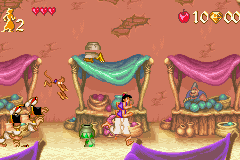
Disney’s Aladdin (J)(Eurasia) is a classic Game Boy Advance game that you can play right in your browser. It offers a nostalgic trip for fans of platformers and action-adventure games. The game stays true to the Disney animated film, translating its charm into a portable format. If you enjoy side-scrolling platformers with quick-paced action and exploration, you’ll find plenty to enjoy here.
Getting Into Disney’s Aladdin
The gameplay revolves around guiding Aladdin through a series of side-scrolling levels filled with enemies, obstacles, and collectibles. You’ll move through different environments like streets, caves, and palaces, using simple controls to jump, attack, and dodge hazards. The main goal is to get through each stage by defeating enemies and overcoming platforming challenges, reaching the end of each level.
The game follows a straightforward pattern: finish a level, face a boss or obstacle, and move on. You might replay levels to improve your score or find hidden areas. It’s designed to be accessible, with an emphasis on timing jumps and attacks just right to avoid damage. Since it’s rooted in platforming, it often requires a bit of trial and error, especially in tricky spots, which makes it satisfying for players who enjoy practicing and mastering levels over time.
Standout Features
The visuals in Disney’s Aladdin for the Game Boy Advance are colorful, with sprites and backgrounds that bring the animated film to life. Character animations are smooth, and the art style remains faithful to Disney’s aesthetic, creating a lively, charming atmosphere despite the hardware’s limitations. The levels are well-designed, gradually increasing in difficulty and complexity to keep things interesting on multiple plays.
Progression is simple but rewarding. Completing levels unlocks new stages and sometimes hidden secrets, giving you a reason to revisit earlier sections with better skills. The game’s short, engaging gameplay makes it perfect for quick sessions, but it also offers enough challenge to keep dedicated players trying to improve their runs and find everything.
Strategy and Tips
Getting better at Disney’s Aladdin means practicing your timing for jumps and attacks, especially in difficult platforming areas. Patience helps; rushing often leads to unnecessary damage. Keep an eye out for hidden paths and power-ups that can help you survive longer and do more damage.
- Work on your jumps so you don’t fall into hazards or miss collectibles.
- Pay attention to enemy patterns so you can attack or avoid efficiently.
- Take your time to plan your next move in tricky sections, using safe spots if available.
- Explore each level thoroughly to find hidden items and shortcuts.
- Patience pays off, especially in tight spots where rushing can cause mistakes.
Quick Questions
How do I get started if I’ve never played this game before?
Start with the first level to get a feel for the controls and enemy behaviors. Take your time to learn each part before moving ahead.
What’s a common mistake beginners make?
Many players jump into levels too quickly without observing enemy movements or planning their jumps, which often leads to damage or falls.
Can I play Disney’s Aladdin on a mobile device or touchscreen?
This version runs directly in your browser, so it works nicely on mobile devices with touchscreens, making it easy to enjoy without extra setup.
Disney’s Aladdin stays a fun, accessible platformer that captures the spirit of the original film. Its simple gameplay and appealing visuals make it a good pick for players of all ages who want to experience a classic adventure right in their browser.
Related games: you can also try Breath of Fire 2 (E)(Patience) and Beyblade VForce – Ultimate Blader Jam (E)(Rising Sun), or browse all other games in the Game Boy Advance category.
How to Play Disney’s Aladdin (J)(Eurasia)?
Guide Aladdin through side-scrolling levels by jumping, attacking, and dodging enemies to reach the end of each stage. Collect items and find secrets to improve your score and progress.
Game Controls
Arrow keys control movement; attack and jump are mapped to separate keys.
You may be interested in:
-
 Game Boy Advance
♥ 2
Zooo (J)(Rising Sun)
Game Boy Advance
♥ 2
Zooo (J)(Rising Sun) -
 Game Boy Advance
♥ 4
Zooo (E)(Trashman)
Game Boy Advance
♥ 4
Zooo (E)(Trashman) -
 Game Boy Advance
♥ 2
ZooCube (U)(Mode7)
Game Boy Advance
♥ 2
ZooCube (U)(Mode7) -
 Game Boy Advance
♥ 1
ZooCube (E)(Blizzard)
Game Boy Advance
♥ 1
ZooCube (E)(Blizzard) -
 Game Boy Advance
♥ 1
Zone of the Enders – The Fist of Mars (U)(Mode7)
Game Boy Advance
♥ 1
Zone of the Enders – The Fist of Mars (U)(Mode7) -
 Game Boy Advance
♥ 1
Zone of the Enders – The Fist of Mars (E)(Cezar)
Game Boy Advance
♥ 1
Zone of the Enders – The Fist of Mars (E)(Cezar) -
 Game Boy Advance
♥ 1
Zoku Bokura no Taiyou – Taiyou Shounen Django (J)(Independent)
Game Boy Advance
♥ 1
Zoku Bokura no Taiyou – Taiyou Shounen Django (J)(Independent) -
 Game Boy Advance
♥ 7
Zoku Bokura no Taiyou – Taiyou Shounen Django (J)(Caravan)
Game Boy Advance
♥ 7
Zoku Bokura no Taiyou – Taiyou Shounen Django (J)(Caravan)
Comments (0)
No comments yet. Be the first to comment!