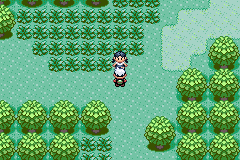
Emerald Uncensored Beta 2
0 17 23
Emerald Uncensored Beta 2 is a classic Game Boy Advance game that runs right in your browser through an emulator, bringing a piece of handheld gaming history to your screen. Its pixelated look and chiptune soundtrack evoke the late 2000s era of portable gaming, offering a straightforward yet engaging experience. This beta version hints at ongoing updates, but the core gameplay is solid and ready to play without any downloads.
Step Into the World of Emerald Uncensored Beta 2
The game takes you to a simple, grid-based environment filled with vibrant, blocky graphics typical of the Game Boy Advance’s limited color palette. The sound design relies on looping chiptunes and basic effects that remind players of the technical limits of the era, creating a nostalgic vibe that fans of retro gaming will recognize immediately. The interface is minimal, with clear sprites and straightforward menus, putting the focus on gameplay rather than visuals.
Since it’s browser-based, Emerald Uncensored Beta 2 can be played instantly, letting you jump right into its pixelated universe. While it doesn’t have voice acting or fancy animations, its sprite work and soundtrack capture the charm of early portable gaming. Playing on this site gives a smooth, lag-free experience, making it easy to enjoy a quick session or spend a bit more time exploring without any hassle to set up.
How the Gameplay Hooks You
The game moves at a steady pace, encouraging you to explore its mechanics without feeling overwhelmed. Its simple goals and controls make it easy to pick up for short play sessions, but enough depth keeps you coming back. Progress depends on completing levels or challenges that gradually get tougher, rewarding your resourcefulness and quick thinking.
The game’s core loop is clear: explore, solve puzzles, and move forward. Level design mixes puzzles with small combat encounters, with difficulty increasing gradually to match your growing skills. It also invites experimentation, encouraging you to try different strategies to overcome obstacles, making each session satisfying without feeling repetitive.
Pro Tips for Emerald Uncensored Beta 2
Here are some tips to make your experience smoother:
- Watch for visual hints; sprites and backgrounds can suggest hidden paths or secrets.
- Try different approaches to puzzles; some solutions might need creative thinking.
- Manage your resources carefully; limited items can be key to progressing smoothly.
- If possible, save your progress often; it can save you from frustration after setbacks.
- Take breaks if puzzles or battles get tough, to keep your focus sharp.
- If available, use the pause feature to plan your moves during tricky moments without time pressure.
Frequently Asked Questions
Does Emerald Uncensored Beta 2 have a story or narrative?
The game mainly focuses on gameplay and puzzles, with very little storytelling. It’s more about exploring and overcoming challenges than following a story.
Is the game repetitive after a while?
While it involves levels with puzzles and challenges, each level has unique layouts and mechanics that keep things fresh for short or medium play sessions.
Can I play Emerald Uncensored Beta 2 offline or on mobile devices?
Playing through your browser makes it accessible on desktops and mobile devices with an internet connection. It doesn’t require downloads, and offline play depends on your browser setup, but it’s designed for quick, casual fun.
Emerald Uncensored Beta 2 offers a look back at the design style of early 2000s handheld games—simple, engaging, and full of charm. Its browser-based setup makes it easy to get into, whether you’re after a quick nostalgic trip or a longer challenge.
Related games: you can also try Cars (U)(Trashman) and Disney's Brother Bear (E)(Rising Sun), or browse all other games in the Game Boy Advance category.
How to Play Emerald Uncensored Beta 2?
Explore the grid, solve puzzles, and defeat enemies to progress through levels. Use quick thinking and resource management to overcome challenges and advance in the game.
Game Controls
Arrow keys control movement; other keys handle actions and menu navigation.
You may be interested in:
-
 Game Boy Advance
♥ 2
Zooo (J)(Rising Sun)
Game Boy Advance
♥ 2
Zooo (J)(Rising Sun) -
 Game Boy Advance
♥ 4
Zooo (E)(Trashman)
Game Boy Advance
♥ 4
Zooo (E)(Trashman) -
 Game Boy Advance
♥ 2
ZooCube (U)(Mode7)
Game Boy Advance
♥ 2
ZooCube (U)(Mode7) -
 Game Boy Advance
♥ 1
ZooCube (E)(Blizzard)
Game Boy Advance
♥ 1
ZooCube (E)(Blizzard) -
 Game Boy Advance
♥ 1
Zone of the Enders – The Fist of Mars (U)(Mode7)
Game Boy Advance
♥ 1
Zone of the Enders – The Fist of Mars (U)(Mode7) -
 Game Boy Advance
♥ 1
Zone of the Enders – The Fist of Mars (E)(Cezar)
Game Boy Advance
♥ 1
Zone of the Enders – The Fist of Mars (E)(Cezar) -
 Game Boy Advance
♥ 1
Zoku Bokura no Taiyou – Taiyou Shounen Django (J)(Independent)
Game Boy Advance
♥ 1
Zoku Bokura no Taiyou – Taiyou Shounen Django (J)(Independent) -
 Game Boy Advance
♥ 7
Zoku Bokura no Taiyou – Taiyou Shounen Django (J)(Caravan)
Game Boy Advance
♥ 7
Zoku Bokura no Taiyou – Taiyou Shounen Django (J)(Caravan)
Comments (0)
No comments yet. Be the first to comment!