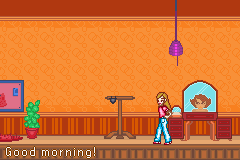
Evergirl (U)(Trashman)
0 6 1
Evergirl (U)(Trashman) is a classic Game Boy Advance game playable right in your browser here. It offers a straightforward, nostalgic experience that brings back the feel of handheld titles from the early 2000s. If you enjoy pixel art, simple gameplay, and the charm of old-school games, this one is easy to try without downloading anything. It’s a compact adventure that appeals to fans of retro gaming and gives a glimpse of what the GBA was all about.
Getting Into Evergirl
The main idea in Evergirl is to complete levels that test your timing and precision. You control a character moving through obstacles, collecting items, or avoiding enemies. Usually, you start a level, try to reach the end while dodging hazards, then move on to the next. The game is built around quick, focused play sessions, so you can enjoy short bursts or spend more time trying to beat your best times.
The modes are simple, with no complex storylines or branching paths. As you progress, levels get tougher, demanding better timing and smarter movement. Since it’s a classic GBA game, expect a challenge that relies on reflexes and memorization, with no need for long tutorials or complicated mechanics. Playing often means learning from mistakes and gradually memorizing enemy patterns and level layouts.
Standout Features
The visuals stay true to the pixel art style typical of Game Boy Advance titles—colorful, blocky sprites that are clear and animated well enough for fast-paced gameplay. The increasing difficulty in level design encourages players to sharpen their skills with each attempt. Short but tricky levels mean you can finish a stage quickly, but you might find yourself trying multiple times to get it just right.
Replayability comes from the challenge itself. As you improve, you might try to beat your best times or collect items for higher scores. The difficulty curve keeps things interesting for those who enjoy honing their skills. Since it runs right in your browser, you can jump back into a level anytime to practice or try again without hassle. Its simple design makes it perfect for quick play sessions or sneaking in a few levels during free moments.
Strategy and Tips
Getting started with Evergirl is easy, but getting good takes practice. Focus on understanding each level’s layout and enemy patterns early on to avoid mistakes. Precise timing is essential, especially in later levels where hazards move faster and appear more often.
- Try to memorize obstacle patterns instead of reacting on the fly, especially in the later stages.
- Practice each level multiple times to improve your speed and accuracy.
- Use quick retries to learn from failures—each attempt helps you improve.
- Keep an eye on your character’s position relative to hazards; patience often pays off more than rushing.
- If you get stuck, take a break and come back later with fresh eyes to spot easier routes or better timing.
Quick Questions
How do I get started in Evergirl?
Just pick a level from the main menu and start playing—no complicated setup needed. It’s designed to be easy to jump into for quick sessions.
What’s a common mistake beginners make?
Many rush through levels without paying attention to enemy patterns or hazards, which leads to mistakes. Slowing down and observing can really help improve your success rate.
Can I play Evergirl on mobile or touch devices?
Yes. Since it runs in your browser, you can play on any device with a web browser, including phones and tablets. Touch controls work well for easier mobile play.
Evergirl offers a simple but tough experience that captures the feel of classic GBA games. Its straightforward gameplay makes it easy to pick up, but the challenge keeps things interesting. For fans of retro titles, it’s a quick, enjoyable game you can try right in your browser without any fuss.
Related games: you can also try Cartoon Network – Speedway (U)(Venom) and Advance Guardian Heroes (U)(Venom), or browse all other games in the Game Boy Advance category.
How to Play Evergirl (U)(Trashman)?
Move your character through levels, avoid obstacles, and collect items to reach the end as quickly as possible. Practice helps memorize enemy patterns and improve timing for tougher stages.
Game Controls
Arrow keys control movement; other keys handle actions like jumping or interacting.
You may be interested in:
-
 Game Boy Advance
♥ 2
Zooo (J)(Rising Sun)
Game Boy Advance
♥ 2
Zooo (J)(Rising Sun) -
 Game Boy Advance
♥ 4
Zooo (E)(Trashman)
Game Boy Advance
♥ 4
Zooo (E)(Trashman) -
 Game Boy Advance
♥ 2
ZooCube (U)(Mode7)
Game Boy Advance
♥ 2
ZooCube (U)(Mode7) -
 Game Boy Advance
♥ 1
ZooCube (E)(Blizzard)
Game Boy Advance
♥ 1
ZooCube (E)(Blizzard) -
 Game Boy Advance
♥ 1
Zone of the Enders – The Fist of Mars (U)(Mode7)
Game Boy Advance
♥ 1
Zone of the Enders – The Fist of Mars (U)(Mode7) -
 Game Boy Advance
♥ 1
Zone of the Enders – The Fist of Mars (E)(Cezar)
Game Boy Advance
♥ 1
Zone of the Enders – The Fist of Mars (E)(Cezar) -
 Game Boy Advance
♥ 1
Zoku Bokura no Taiyou – Taiyou Shounen Django (J)(Independent)
Game Boy Advance
♥ 1
Zoku Bokura no Taiyou – Taiyou Shounen Django (J)(Independent) -
 Game Boy Advance
♥ 7
Zoku Bokura no Taiyou – Taiyou Shounen Django (J)(Caravan)
Game Boy Advance
♥ 7
Zoku Bokura no Taiyou – Taiyou Shounen Django (J)(Caravan)
Comments (0)
No comments yet. Be the first to comment!