Fantastic 4 (U)(Rising Sun)
0 3 0
Fantastic 4 (U)(Rising Sun) is a classic Game Boy Advance action game that provides a simple yet engaging experience for fans of the platform. As a game from the GBA era, it’s suited for players who enjoy straightforward controls paired with fast-paced gameplay. If you feel nostalgic for handheld titles from the early 2000s or want a compact action game to play in your browser, this is a solid choice.
Getting Into Fantastic 4
The gameplay revolves around controlling a team of characters through levels filled with enemies and obstacles. The main mechanic involves moving through each stage, defeating enemies, and avoiding hazards—something common in action games from that time. The game generally follows a linear path, with each level getting a little tougher. Sessions tend to be short, making it easy to jump in for a quick game or casual play when you have a few free minutes.
Most of your time will be spent learning the timing of attacks and movements to take out enemies efficiently. The game doesn’t have complex puzzles or branching paths; it focuses on reflexes and recognizing patterns. Since it’s playable directly on this site, you can start a game instantly without delays, making it easy to pick up and pause as needed.
Standout Features
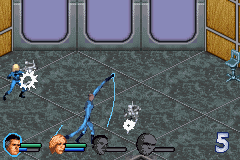
Visually, Fantastic 4 keeps things simple with pixel art typical of early GBA titles. Its sprites are clear, and the backgrounds are functional, helping you quickly spot enemies and hazards. The progression is straightforward, with each level designed to test your reflexes rather than puzzle-solving skills. Replaying levels can help you improve your score or finish faster, giving it some replay value for competitive players or those trying to master its mechanics.
Being a classic from the GBA era, the game is built around short, digestible levels. With no branching paths or unlockable content, its replay value depends on sharpening your skills or beating your high scores, rather than discovering new areas. Playing it in your browser means instant access to a familiar, nostalgic experience without the need for downloads or hardware.
Strategy and Tips
To succeed, focus on good timing and understanding enemy patterns. Memorizing enemy movements can help you avoid taking damage. Take your time going through levels—patience can help conserve health and improve your overall performance.
- Practice levels to learn where enemies appear and how they attack.
- Quickly eliminate enemies to avoid getting overwhelmed.
- Use safe spots to pause and plan your next move in busy sections.
- Watch your health bar and steer clear of unnecessary risks.
- Replay levels to beat your best times or scores.
- Pay attention to level layouts to find the safest routes around hazards.
Quick Questions
How do I get started with Fantastic 4?
Just load the game on this page and start playing. No setup or downloads needed—just click and go.
What’s a common mistake for beginners?
Many new players rush through levels without learning enemy patterns, which can lead to unnecessary damage or failure. Take your time to memorize enemy movements.
Can I play Fantastic 4 on mobile or touch devices?
Since it runs right in your browser, you can play it on mobile devices with a touch interface. Some adjustment may be needed for precise timing compared to using a keyboard or controller.
Overall, the game offers a compact, nostalgic action experience rooted in the GBA’s era. It’s great for quick sessions or practicing your reflexes, making Fantastic 4 a nice addition to any collection of browser-based retro titles.
Related games: you can also try 2 in 1 – Koda Fratello Orso & Disney Principesse (I)(Independent) and Battlebots – Design And Destroy (U)(Rising Sun), or browse all other games in the Game Boy Advance category.
How to Play Fantastic 4 (U)(Rising Sun)?
Move your characters through levels, defeat enemies, and avoid hazards to complete each stage quickly. Focus on timing your attacks and learning enemy patterns to improve your score.
Game Controls
Arrow keys control movement; action buttons are mapped to keyboard keys for attacking and jumping.
You may be interested in:
-
 Game Boy Advance
♥ 2
Zooo (J)(Rising Sun)
Game Boy Advance
♥ 2
Zooo (J)(Rising Sun) -
 Game Boy Advance
♥ 4
Zooo (E)(Trashman)
Game Boy Advance
♥ 4
Zooo (E)(Trashman) -
 Game Boy Advance
♥ 2
ZooCube (U)(Mode7)
Game Boy Advance
♥ 2
ZooCube (U)(Mode7) -
 Game Boy Advance
♥ 1
ZooCube (E)(Blizzard)
Game Boy Advance
♥ 1
ZooCube (E)(Blizzard) -
 Game Boy Advance
♥ 1
Zone of the Enders – The Fist of Mars (U)(Mode7)
Game Boy Advance
♥ 1
Zone of the Enders – The Fist of Mars (U)(Mode7) -
 Game Boy Advance
♥ 1
Zone of the Enders – The Fist of Mars (E)(Cezar)
Game Boy Advance
♥ 1
Zone of the Enders – The Fist of Mars (E)(Cezar) -
 Game Boy Advance
♥ 1
Zoku Bokura no Taiyou – Taiyou Shounen Django (J)(Independent)
Game Boy Advance
♥ 1
Zoku Bokura no Taiyou – Taiyou Shounen Django (J)(Independent) -
 Game Boy Advance
♥ 7
Zoku Bokura no Taiyou – Taiyou Shounen Django (J)(Caravan)
Game Boy Advance
♥ 7
Zoku Bokura no Taiyou – Taiyou Shounen Django (J)(Caravan)
Comments (0)
No comments yet. Be the first to comment!