Final Fantasy I & II – Dawn of Souls (E)(Independent)
0 40 0
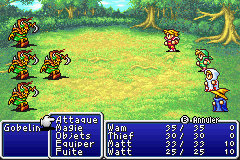
Final Fantasy I & II – Dawn of Souls (E)(Independent) is a classic Game Boy Advance game you can play right in your browser, bringing together two well-loved RPGs in one package. It’s a simple way for newcomers and longtime fans to enjoy the early Final Fantasy titles without needing complicated setups or downloads. Playing these titles here keeps the nostalgic GBA feel alive on modern browsers.
What Is Final Fantasy I & II – Dawn of Souls?
This collection includes the first two games in the Final Fantasy series, both of which are turn-based RPGs focused on exploration, battles, and character growth. The games let you follow two different stories, each with its own characters, worlds, and challenges, all in a single package. You’ll build a party, fight enemies, and upgrade your gear and skills as you go along.
Both games stick to the mechanics that made the series popular, like strategic menu-based fights and exploring large worlds. Final Fantasy I is about restoring light to a darkened world, while Final Fantasy II features a more story-driven approach with a focus on gaining experience and leveling up. Together, they give a nice look at how the series evolved early on.
What Keeps You Coming Back
The game stays interesting because of its challenge and depth. There are plenty of dungeons, optional battles, and side quests to explore, encouraging multiple playthroughs. Different character classes and equipment options let you try different strategies, keeping things fresh. You can also compare your progress across both stories, which adds to the replay value.
There are hidden items and optional encounters that reward thorough exploration. Since it’s a classic GBA title, the difficulty strikes a balance—approachable for new players but still engaging for seasoned RPG fans. Playing here in your browser means quick access—you can jump in and out easily, which makes replaying it more convenient.
Handy Tips
If you’re just starting out, these tips might help:
- Save often, especially before tough battles or entering new areas, so you don’t lose progress.
- Try different character classes and gear to find what works best for your style.
- Follow the story and side quests; they often give helpful items or experience points.
- Check the menu regularly to see your party’s strengths and weaknesses.
- Manage your resources carefully—saving items and magic can be key in longer dungeons.
- Explore every corner of the maps; hidden treasures and secrets are often tucked away.
Player FAQ
Is Final Fantasy I & II – Dawn of Souls easy enough for newcomers?
Yes, it’s accessible for new players, especially since it runs smoothly in your browser and doesn’t need any extra downloads or complicated setups. The difficulty is balanced for both beginners and experienced RPG fans.
Is this game suitable for younger players?
Most players aged 10 and up should be fine with Final Fantasy I & II – Dawn of Souls, thanks to its turn-based combat and simple stories. Some battles might be tough for very young kids, so parental discretion is a good idea.
Do I need an internet connection to play this game?
No, you can enjoy Final Fantasy I & II – Dawn of Souls entirely in your browser without an internet connection. It’s ready to go instantly, making it easy to play whenever you want.
Final fantasy i & ii – dawn of souls offers a nostalgic RPG experience on the Game Boy Advance platform. Playing it here, you get instant access to two classic stories that still hold up today, all without leaving your browser.
Related games: you can also try Ed, Edd n Eddy – Jawbreakers! (U)(Sir VG) and Bubble Bobble – Old & New (J)(Eurasia), or browse all other games in the Game Boy Advance category.
How to Play Final Fantasy I & II – Dawn of Souls (E)(Independent)?
Explore dungeons, fight turn-based battles, and upgrade your characters to complete quests and progress through two classic RPG stories.
Game Controls
Arrow keys for movement; Enter to select; action buttons mapped to keyboard keys.
You may be interested in:
-
 Game Boy Advance
♥ 2
Zooo (J)(Rising Sun)
Game Boy Advance
♥ 2
Zooo (J)(Rising Sun) -
 Game Boy Advance
♥ 4
Zooo (E)(Trashman)
Game Boy Advance
♥ 4
Zooo (E)(Trashman) -
 Game Boy Advance
♥ 2
ZooCube (U)(Mode7)
Game Boy Advance
♥ 2
ZooCube (U)(Mode7) -
 Game Boy Advance
♥ 1
ZooCube (E)(Blizzard)
Game Boy Advance
♥ 1
ZooCube (E)(Blizzard) -
 Game Boy Advance
♥ 1
Zone of the Enders – The Fist of Mars (U)(Mode7)
Game Boy Advance
♥ 1
Zone of the Enders – The Fist of Mars (U)(Mode7) -
 Game Boy Advance
♥ 1
Zone of the Enders – The Fist of Mars (E)(Cezar)
Game Boy Advance
♥ 1
Zone of the Enders – The Fist of Mars (E)(Cezar) -
 Game Boy Advance
♥ 1
Zoku Bokura no Taiyou – Taiyou Shounen Django (J)(Independent)
Game Boy Advance
♥ 1
Zoku Bokura no Taiyou – Taiyou Shounen Django (J)(Independent) -
 Game Boy Advance
♥ 7
Zoku Bokura no Taiyou – Taiyou Shounen Django (J)(Caravan)
Game Boy Advance
♥ 7
Zoku Bokura no Taiyou – Taiyou Shounen Django (J)(Caravan)
Comments (0)
No comments yet. Be the first to comment!