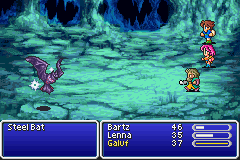
Final Fantasy V Advance (U)(Independent)
0 20 0
Final Fantasy V Advance (U)(Independent) is a classic Game Boy Advance game that runs right in your browser. Fans of traditional JRPGs will find this port a faithful way to experience a well-loved entry from the series, with its strategic gameplay and nostalgic charm still present. Designed for portable play, it offers a solid adventure that’s easy to pick up and enjoy, whether for quick sessions or longer gaming marathons.
Getting Into Final Fantasy V Advance
The gameplay centers on turn-based battles, character development, and exploration. You control a party of characters, each with their own abilities, and the game emphasizes choosing the right jobs and skills to handle enemies. Progress mainly comes from completing story quests, discovering new locations, and customizing your team to face different challenges.
Playing involves managing abilities, equipment, and items during battles. The game is organized into dungeons, towns, and open areas, with play sessions that can be brief or extended. Saving is simple, and navigating menus is straightforward using keyboard or touch controls, depending on your device. Trying out different job setups keeps the game fresh, with each run offering a slightly different experience.
Standout Features
The visual style sticks to the sprite-based look of the GBA’s 16-bit era, with colorful characters and detailed backgrounds. Although not graphically demanding by modern standards, the art style remains charming and supports storytelling. The game’s system for mastering job classes and customizing characters encourages replaying—players often revisit to try new combinations or refine strategies.
Replay value is boosted by optional side quests, hidden items, and different battle tactics. The design invites players to experiment with various setups, making each playthrough unique. Its mechanics are straightforward, and the difficulty is balanced, so it’s accessible to newcomers but still engaging for seasoned players. The browser version keeps all these features intact, so you can jump in quickly without losing the core experience.
Strategy and Tips
Starting out in Final Fantasy V Advance is simple, but a few tips can help you avoid common mistakes and enjoy the game more.
- Build a balanced party with a mix of attack, defense, and support roles to handle different foes.
- Experiment with job combinations early on to find synergies that suit your style.
- Save regularly, especially before tough fights or bosses, to avoid losing progress.
- Use items wisely; don’t waste them on minor enemies when resources should be saved for stronger foes.
- Watch enemy weaknesses; exploiting them can make tough battles much easier.
- Take on side quests—they often offer useful items and experience that can make the main story smoother.
Quick Questions
How do I get started with Final Fantasy V Advance?
Just pick the game from the browser menu and start exploring. The controls are intuitive, so you can jump right into the story without any fuss.
What’s a common mistake beginners make?
Underestimating the importance of job flexibility and not trying different class combinations early can limit your options later on.
Can I play Final Fantasy V Advance on mobile or touch devices?
Yes, since it runs in your browser, you can play it on smartphones and tablets. A keyboard might make some controls easier, but touch screens work too.
Final Fantasy V Advance offers a rich, strategic RPG experience that works right in your browser. With its deep customization and charming visuals, it’s a great choice for fans of the series or anyone looking for a classic JRPG to enjoy at their own pace.
Related games: you can also try 2 in 1 – Columns & Chu Chu Rocket (E)(Rising Sun) and Banjo Kazooie Grunty's Revenge (E)(Suxxors), or browse all other games in the Game Boy Advance category.
How to Play Final Fantasy V Advance (U)(Independent)?
Control a party of characters, explore towns and dungeons, and engage in turn-based battles by selecting actions, abilities, and items to defeat enemies and progress through the story.
Game Controls
Arrow keys for movement; Enter or space for menu selection and actions.
You may be interested in:
-
 Game Boy Advance
♥ 2
Zooo (J)(Rising Sun)
Game Boy Advance
♥ 2
Zooo (J)(Rising Sun) -
 Game Boy Advance
♥ 4
Zooo (E)(Trashman)
Game Boy Advance
♥ 4
Zooo (E)(Trashman) -
 Game Boy Advance
♥ 2
ZooCube (U)(Mode7)
Game Boy Advance
♥ 2
ZooCube (U)(Mode7) -
 Game Boy Advance
♥ 1
ZooCube (E)(Blizzard)
Game Boy Advance
♥ 1
ZooCube (E)(Blizzard) -
 Game Boy Advance
♥ 1
Zone of the Enders – The Fist of Mars (U)(Mode7)
Game Boy Advance
♥ 1
Zone of the Enders – The Fist of Mars (U)(Mode7) -
 Game Boy Advance
♥ 1
Zone of the Enders – The Fist of Mars (E)(Cezar)
Game Boy Advance
♥ 1
Zone of the Enders – The Fist of Mars (E)(Cezar) -
 Game Boy Advance
♥ 1
Zoku Bokura no Taiyou – Taiyou Shounen Django (J)(Independent)
Game Boy Advance
♥ 1
Zoku Bokura no Taiyou – Taiyou Shounen Django (J)(Independent) -
 Game Boy Advance
♥ 7
Zoku Bokura no Taiyou – Taiyou Shounen Django (J)(Caravan)
Game Boy Advance
♥ 7
Zoku Bokura no Taiyou – Taiyou Shounen Django (J)(Caravan)
Comments (0)
No comments yet. Be the first to comment!