Fushigi no Kuni no Angelique (J)(Independent)
0 1 0
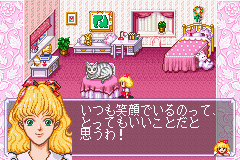
Fushigi no Kuni no Angelique (J)(Independent) is a classic adventure game originally made for the Game Boy Advance. Now you can play it right in your browser through an emulator. The game keeps things simple, focusing on exploration and puzzle-solving, which gives a nostalgic feel of handheld gaming from the early 2000s. It’s a straightforward experience that appeals to fans of vintage games and anyone looking for a relaxed puzzle challenge.
Fushigi no Kuni no Angelique: Gameplay Overview
The game takes place in a fantasy setting where you explore different areas, solve puzzles, and interact with characters and objects. The main idea is moving between scenes, collecting items, and using them to unlock new areas or progress the story. It’s more about figuring out puzzles than fighting or complex mechanics, so it’s easy for players of all ages to enjoy.
The controls are simple, typical of the Game Boy Advance style. You select actions from a menu—like examining items, talking to characters, or using inventory items. The game encourages watching your surroundings and thinking logically, with each new scene offering fresh challenges. Its straightforward design makes it easy to focus on the story and environment without feeling overwhelmed by complicated mechanics.
Modes, Levels and Progression
The game moves forward in a straight line through different levels, each with its own puzzles and scenarios. It doesn’t have multiplayer options or difficulty settings, but the changing environments and puzzles keep things interesting. As you progress, puzzles tend to get a little trickier, encouraging you to pay attention and use your items wisely.
Progress mainly comes from solving puzzles and uncovering environmental secrets. There aren’t multiple endings or branching storylines, but exploring each area thoroughly is part of the fun. You might replay scenes to find hidden items or try different solutions, especially if you want to improve your time or puzzle-solving skills. Its simplicity makes it suitable for quick play sessions or longer explorations, depending on what you prefer.
Winning Strategies
Since puzzles are a big part of the game, paying attention to clues in the environment is key. Keeping your inventory organized helps when combining or using items at the right time.
- Check every scene carefully for hidden objects or hints that could help solve puzzles.
- Take note of dialogue or visual cues that might relate to what you need to do.
- Return to previous areas after getting new items—you might find new ways to use them.
- Focus on solving puzzles that block your path before moving on to new areas.
- If possible, save often to avoid losing progress after tough puzzles or mistakes.
Common Questions About Fushigi no Kuni no Angelique
How long does it usually take to finish the game?
It depends on how quickly you solve puzzles and explore, but most players spend around 1 to 2 hours completing it. It’s a good fit for short gaming sessions or casual play.
Are there different modes or difficulty levels?
Nope, it’s a straightforward experience with a steady difficulty level. Your progress depends on solving puzzles rather than changing settings.
Is there replay value?
While there aren’t multiple endings, you might enjoy going back to find hidden items or try solving puzzles more quickly. Revisiting scenes can reveal new details or shortcuts, which adds to the fun if you like puzzle-based adventures.
Fushigi no Kuni no Angelique is a charming example of early handheld adventure games. Its simple mechanics and focus on exploration make it easy to pick up and enjoy, whether you’re feeling nostalgic or just want a gentle puzzle experience. Playing it here in your browser makes it convenient to try out without any extra setup.
Related games: you can also try ESPN Winter X-Games – Snowboarding 2002 (J)(Eurasia) and Dr Seuss – Green Eggs and Ham (U)(Mode7), or browse all other games in the Game Boy Advance category.
How to Play Fushigi no Kuni no Angelique (J)(Independent)?
Explore scenes, solve puzzles by examining objects, talking to characters, and using items from your inventory to progress through each level.
Game Controls
Arrow keys move; Enter selects actions; other keys handle menu and item use.
You may be interested in:
-
 Game Boy Advance
♥ 2
Zooo (J)(Rising Sun)
Game Boy Advance
♥ 2
Zooo (J)(Rising Sun) -
 Game Boy Advance
♥ 4
Zooo (E)(Trashman)
Game Boy Advance
♥ 4
Zooo (E)(Trashman) -
 Game Boy Advance
♥ 2
ZooCube (U)(Mode7)
Game Boy Advance
♥ 2
ZooCube (U)(Mode7) -
 Game Boy Advance
♥ 1
ZooCube (E)(Blizzard)
Game Boy Advance
♥ 1
ZooCube (E)(Blizzard) -
 Game Boy Advance
♥ 1
Zone of the Enders – The Fist of Mars (U)(Mode7)
Game Boy Advance
♥ 1
Zone of the Enders – The Fist of Mars (U)(Mode7) -
 Game Boy Advance
♥ 1
Zone of the Enders – The Fist of Mars (E)(Cezar)
Game Boy Advance
♥ 1
Zone of the Enders – The Fist of Mars (E)(Cezar) -
 Game Boy Advance
♥ 1
Zoku Bokura no Taiyou – Taiyou Shounen Django (J)(Independent)
Game Boy Advance
♥ 1
Zoku Bokura no Taiyou – Taiyou Shounen Django (J)(Independent) -
 Game Boy Advance
♥ 7
Zoku Bokura no Taiyou – Taiyou Shounen Django (J)(Caravan)
Game Boy Advance
♥ 7
Zoku Bokura no Taiyou – Taiyou Shounen Django (J)(Caravan)
Comments (0)
No comments yet. Be the first to comment!