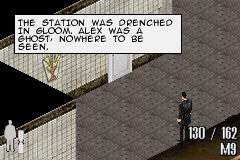
Max Payne (U)(Mode7)
0 5 0
Max Payne (U)(Mode7) is a classic Game Boy Advance game that brings the gritty, noir-inspired shooter and action-adventure experience to a handheld device. If you’ve played the original PC version, this one offers a condensed but true-to-the-original take on the intense storytelling and gunplay. It’s a rare chance to enjoy Max Payne on the go, right in your browser, without any downloads.
Getting Into Max Payne
Playing Max Payne on the Game Boy Advance means moving through levels that mix shooting, exploration, and story. The main gameplay involves taking on enemies and dodging fire, with a focus on timing and positioning. Designed for short, sharp sessions — typical of handheld games — each encounter tests your reflexes and awareness.
The game moves you through levels, where you face enemies and push the story forward. While it’s mostly linear, different enemy types and weapon options keep things interesting. Since it runs in your browser, you can jump in whenever you want, whether for quick breaks or longer sessions. It’s perfect for players who enjoy fast-paced combat with story moments woven in.
Standout Features
The visuals are simplified but capture the dark, atmospheric tone through pixel art and limited colors. The design emphasizes mood, with shadowy environments and character sprites that still convey emotion despite the technical limits. The level layout encourages strategic movement, with cover and enemy placement playing key roles in fights.
Progression is straightforward: you go from one shooting segment to the next, unlocking weapons and facing tougher enemies as you go. Replay value comes from trying different combat approaches and exploring levels thoroughly. As a smaller version of a larger game, it offers a focused experience that rewards replay, especially when you get the timing and resource management just right.
Strategy and Tips
If you’re new, focusing on movement and taking cover will help you last longer. Try to learn enemy spawn points and attack angles early. Managing your ammo and choosing the right moments to shoot or dodge can turn tough fights in your favor.
- Use cover smartly: don’t rush into open areas without a plan.
- Take your time aiming, especially for headshots or critical hits.
- Watch your ammo count; conserve it for tougher enemies or bosses.
- Practice dodging to avoid fire; timing your movements is important.
- Switch weapons when needed to match enemy types or situations.
- If possible, save your progress often to avoid losing ground after hard sections.
Quick Questions
How do I get started playing Max Payne on this site?
Just load the game in your browser, and it runs instantly without any setup. Use your keyboard or touch controls to move and shoot.
What’s a common mistake for beginners?
Many rush into fights without using cover or paying attention to enemy positions, which can get them defeated quickly. Take your time and plan your moves.
Can I play Max Payne comfortably on a mobile device or with touch controls?
Yes, it works on mobile browsers and supports touch controls. Still, aiming precisely and moving quickly is easier with a keyboard or mouse.
Max Payne on the Game Boy Advance offers a compact, faithful shooter experience that captures much of what made the original great. Its simple gameplay, atmospheric visuals, and strategic combat make it a good pick for fans of action games. Playing directly in your browser makes revisiting this classic quick and easy, with no fuss involved.
Related games: you can also try Dr. Sudoku (E)(Rising Sun) and Genso Maden Saiyuki (J)(WRG), or browse all other games in the Game Boy Advance category.
How to Play Max Payne (U)(Mode7)?
Move through levels, shoot enemies, take cover, and complete objectives while managing ammo and health. Progress by defeating enemies and advancing the story in fast-paced combat segments.
Game Controls
Arrow keys control movement; action buttons are mapped to keyboard keys for shooting, dodging, and switching weapons.
You may be interested in:
-
 Game Boy Advance
♥ 2
Zooo (J)(Rising Sun)
Game Boy Advance
♥ 2
Zooo (J)(Rising Sun) -
 Game Boy Advance
♥ 4
Zooo (E)(Trashman)
Game Boy Advance
♥ 4
Zooo (E)(Trashman) -
 Game Boy Advance
♥ 2
ZooCube (U)(Mode7)
Game Boy Advance
♥ 2
ZooCube (U)(Mode7) -
 Game Boy Advance
♥ 1
ZooCube (E)(Blizzard)
Game Boy Advance
♥ 1
ZooCube (E)(Blizzard) -
 Game Boy Advance
♥ 1
Zone of the Enders – The Fist of Mars (U)(Mode7)
Game Boy Advance
♥ 1
Zone of the Enders – The Fist of Mars (U)(Mode7) -
 Game Boy Advance
♥ 1
Zone of the Enders – The Fist of Mars (E)(Cezar)
Game Boy Advance
♥ 1
Zone of the Enders – The Fist of Mars (E)(Cezar) -
 Game Boy Advance
♥ 1
Zoku Bokura no Taiyou – Taiyou Shounen Django (J)(Independent)
Game Boy Advance
♥ 1
Zoku Bokura no Taiyou – Taiyou Shounen Django (J)(Independent) -
 Game Boy Advance
♥ 7
Zoku Bokura no Taiyou – Taiyou Shounen Django (J)(Caravan)
Game Boy Advance
♥ 7
Zoku Bokura no Taiyou – Taiyou Shounen Django (J)(Caravan)
Comments (0)
No comments yet. Be the first to comment!