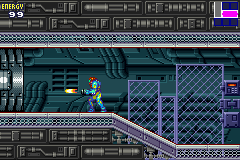
Metroid – Fusion (E)(FlashAdvance)
0 99 2
Metroid – Fusion (E)(FlashAdvance) is a classic Game Boy Advance game emulated right in your browser, bringing back memories of the handheld’s golden days. Fans of platformers and action-adventure games will find this title a good mix of exploration, combat, and puzzle-solving, all packed into a portable format. It’s great for players who like tense moments and careful progression, all without needing downloads or installations.
Getting Into Metroid – Fusion
Metroid – Fusion revolves around a gameplay loop that combines exploring, collecting items, and battling enemies. You control a lone bounty hunter navigating interconnected environments filled with foes, puzzles, and hidden secrets. The game encourages going back to earlier areas once you get new upgrades, which makes you feel like you’re gradually uncovering more of the map. Playing involves solving puzzles, defeating enemies, and managing your resources to handle tough encounters.
The structure balances quick reflex challenges with slower, puzzle-focused sections that make you think. Its action-adventure style keeps the pace moving, while platforming parts test your timing and precision. Each session can feel rewarding, whether you’re facing a tough boss or finding a hidden upgrade tucked away in a corner of the map.
Standout Features
Visually, Metroid – Fusion on the Game Boy Advance has detailed sprite work and animated backgrounds that give a dark, mysterious vibe to its world. The color palette and sprite design help make each environment feel distinct and alive. The progression system is simple but satisfying—gaining new abilities lets you reach areas you couldn’t access before, slowly expanding your exploration options.
Replay value comes from the layered exploration and hidden secrets. Finding every upgrade or item can add to how long you play, and mastering the combat and platforming keeps things interesting. Since puzzle-solving and resource management are key, many players go back to improve their runs or find missed secrets, making it fun for both completionists and casual players.
Strategy and Tips
Getting started in Metroid – Fusion means familiarizing yourself with the environment and conserving your resources. Here are some tips:
- Check every area carefully before moving on—many upgrades are tucked away in tricky spots.
- Keep an eye on your health and ammo; save supplies for tougher enemies and bosses.
- Watch for environmental hints—some puzzles and paths only make sense after you get certain upgrades.
- Backtrack to earlier places with new abilities—you might find secrets or new routes.
- Save often, especially after tough sections or boss fights.
- Be patient during platforming parts; timing and precision matter to avoid damage.
Quick Questions
How do I start playing Metroid – Fusion?
The game begins right when you load it, with no extra setup needed. Just start exploring and follow the clues to move forward.
What’s a common mistake for new players?
Many beginners try rushing through without exploring enough or saving often, which can cause problems during difficult moments.
Can I comfortably play Metroid – Fusion on mobile or touch devices?
Yes, since it runs directly in your browser, you can play on mobile devices with touch controls. Using a keyboard or gamepad might make the experience smoother if your device supports it.
Metroid – Fusion offers a compact but layered experience that makes you think about exploring and managing your resources carefully. Its engaging gameplay and atmospheric visuals make it a good addition to your collection of browser-based classic Game Boy Advance titles.
Related games: you can also try Dead to Rights (E)(Rising Sun) and Bomberman Max 2 Red Advance (U)(Mode7), or browse all other games in the Game Boy Advance category.
How to Play Metroid – Fusion (E)(FlashAdvance)?
Explore interconnected areas, defeat enemies, solve puzzles, and collect upgrades to progress and uncover secrets in this action-adventure platformer.
Game Controls
Arrow keys move; space or designated keys handle actions like shooting and jumping.
You may be interested in:
-
 Game Boy Advance
♥ 2
Zooo (J)(Rising Sun)
Game Boy Advance
♥ 2
Zooo (J)(Rising Sun) -
 Game Boy Advance
♥ 4
Zooo (E)(Trashman)
Game Boy Advance
♥ 4
Zooo (E)(Trashman) -
 Game Boy Advance
♥ 2
ZooCube (U)(Mode7)
Game Boy Advance
♥ 2
ZooCube (U)(Mode7) -
 Game Boy Advance
♥ 1
ZooCube (E)(Blizzard)
Game Boy Advance
♥ 1
ZooCube (E)(Blizzard) -
 Game Boy Advance
♥ 1
Zone of the Enders – The Fist of Mars (U)(Mode7)
Game Boy Advance
♥ 1
Zone of the Enders – The Fist of Mars (U)(Mode7) -
 Game Boy Advance
♥ 1
Zone of the Enders – The Fist of Mars (E)(Cezar)
Game Boy Advance
♥ 1
Zone of the Enders – The Fist of Mars (E)(Cezar) -
 Game Boy Advance
♥ 1
Zoku Bokura no Taiyou – Taiyou Shounen Django (J)(Independent)
Game Boy Advance
♥ 1
Zoku Bokura no Taiyou – Taiyou Shounen Django (J)(Independent) -
 Game Boy Advance
♥ 7
Zoku Bokura no Taiyou – Taiyou Shounen Django (J)(Caravan)
Game Boy Advance
♥ 7
Zoku Bokura no Taiyou – Taiyou Shounen Django (J)(Caravan)
Comments (0)
No comments yet. Be the first to comment!