Motoracer Advance (E)(Mode7)
0 1 0
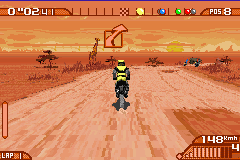
Motoracer Advance (E)(Mode7) is a classic Game Boy Advance game that delivers high-speed racing with a focus on arcade-style thrills. Its pixel-perfect graphics and Mode7 rotation effects evoke the feeling of early 3D racing titles, bringing a sense of excitement and nostalgia for those familiar with GBA’s technical capabilities. The game’s straightforward approach makes it easy to pick up and play, yet it requires skill and precision to master its tricky tracks. As part of the GBA era, it stands out for its smooth scrolling, vibrant visuals, and energetic soundtrack, all running smoothly in your browser for instant access.
Step Into the World of Motoracer Advance
Set on winding tracks that twist through stylized environments, Motoracer Advance’s visuals rely heavily on the Mode7 graphics mode to create a sense of depth and perspective. Bright colors and simple textures give it a cartoony charm, similar to racing games from the early 2000s. The soundtrack features upbeat tunes that keep the adrenaline flowing, fitting the game’s fast pace. While not overly complicated, the atmosphere captures the thrill of racing at high speed, with each track offering a new challenge. Playing in your browser, the game maintains a crisp frame rate and responsive controls, making the experience both nostalgic and immediate.
How the Gameplay Hooks You
The main gameplay loop involves racing on different circuits, each requiring quick reflexes and accurate steering. Its pacing encourages short, intense sessions where players try to beat their best times or improve their standings against AI opponents. Progression unlocks new tracks and more difficult levels, pushing players to sharpen their skills. The mechanics reward quick decision-making, with tight turns and speed boosts that need careful timing. The simple design makes it easy to get started, but mastering drifting, braking, and acceleration keeps the challenge interesting across multiple runs.
Pro Tips for Motoracer Advance
To get the most out of the game, focus on strategic racing and technical control. Here are some tips:
- Keep your momentum through turns by avoiding harsh braking; smooth inputs help maintain speed.
- Use drifting to handle sharp corners more efficiently—timing is key to keeping control.
- Familiarize yourself with each track layout to anticipate upcoming turns and plan your racing lines.
- Watch your lap times to find sections where you can shave off a few seconds.
- Adjust your approach based on the difficulty level—more aggressive tactics might be needed at higher levels.
Frequently Asked Questions
Does Motoracer Advance have a story mode or campaign?
No, it focuses on quick race sessions across multiple tracks instead of a narrative-driven campaign.
Is the gameplay repetitive, or does it stay interesting over time?
The core gameplay stays consistent, but increasing difficulty and unlockable tracks help keep it engaging, whether playing briefly or for longer stretches.
Can I play Motoracer Advance in short sessions or on mobile devices?
Yes, the game runs smoothly in your browser, making it easy to play on PC or mobile without downloading anything.
Motoracer Advance offers a compact, challenging racing experience that captures the spirit of classic GBA titles. Its simple mechanics and lively visuals make it perfect for quick, adrenaline-filled races, all accessible directly in your browser. Whether you’re just looking for a few minutes of fun or trying to improve your lap times, it’s a solid throwback to handheld racing games from the past.
Related games: you can also try 2 in 1 – Scooby-Doo & Scooby-Doo 2 (E)(Independent) and 2 in 1 – Hugo Bukkazoom & Hugo & The Evil Mirror (E)(Rising Sun), or browse all other games in the Game Boy Advance category.
How to Play Motoracer Advance (E)(Mode7)?
Race through winding tracks using precise steering, drifting, and speed boosts. Complete laps quickly to beat times and unlock new challenges while avoiding crashes and sharp turns.
Game Controls
Arrow keys control steering and acceleration; other buttons handle braking and drifting.
You may be interested in:
-
 Game Boy Advance
♥ 2
Zooo (J)(Rising Sun)
Game Boy Advance
♥ 2
Zooo (J)(Rising Sun) -
 Game Boy Advance
♥ 4
Zooo (E)(Trashman)
Game Boy Advance
♥ 4
Zooo (E)(Trashman) -
 Game Boy Advance
♥ 2
ZooCube (U)(Mode7)
Game Boy Advance
♥ 2
ZooCube (U)(Mode7) -
 Game Boy Advance
♥ 1
ZooCube (E)(Blizzard)
Game Boy Advance
♥ 1
ZooCube (E)(Blizzard) -
 Game Boy Advance
♥ 1
Zone of the Enders – The Fist of Mars (U)(Mode7)
Game Boy Advance
♥ 1
Zone of the Enders – The Fist of Mars (U)(Mode7) -
 Game Boy Advance
♥ 1
Zone of the Enders – The Fist of Mars (E)(Cezar)
Game Boy Advance
♥ 1
Zone of the Enders – The Fist of Mars (E)(Cezar) -
 Game Boy Advance
♥ 1
Zoku Bokura no Taiyou – Taiyou Shounen Django (J)(Independent)
Game Boy Advance
♥ 1
Zoku Bokura no Taiyou – Taiyou Shounen Django (J)(Independent) -
 Game Boy Advance
♥ 7
Zoku Bokura no Taiyou – Taiyou Shounen Django (J)(Caravan)
Game Boy Advance
♥ 7
Zoku Bokura no Taiyou – Taiyou Shounen Django (J)(Caravan)
Comments (0)
No comments yet. Be the first to comment!