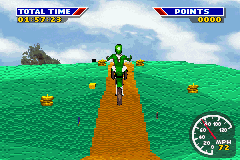
MX 2002 Featuring Ricky Carmichael (U)(Mode7)
0 1 0
MX 2002 Featuring Ricky Carmichael (U)(Mode7) is a classic Game Boy Advance game that runs right in your browser, giving you a taste of early 2000s motocross action. It combines elements of action, sports, driving, and simulation, capturing the rush of racing on dirt tracks while offering enough depth to keep dedicated players engaged. The game belongs to the GBA era, known for its simple controls and shorter play sessions, making it easy to pick up and enjoy regardless of skill level.
Why MX 2002 Featuring Ricky Carmichael Is Worth Playing
This game offers a surprisingly detailed motocross experience for a handheld title. Though the visuals are simple compared to today’s standards, they effectively show dirt tracks, jumps, and rider animations that convey the fast-paced feel of off-road racing. The atmosphere is lively, emphasizing speed and precision, encouraging players to master timing and control over various courses. Its clean layout and straightforward interface make it easy for newcomers to get started, while experienced players can find enough challenge in the tracks and improving their times.
What makes it stand out is how it balances realistic physics with arcade-style gameplay. It’s not overly complicated but rewards players who pay attention to timing and the details of each track. Ricky Carmichael’s name adds a touch of authenticity for motocross fans, even if the game doesn’t focus on extensive customization or career modes. Instead, it sticks to core racing mechanics and quick replayability, making it a good choice for casual sessions or quick bursts of fun. It captures early GBA racing well, with enough polish to satisfy sports and driving enthusiasts.
Tips to Get Ahead
To get the most out of the game, try these tips:
- Timing your jumps well helps avoid crashes and keeps your speed up.
- Work on your cornering to maintain momentum through turns.
- Pay attention to track layouts so you can anticipate obstacles.
- Use throttle control carefully—pressing too hard can cause you to lose control.
- Start with easier tracks to get a feel for how the physics work before trying the tougher ones.
- Watch your rider’s posture and balance for smoother riding.
Things to Know Before You Start
What’s the difficulty level like in MX 2002 Featuring Ricky Carmichael?
It’s a moderate challenge, especially if you’re aiming for top times on the harder tracks. Beginners will find it accessible, but there’s enough depth for seasoned players to improve their skills and master the physics.
How long does a typical session last?
Most races are pretty quick, often just a few minutes, making it perfect for short gaming sessions. You can finish a race in one sitting, which is handy if you want a quick dose of fun without committing to longer play.
Is MX 2002 Featuring Ricky Carmichael good for casual players?
Definitely. Its simple controls and short races are ideal for casual fans of sports and driving games. At the same time, players who want to get better can enjoy the challenge of improving their times and mastering the tracks.
Can I play this game offline or on mobile devices?
Since it runs directly in your browser, no downloads are needed. It’s easy to jump in and play whenever you like, whether on a computer or mobile device with a browser.
Jump into MX 2002 featuring Ricky Carmichael without fuss. Its straightforward gameplay and nostalgic feel make it a nice pick for anyone interested in motocross racing on the GBA platform, now available free in your browser.
Related games: you can also try Cabela's Big Game Hunter 2005 Adventures (U)(Venom) and Moemon Quetzal English Alpha 0.8.4, or browse all other games in the Game Boy Advance category.
How to Play MX 2002 Featuring Ricky Carmichael (U)(Mode7)?
Race through dirt tracks, jump over obstacles, and complete laps as fast as possible while controlling your rider’s balance and speed. Focus on timing jumps and turns to improve your times and avoid crashes.
Game Controls
Arrow keys control movement and steering; buttons handle jumps and acceleration.
You may be interested in:
-
 Game Boy Advance
♥ 2
Zooo (J)(Rising Sun)
Game Boy Advance
♥ 2
Zooo (J)(Rising Sun) -
 Game Boy Advance
♥ 4
Zooo (E)(Trashman)
Game Boy Advance
♥ 4
Zooo (E)(Trashman) -
 Game Boy Advance
♥ 2
ZooCube (U)(Mode7)
Game Boy Advance
♥ 2
ZooCube (U)(Mode7) -
 Game Boy Advance
♥ 1
ZooCube (E)(Blizzard)
Game Boy Advance
♥ 1
ZooCube (E)(Blizzard) -
 Game Boy Advance
♥ 1
Zone of the Enders – The Fist of Mars (U)(Mode7)
Game Boy Advance
♥ 1
Zone of the Enders – The Fist of Mars (U)(Mode7) -
 Game Boy Advance
♥ 1
Zone of the Enders – The Fist of Mars (E)(Cezar)
Game Boy Advance
♥ 1
Zone of the Enders – The Fist of Mars (E)(Cezar) -
 Game Boy Advance
♥ 1
Zoku Bokura no Taiyou – Taiyou Shounen Django (J)(Independent)
Game Boy Advance
♥ 1
Zoku Bokura no Taiyou – Taiyou Shounen Django (J)(Independent) -
 Game Boy Advance
♥ 7
Zoku Bokura no Taiyou – Taiyou Shounen Django (J)(Caravan)
Game Boy Advance
♥ 7
Zoku Bokura no Taiyou – Taiyou Shounen Django (J)(Caravan)
Comments (0)
No comments yet. Be the first to comment!