Pokemon Stranded v0.6.7
0 11 3
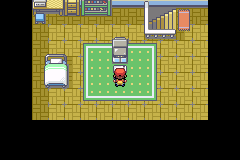
Pokemon Stranded v0.6.7 is a classic Game Boy Advance RPG that takes players into a Pokémon-filled universe where survival and exploration go hand in hand. For fans of the GBA era’s straightforward but engaging gameplay, this game offers nostalgic pixel art and familiar mechanics, with a focus on resource management and strategy. Since it runs directly in your browser without needing downloads, you can jump in for a quick session or settle in for a longer playthrough, making it a good pick for both casual players and those seeking a different kind of Pokémon experience.
Why Pokemon Stranded v0.6.7 Is Worth Playing
The visuals lean into the GBA’s charming sprite-based style, with colorful environments and expressive Pokémon designs that bring back childhood memories. Its atmosphere balances light exploration with a sense of challenge, as each decision can affect your chances of survival. The game stands out by emphasizing mechanics like item collection, battling wild Pokémon, and managing your resources—adding depth beyond the usual Pokémon formula. This variation keeps things interesting longer, shifting focus from just catching Pokémon to building a sustainable team in a tougher environment.
The gameplay involves exploring various areas, capturing Pokémon, and battling trainers, but it’s the pacing that keeps players coming back. It doesn’t get bogged down with complexity; instead, it offers rewarding moments of discovery and strategic choices. The pixel art and sound design work together to create a nostalgic yet slightly gritty atmosphere that feels fresh compared to standard Pokémon titles. It shows how a familiar genre can be refreshed with subtle tweaks, encouraging players to think more carefully about their Pokémon team and resources.
Tips to Get Ahead
Starting out with Pokemon Stranded v0.6.7 might seem a little daunting, especially if you’re used to traditional Pokémon games. Here are some practical tips to help improve your chances:
- Try to catch Pokémon that can learn moves useful for survival or tough battles early on.
- Be careful with your items; avoid wasting potions or Poké Balls on Pokémon that aren’t worth it.
- Explore every area thoroughly to find hidden items and resources that can help you along the way.
- Keep your team’s levels balanced by battling wild Pokémon and trainers so you’re prepared for tougher fights.
- Pay attention to your Pokémon’s health and status conditions; healing at the right moments can prevent setbacks.
- Adjust your strategy based on which Pokémon you find; some are better suited for certain environments or opponents.
Things to Know Before You Start
Getting a sense of what to expect can help you enjoy Pokemon Stranded v0.6.7 more fully. Here are some common questions:
How difficult is Pokemon Stranded v0.6.7?
It offers a moderate challenge, with some tough battles and resource management elements that can trip up casual players.
How long will a typical session last?
A session can last from about 30 minutes to over an hour, depending on how much you explore and how many battles you get into. It’s suitable for quick breaks or longer play sessions.
Is this game good for casual or dedicated players?
It works well for both; casual players can enjoy exploring and catching Pokémon, while more serious players will appreciate the survival mechanics and strategic depth in managing resources and team setups.
Jump into Pokemon Stranded v0.6.7 and see how well you can survive and thrive in this pixelated Pokémon adventure. Its mix of familiar mechanics and survival elements offers a different take for fans and newcomers alike, all playable right in your browser for instant fun.
Related games: you can also try Disney's Kim Possible 3 – Team Possible (U)(Trashman) and Nekketsu Monogatari Advance (English v1.0), or browse all other games in the Game Boy Advance category.
How to Play Pokemon Stranded v0.6.7?
Explore areas, catch Pokémon, battle trainers, and manage your resources to survive and build a strong team in a challenging environment.
Game Controls
Arrow keys move; Z and X are action buttons; Enter is start.
You may be interested in:
-
 Game Boy Advance
♥ 2
Zooo (J)(Rising Sun)
Game Boy Advance
♥ 2
Zooo (J)(Rising Sun) -
 Game Boy Advance
♥ 4
Zooo (E)(Trashman)
Game Boy Advance
♥ 4
Zooo (E)(Trashman) -
 Game Boy Advance
♥ 2
ZooCube (U)(Mode7)
Game Boy Advance
♥ 2
ZooCube (U)(Mode7) -
 Game Boy Advance
♥ 1
ZooCube (E)(Blizzard)
Game Boy Advance
♥ 1
ZooCube (E)(Blizzard) -
 Game Boy Advance
♥ 1
Zone of the Enders – The Fist of Mars (U)(Mode7)
Game Boy Advance
♥ 1
Zone of the Enders – The Fist of Mars (U)(Mode7) -
 Game Boy Advance
♥ 1
Zone of the Enders – The Fist of Mars (E)(Cezar)
Game Boy Advance
♥ 1
Zone of the Enders – The Fist of Mars (E)(Cezar) -
 Game Boy Advance
♥ 1
Zoku Bokura no Taiyou – Taiyou Shounen Django (J)(Independent)
Game Boy Advance
♥ 1
Zoku Bokura no Taiyou – Taiyou Shounen Django (J)(Independent) -
 Game Boy Advance
♥ 7
Zoku Bokura no Taiyou – Taiyou Shounen Django (J)(Caravan)
Game Boy Advance
♥ 7
Zoku Bokura no Taiyou – Taiyou Shounen Django (J)(Caravan)
Comments (0)
No comments yet. Be the first to comment!