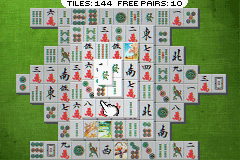
Ultimate Brain Games (U)(Eurasia)
0 2 0
Ultimate Brain Games (U)(Eurasia) is a classic Game Boy Advance title that challenges your mind with a variety of strategy puzzles. This game offers a nostalgic look back at handheld gaming from the early 2000s, wrapped in a simple package designed to test your mental agility. As a browser-emulated GBA classic, it runs smoothly right in your browser, with no downloads or installations needed. It’s great for quick sessions or longer puzzle marathons, providing a focused experience rooted in classic strategy mechanics.
Step Into the World of Ultimate Brain Games
Visuals in Ultimate Brain Games stay true to the Game Boy Advance era, with simple, pixelated graphics that emphasize clarity over complexity. The color palette is modest but functional, making it easy to tell different puzzle elements and game modes apart. The sound design is minimal—light beeps and melodies that evoke the handheld’s nostalgic charm—creating a calm, focused atmosphere suited for mental exercises. The interface is clean, with menus that are easy to navigate, so players can jump into puzzles without fuss.
The overall atmosphere encourages concentration, with a straightforward layout that keeps the focus on the puzzles. Its design cues are familiar for anyone who grew up with GBA titles, combining simplicity with a touch of vintage gaming style. Playing it in your browser means instant access, turning your browser into a portable puzzle box that feels both retro and immediate.
How the Gameplay Hooks You
The core mechanic revolves around a series of strategy puzzles that test your logic and planning skills. Each puzzle offers a different challenge, with a clear goal and immediate feedback. The pacing is steady; you can spend a few minutes on one puzzle or stretch it out into longer sessions without feeling overwhelmed. As you progress, the difficulty gradually increases, rewarding strategic thinking and patience.
The variety of puzzles keeps things interesting over time. There’s a natural loop of trying, failing, and refining your approach, which helps keep your mind sharp and the experience fresh. This focus on puzzle-solving and gradual progress makes Ultimate Brain Games a good way to exercise your brain during short breaks or longer play sessions alike.
Pro Tips for Ultimate Brain Games
Start with the easier puzzles to get a feel for the mechanics before tackling the trickier challenges.
- Look for patterns in the puzzles—recognizing recurring structures can speed up your solutions.
- If you get stuck, taking a break can help you see things differently.
- Pay attention to visual cues and feedback within each puzzle to guide your strategy.
- Try to find efficient solutions—quicker approaches can help you master higher difficulty levels faster.
- Experiment with trial and error; exploring different options can sometimes lead to breakthroughs.
Frequently Asked Questions
Is Ultimate Brain Games good for quick play sessions?
Absolutely. Each puzzle can be finished in a few minutes, making it perfect for short mental exercises.
Are there different modes or difficulty levels?
The game offers puzzles of increasing difficulty, but it doesn’t have separate modes; progression depends on puzzle complexity.
Can I play this offline or on mobile?
Since it runs directly in your browser, you don’t need an internet connection. It works on any device with a compatible browser, including smartphones and tablets.
Ultimate Brain Games provides a straightforward, strategy-based puzzle experience that tests your mental agility. Its nostalgic GBA roots make it a charming addition to your collection of browser-based games, great for quick, satisfying brain teasers.
Related games: you can also try Star Wars Episode III – Revenge of the Sith (U)(TrashMan) and Metroid – Fusion (J)(Polla), or browse all other games in the Game Boy Advance category.
How to Play Ultimate Brain Games (U)(Eurasia)?
Solve a variety of puzzles by planning and making strategic moves, aiming to complete each challenge with the fewest mistakes. Progress through increasing difficulty to sharpen your logic and planning skills.
Game Controls
Arrow keys act as the D-pad; Enter is Start; on-screen mapped keys handle the action buttons.
You may be interested in:
-
 Game Boy Advance
♥ 1
Wagamama Fairy Mirumo De Pon – 8 Nin no Toki no Yousei (J)(Rising Sun)
Game Boy Advance
♥ 1
Wagamama Fairy Mirumo De Pon – 8 Nin no Toki no Yousei (J)(Rising Sun) -
 Game Boy Advance
♥ 1
Wade Hixtons Counter Punch (U)(Independent)
Game Boy Advance
♥ 1
Wade Hixtons Counter Punch (U)(Independent) -
 Game Boy Advance
♥ 3
W.I.T.C.H. (E)(Rising Sun)
Game Boy Advance
♥ 3
W.I.T.C.H. (E)(Rising Sun) -
 Game Boy Advance
♥ 1
Virtual Kasparov (U)(Nobody)
Game Boy Advance
♥ 1
Virtual Kasparov (U)(Nobody) -
 Game Boy Advance
♥ 1
Virtual Kasparov (E)(Venom)
Game Boy Advance
♥ 1
Virtual Kasparov (E)(Venom) -
 Game Boy Advance
♥ 1
Virtua Tennis (U)(Venom)
Game Boy Advance
♥ 1
Virtua Tennis (U)(Venom) -
 Game Boy Advance
♥ 2
Virtua Tennis (E)(Patience)
Game Boy Advance
♥ 2
Virtua Tennis (E)(Patience) -
 Game Boy Advance
♥ 6
VIP (E)(Venom)
Game Boy Advance
♥ 6
VIP (E)(Venom)
Comments (0)
No comments yet. Be the first to comment!