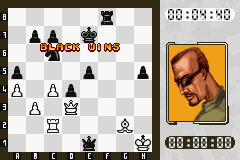
Virtual Kasparov (E)(Venom)
0 1 0
Virtual Kasparov (E)(Venom) is a classic Game Boy Advance game that you can play right in your browser. It offers a chess experience that combines strategy and simulation, pitting you against an AI modeled after Garry Kasparov. This game appeals to those who enjoy chess and strategy, providing a portable challenge without the need to download anything. Its clean interface and straightforward gameplay make it easy to pick up and sharpen your thinking skills while enjoying some nostalgia from GBA titles.
Getting Into Virtual Kasparov
The main gameplay involves playing chess against an AI opponent. You take turns making moves, trying to outsmart the computer’s simulated strategies. You can practice or test your skills in single-player mode, making it suitable for quick matches or longer sessions. Games start with the standard opening positions, and the AI responds with moves designed to challenge your planning.
Since the game focuses on thinking ahead rather than quick reflexes, matches usually last a few minutes, depending on how fast you play. You can choose different difficulty levels, which tweak how aggressive or deep the AI’s calculations are. The game also keeps track of your moves and offers undo options, which makes learning and experimenting easier. It’s a good fit whether you want some casual play or to improve your chess without the pressure of multiplayer or timed moves.
Standout Features
The visuals in Virtual Kasparov are simple but clear, showing a classic chessboard with pieces that look like traditional sets. The interface is minimal, helping you focus on the game instead of flashy graphics. The gameplay is straightforward: make your move, see how the AI responds, and continue until checkmate, stalemate, or a draw. This simplicity helps new players get comfortable quickly, and experienced players can enjoy testing their skills against a tough opponent.
You can replay matches multiple times, thanks to different difficulty settings. Trying out various openings or attempting to beat Kasparov at higher levels keeps the game interesting. Since it simulates real chess, each game feels unique, especially when the computer adapts its strategy. The quick setup and reset options make it easy to try different scenarios in one sitting, encouraging ongoing practice and strategic growth.
Strategy and Tips
Playing Virtual Kasparov well means knowing basic chess principles and adjusting to how the AI plays. Here are some simple tips to get started:
- Learn some common openings to avoid early mistakes and understand typical positions.
- Keep your king safe—castling early can help prevent unnecessary risks.
- Control the center of the board, giving your pieces more room to move.
- Look for tactical opportunities like forks, pins, and skewers to gain material advantage.
- Use the undo function to review your moves and learn from your mistakes.
- Adjust the difficulty level as you improve to keep challenging yourself.
Quick Questions
How do I get started with Virtual Kasparov?
Once the game loads, just pick your difficulty and start making moves on the chessboard in your browser.
What’s a common mistake beginners make?
Many focus too much on capturing pieces without considering king safety or strategic positioning, which can lead to quick losses.
Can I play Virtual Kasparov on mobile or with touch controls?
Yes, since it runs in your browser, it works well on smartphones and tablets without any extra setup.
Virtual Kasparov offers a simple chess simulation rooted in the GBA style, making it a reliable choice for players looking for a strategic challenge in their browser. Its focus on core gameplay, adjustable difficulty, and straightforward visuals make it a solid pick for chess fans at any level.
Related games: you can also try Korokke Yume no Bunker Survival (J)(Patience) and Rock 'Em Sock 'Em Robots (U)(Sir VG), or browse all other games in the Game Boy Advance category.
How to Play Virtual Kasparov (E)(Venom)?
Move pieces to outsmart the AI opponent and achieve checkmate or stalemate. Take turns making moves, try different strategies, and adjust difficulty to improve your chess skills.
Game Controls
Arrow keys navigate; Enter confirms moves; other keys handle undo and menu actions.
You may be interested in:
-
 Game Boy Advance
♥ 4
Wario Ware – Twisted! (No Gyro Fix)
Game Boy Advance
♥ 4
Wario Ware – Twisted! (No Gyro Fix) -
 Game Boy Advance
♥ 9
Wario Land Advance (C)(WRG)
Game Boy Advance
♥ 9
Wario Land Advance (C)(WRG) -
 Game Boy Advance
♥ 22
Wario Land 4: PT-like Moveset Conversion
Game Boy Advance
♥ 22
Wario Land 4: PT-like Moveset Conversion -
 Game Boy Advance
♥ 15
Wario Land 4: Parallel World
Game Boy Advance
♥ 15
Wario Land 4: Parallel World -
 Game Boy Advance
♥ 15
Wario Land 4 (J)(Eurasia)
Game Boy Advance
♥ 15
Wario Land 4 (J)(Eurasia) -
 Game Boy Advance
♥ 291
Wario Land 4 (E)(Mode7)
Game Boy Advance
♥ 291
Wario Land 4 (E)(Mode7) -
 Game Boy Advance
♥ 1
Wario Land 4 – Time Attack Edition ver1.5
Game Boy Advance
♥ 1
Wario Land 4 – Time Attack Edition ver1.5 -
 Game Boy Advance
♥ 1
Wario Land 4 – Seaside Ruins
Game Boy Advance
♥ 1
Wario Land 4 – Seaside Ruins
Comments (0)
No comments yet. Be the first to comment!