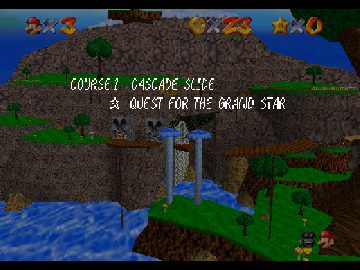
Cascade Slide
0 1 1
Cascade Slide is a classic Nintendo 64 game emulated directly in your browser, offering a simple yet engaging experience for fans of nostalgic platformers. If you enjoy gameplay that emphasizes timing and precision, this game should suit you. Its roots in the Nintendo 64 era give it a familiar feel for those who remember the console’s early days of 3D gaming.
Getting Into Cascade Slide
The game revolves around guiding a character through sliding sections, where the main challenge is timing jumps and moves to dodge obstacles and finish each level. Each run usually starts with a quick overview of the level layout, then you try to complete the slide while keeping control. As you go along, levels might get a little tougher, requiring sharper reflexes and better timing.
Most modes focus on single-player progress through increasingly tricky slides. There aren’t complicated mechanics or multiplayer options, so it’s easy to pick up for quick sessions or casual play. The game encourages trial and error, rewarding players who learn the timing of each obstacle and slide. You can replay levels to beat your best times or practice tricky sections, which keeps the game interesting.
Standout Features
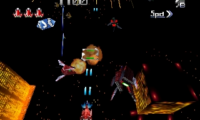
Visually, Cascade Slide reflects the style of late 90s 3D platformers, with colorful environments and simple, blocky characters that run smoothly even in a browser emulator. Its design makes it easy to tell safe paths from hazards, which is key for timing-based gameplay. Progression is straightforward—advancing through levels unlocks new slides and environments, keeping things fresh without overwhelming you with content.
You’ll find replay value in trying to beat your best times and mastering tough segments. Each level encourages experimenting, and the minimalistic setup means you can jump right in without needing a lengthy tutorial. Because it runs in-browser, sessions are quick, making it perfect for short gaming breaks or revisiting levels to sharpen your skills. Its simplicity also means players of all ages can enjoy a quick, fun challenge.
Strategy and Tips
Focus on timing to get better faster. Listen for the rhythm of slides and obstacles—most hazards follow predictable patterns once you recognize them.
- Practice levels to memorize obstacle positions and timing for jumps.
- Use small, controlled movements instead of rushing to stay in control during slides.
- Look ahead to anticipate hazards and plan your moves early.
- Go back and replay levels to improve your times and develop quicker reflexes.
- Don’t take unnecessary risks at first; prioritize safety over speed until you’re comfortable.
- Pay attention to visual cues in the environment, as they often signal when to prepare for a jump or dodge.
Quick Questions
Can I play Cascade Slide on mobile or touch devices?
Yes, since it runs in your browser, you can play it on mobile devices, though controls might be a bit trickier than on a keyboard.
What’s the most common mistake beginners make?
Many players try to rush through slides without paying enough attention to timing, which often leads to hitting obstacles or falling off.
How long does a typical game session last?
Sessions usually last a few minutes up to half an hour, depending on how many levels you want to try or improve your times in.
Playing Cascade Slide offers a quick test of timing and reflexes wrapped in a nostalgic Nintendo 64-style look. Its straightforward design makes it accessible, but the challenge keeps players coming back for just one more run. The slide-based gameplay keeps each session feeling fresh, even after multiple tries, making it a fun piece of retro gaming you can enjoy right in your browser.
Related games: you can also try Are we the bad guys 64 and Bakushou Jinsei 64 – Mezase! Resort Ou (Japan), or browse all other games in the Nintendo 64 category.
How to Play Cascade Slide?
Guide your character through sliding levels by timing jumps and moves to avoid obstacles and reach the end. Replay and practice to improve your speed and accuracy.
Game Controls
Arrow keys control movement; action buttons are mapped to keyboard keys for jumping and dodging.
You may be interested in:
-
 Nintendo 64
♥ 2
DK’s Adventure
Nintendo 64
♥ 2
DK’s Adventure -
 Nintendo 64
♥ 10
Dinosaur Planet
Nintendo 64
♥ 10
Dinosaur Planet -
 Nintendo 64
♥ 7
Diddy Kong Racing (USA) (En,Fr) (Rev A)
Nintendo 64
♥ 7
Diddy Kong Racing (USA) (En,Fr) (Rev A) -
 Nintendo 64
♥ 46
Diddy Kong Racing (USA) (En,Fr)
Nintendo 64
♥ 46
Diddy Kong Racing (USA) (En,Fr) -
 Nintendo 64
♥ 4
Diddy Kong Racing (Japan)
Nintendo 64
♥ 4
Diddy Kong Racing (Japan) -
 Nintendo 64
♥ 2
Diddy Kong Racing (Europe) (En,Fr,De) (Rev A)
Nintendo 64
♥ 2
Diddy Kong Racing (Europe) (En,Fr,De) (Rev A) -
 Nintendo 64
♥ 10
Diddy Kong Racing (Europe) (En,Fr,De)
Nintendo 64
♥ 10
Diddy Kong Racing (Europe) (En,Fr,De) -
 Nintendo 64
♥ 2
Dezaemon 3D (Japan)
Nintendo 64
♥ 2
Dezaemon 3D (Japan)
Comments (0)
No comments yet. Be the first to comment!