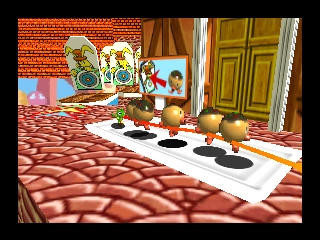
Chameleon Twist 2 (USA)
0 1 1
Chameleon Twist 2 (USA) is a charming platformer from the Nintendo 64 era that offers a lively, cartoony experience. Designed with fun and exploration in mind, this game appeals to players who enjoy quirky characters, inventive mechanics, and a lighthearted adventure. Its colorful visuals and straightforward gameplay make it accessible for newcomers, while still providing enough challenge for seasoned platform fans.
Getting Into Chameleon Twist 2
The main gameplay involves controlling a playful chameleon who uses its long tongue to navigate through various levels. Each stage presents jumps, puzzles, and enemy encounters that test your timing and strategic use of the tongue mechanic. The game encourages exploring environments, finding hidden areas, and completing objectives to move forward.
Sessions typically start with choosing a level, which can feature environments like jungles, caves, or underwater scenes. The gameplay emphasizes fluid movement and rhythmic jumping, with players bouncing off surfaces and using the tongue to grab items or swing across gaps. As you progress, the difficulty increases, introducing new obstacles and enemies that require quick reflexes and puzzle-solving skills. The game offers replayability through hidden secrets and optional collectibles, rewarding players who take their time to explore thoroughly.
Standout Features
Visually, Chameleon Twist 2 features vibrant, cartoon-inspired graphics that still look good thanks to the emulator’s crisp rendering. Its colorful design and exaggerated character animations add humor to each level, making it appealing across different ages. The level design is varied, with each environment offering unique challenges and creative layouts that keep gameplay interesting.
Progression is straightforward but engaging, with a series of levels that gradually introduce new mechanics and enemies. Replay value comes from discovering hidden areas, mastering tricky jumps, and completing levels with high scores or under specific conditions. The simple mechanics encourage experimentation, with players often finding different routes and solutions, which helps keep the game fresh despite its manageable length.
Strategy and Tips
Getting started is simple, but mastering the game involves fine-tuning your timing and movement. Here are some helpful tips:
- Practice bouncing off surfaces to keep your momentum and reach tricky spots.
- Use your tongue early to grab items, especially when navigating difficult sections or swinging across gaps.
- Pay attention to level layouts; exploring carefully can reveal secrets and power-ups.
- Learn enemy patterns to avoid damage and save jumps for tougher parts.
- Take your time going through levels; patience often results in better scores and fewer mistakes.
- Try different routes; hidden paths might make levels easier or more rewarding.
Quick Questions
How do I get started playing Chameleon Twist 2?
The game loads instantly in your browser, so just click to start and pick your level. No setup needed.
What’s the most common beginner mistake?
Trying to rush through levels without exploring can cause you to miss secrets and make avoidable mistakes. Taking your time helps.
Can I play Chameleon Twist 2 on mobile or touch devices?
Yes. The game runs in your browser on mobile devices, with controls adapted for touch, so you can play without extra software.
Playing this Nintendo 64 classic in your browser makes it easy to enjoy its colorful platforming. Chameleon Twist 2’s inventive use of the tongue mechanic and playful level design make it worth revisiting for fans of lighthearted, challenge-based games.
Related games: you can also try Banjo Kazooie X Donkey Kong Country and Animal crossing (Doubutsu no Mori English), or browse all other games in the Nintendo 64 category.
How to Play Chameleon Twist 2 (USA)?
Control the chameleon to jump, bounce, and use your tongue to navigate levels, solve puzzles, and collect items while exploring colorful environments and avoiding enemies.
Game Controls
Arrow keys move; action buttons are mapped to keyboard keys for jumping, tongue use, and interacting.
You may be interested in:
-
 Nintendo 64
♥ 1
Forsaken 64 (Europe) (En,Fr,Es,It)
Nintendo 64
♥ 1
Forsaken 64 (Europe) (En,Fr,Es,It) -
 Nintendo 64
♥ 6
Flying Dragon (USA)
Nintendo 64
♥ 6
Flying Dragon (USA) -
 Nintendo 64
♥ 5
Flying Dragon (Europe)
Nintendo 64
♥ 5
Flying Dragon (Europe) -
 Nintendo 64
♥ 6
Fighting Force 64 (USA)
Nintendo 64
♥ 6
Fighting Force 64 (USA) -
 Nintendo 64
♥ 2
Fighting Force 64 (Europe)
Nintendo 64
♥ 2
Fighting Force 64 (Europe) -
 Nintendo 64
♥ 3
Fighting Cup (Japan)
Nintendo 64
♥ 3
Fighting Cup (Japan) -
 Nintendo 64
♥ 2
Fighters Destiny (USA)
Nintendo 64
♥ 2
Fighters Destiny (USA) -
 Nintendo 64
♥ 2
Fighters Destiny (Germany)
Nintendo 64
♥ 2
Fighters Destiny (Germany)
Comments (0)
No comments yet. Be the first to comment!