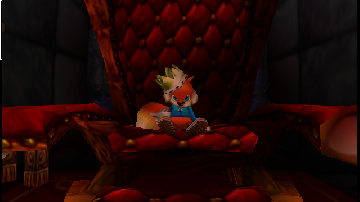
Conker’s Bad Fur Day Debug Build
0 8 2
Conker’s Bad Fur Day Debug Build gives a rare look at how this Nintendo 64 classic was made. Originally designed as a humorous and irreverent platformer, this debug version shows what went on behind the scenes during its development. Its rough, unpolished form reveals elements not seen in the final game, making it interesting for curious players and fans alike. Running straight in your browser, this version skips the final touches but lets you see the core mechanics and atmosphere that made the game stand out during the N64 era.
Step Into the World of Conker’s Bad Fur Day Debug Build
This version takes you into a strange, satirical universe filled with odd characters, crude humor, and unexpected visuals. The graphics, while similar to other Nintendo 64 titles, look a bit rougher—textures aren’t as detailed, and some assets seem incomplete or like placeholders. The sound design keeps the quirky, sometimes jarring soundtrack, but some audio cues are unfinished or loop unexpectedly, reflecting its early state. The overall mood mixes juvenile comedy with dark satire, with unpolished touches adding authenticity to its development roots. Playing in a browser means instant access—no downloads or installations—so you can explore an early version of a game that became a cult favorite.
How the Gameplay Hooks You
Even in this debug form, the game sticks to its main ideas of exploration, solving puzzles, and light combat. You move through different environments that hint at the final design, encountering rougher versions of familiar scenes. The pacing feels more experimental, with some areas feeling incomplete or glitchy—yet that unpredictability can keep things interesting. Progress depends on completing objectives that, in this build, might be simpler or less refined, making it good for short sessions where you want a taste of the game’s chaotic humor without playing the full version. The layout encourages exploring, though some spots might be inaccessible or contain placeholder assets, reminding you it’s still a work in progress.
Pro Tips for Conker’s Bad Fur Day Debug Build
Getting the most out of this debug version means being aware of its quirks and limits. Here are some tips:
- Check out every area carefully—hidden details can give insight into the development process.
- Expect some bugs and glitches; they’re part of the debugging experience, and can be amusing or revealing.
- If you hit a section that’s unresponsive, try retracing your steps or restarting the game for a smoother run.
- Look at placeholder textures and assets—they can hint at what the final game might have looked like.
- Use this version to see how game mechanics evolved, especially if you’re interested in game design or development.
Frequently Asked Questions
What kind of atmosphere should I expect from this debug build?
Answer: It’s a rough, unfinished version with unpolished visuals, placeholder assets, and some glitches, giving a behind-the-scenes look at its early development.
Does the game become repetitive or lose interest quickly?
Answer: Since it’s an early, incomplete build, it can feel unpredictable and short-lived; best enjoyed in short sessions to appreciate its quirks and what it reveals about the process.
Can I play this version offline or on mobile devices?
Answer: The game runs right in your browser, so it works on desktop and mobile with internet access, designed for quick, casual play without needing to install anything.
Conker’s Bad Fur Day Debug Build offers a glimpse into the game’s early stages, showing its development while still capturing some of its humor and charm. Playing it in your browser makes exploring this piece of gaming history straightforward and hassle-free.
Related games: you can also try Bug's Life, A (Italy) and AeroGauge (Europe) (En,Fr,De), or browse all other games in the Nintendo 64 category.
How to Play Conker’s Bad Fur Day Debug Build?
Explore different areas, solve puzzles, and defeat enemies using simple movement and action commands. Complete objectives to progress through the unfinished, glitchy environments and experience early game development quirks.
Game Controls
Arrow keys control movement; action buttons are mapped to other keys for jumping, attacking, and interacting.
You may be interested in:
-
 Nintendo 64
♥ 7
Elmo’s Letter Adventure (USA)
Nintendo 64
♥ 7
Elmo’s Letter Adventure (USA) -
 Nintendo 64
♥ 1
Eikou no Saint Andrews (Japan)
Nintendo 64
♥ 1
Eikou no Saint Andrews (Japan) -
 Nintendo 64
♥ 2
Egg Slide
Nintendo 64
♥ 2
Egg Slide -
 Nintendo 64
♥ 7
ECW Hardcore Revolution (Europe)
Nintendo 64
♥ 7
ECW Hardcore Revolution (Europe) -
 Nintendo 64
♥ 15
Earthworm Jim 3D (USA)
Nintendo 64
♥ 15
Earthworm Jim 3D (USA) -
 Nintendo 64
♥ 3
Earthworm Jim 3D (Europe) (En,Fr,De,Es,It)
Nintendo 64
♥ 3
Earthworm Jim 3D (Europe) (En,Fr,De,Es,It) -
 Nintendo 64
♥ 19
Duke Nukem 64 (USA)
Nintendo 64
♥ 19
Duke Nukem 64 (USA) -
 Nintendo 64
♥ 5
Duke Nukem 64 (France)
Nintendo 64
♥ 5
Duke Nukem 64 (France)
Comments (0)
No comments yet. Be the first to comment!