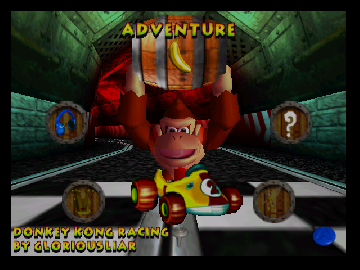
Donkey Kong Racing
0 2 1
Donkey Kong Racing is a classic Nintendo 64 game playable right in your browser, bringing back that nostalgic Nintendo 64 feel. Fans of kart-style racing and platformers will probably enjoy it, especially if you appreciate the distinctive graphics and simple mechanics from that era. It’s a nice way to revisit a piece of Nintendo history without any downloads or hardware needed.
Getting Into Donkey Kong Racing
The game involves racing characters through different themed tracks. Usually, you pick a character and compete in a series of races against the computer. The main idea is straightforward: race, dodge obstacles, and try to finish first. Timing and knowing the track are key, making it easy for newcomers but still offering enough challenge for experienced players.
You can choose between single races or tournaments. During a race, you’ll navigate a simple course with jumps, turns, and hazards. Sometimes, power-ups or boosts appear on the track, giving small advantages that can help you gain an edge. The game moves quickly, so quick reflexes and smart use of boosts are important. As you progress, the tracks get trickier, requiring better control and familiarity with each layout.
Standout Features
The graphics reflect a typical late 90s Nintendo 64 style, with colorful, blocky visuals that give a nostalgic feel. Tracks are themed around familiar environments, and characters are stylized but simple, fitting the hardware limits. Unlocking new characters and tracks as you go encourages replaying and seeing everything the game has to offer.
The game’s simplicity and engaging mechanics make it worth playing multiple times. With several characters and tracks available, you can aim to improve your times and learn each course. Its casual difficulty and familiar controls make it easy for newcomers, while the competitive aspect keeps it fun over time. The variety of tracks helps keep things fresh across different sessions.
Strategy and Tips
Start with the easier tracks and familiar characters to build confidence. Focus on mastering the racing lines early so your lap times improve. Use power-ups wisely—saving boosts for tight turns or crucial overtakes can really make a difference. Keep an eye on your opponents to anticipate their moves and defend your position. Practice drifting around corners to stay fast and avoid losing momentum. Also, get to know each track’s hazards so you can plan your route better.
- Pick a character with balanced speed and handling if you’re just starting out.
- Use boosts on straight sections or before sharp turns to get the most out of them.
- Learn shortcuts and tricky spots on each track to stay ahead.
- Practice cornering to maintain speed at high speeds.
- Adjust your racing style depending on each track’s layout.
- Revisit races to memorize the courses and get better times.
Quick Questions
How do I start playing Donkey Kong Racing?
It loads directly in your browser, so just open it, pick your character, and race.
What’s a common mistake beginners make?
Many rush through turns without learning the best racing lines, which can slow you down. Take your time to master cornering.
Can I play Donkey Kong Racing on mobile or touch devices?
Since it runs in your browser, it should work on mobile browsers, though performance depends on your device. Touch controls aren’t built in, but you might be able to play using touch if your browser supports it.
Donkey Kong Racing is a straightforward, fun racing game with that classic Nintendo 64 charm. Whether you want to beat your best times or just enjoy quick races, it offers a satisfying dose of nostalgic entertainment right in your browser.
Related games: you can also try Blastdozer (Japan) and Banjo-Kazooie Winter's Call, or browse all other games in the Nintendo 64 category.
How to Play Donkey Kong Racing?
Choose a character and race through themed tracks, avoiding obstacles and using power-ups to finish first. Practice timing and track knowledge to improve your times and beat opponents.
Game Controls
Arrow keys control movement; action buttons are mapped to keyboard keys for boosting and using power-ups.
You may be interested in:
-
 Nintendo 64
♥ 7
ECW Hardcore Revolution (Europe)
Nintendo 64
♥ 7
ECW Hardcore Revolution (Europe) -
 Nintendo 64
♥ 15
Earthworm Jim 3D (USA)
Nintendo 64
♥ 15
Earthworm Jim 3D (USA) -
 Nintendo 64
♥ 3
Earthworm Jim 3D (Europe) (En,Fr,De,Es,It)
Nintendo 64
♥ 3
Earthworm Jim 3D (Europe) (En,Fr,De,Es,It) -
 Nintendo 64
♥ 19
Duke Nukem 64 (USA)
Nintendo 64
♥ 19
Duke Nukem 64 (USA) -
 Nintendo 64
♥ 5
Duke Nukem 64 (France)
Nintendo 64
♥ 5
Duke Nukem 64 (France) -
 Nintendo 64
♥ 2
Duke Nukem 64 (Europe)
Nintendo 64
♥ 2
Duke Nukem 64 (Europe) -
 Nintendo 64
♥ 7
Duke Nukem – Zero Hour (USA)
Nintendo 64
♥ 7
Duke Nukem – Zero Hour (USA) -
 Nintendo 64
♥ 2
Duke Nukem – Zero Hour (France)
Nintendo 64
♥ 2
Duke Nukem – Zero Hour (France)
Comments (0)
No comments yet. Be the first to comment!