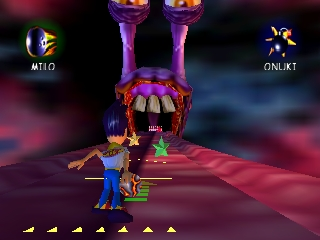
Milo’s Astro Lanes (Europe)
0 1 1
Milo’s Astro Lanes (Europe) is a classic Nintendo 64 game that puts a fun spin on bowling. As a browser-based emulation of this old-school title, it’s simple to access and play without any downloads or complicated setups. If you enjoy casual sports games with a sci-fi touch, this game will appeal to those feeling nostalgic and newcomers alike, thanks to its colorful, space-themed look and straightforward gameplay.
Getting Into Milo’s Astro Lanes
The main idea is knocking down pins in a space-themed alley. You pick a character, each with slight differences, and try to score by rolling a ball down the lane. The game includes different modes, from single-player to multiplayer matches—great for quick play or friendly competition. Before each throw, you choose your power and spin, aiming to clear as many pins as possible in each round.
The play cycle is simple: aim, set your power, and release. The physics are forgiving but require some skill to handle tricky angles or stubborn pin arrangements. The pace encourages trying again and again, whether to beat a high score or improve your consistency. Matches are quick, making it easy to squeeze in a few rounds or have a casual game with friends. Since it’s from the Nintendo 64 era, expect mechanics that are easy to pick up, with less focus on complex strategies—perfect for players of all levels.
Standout Features
The visuals lean into the sci-fi theme with brightly colored lanes and space backgrounds, giving it a unique look compared to standard bowling games. The characters are cartoonish and funny, adding charm and keeping the game light. Even with simple mechanics, the animations and effects—like glowing pins and sparkling lanes—create a lively atmosphere that makes each game visually appealing.
Advancement is straightforward: winning matches unlocks new characters and lane skins, encouraging repeat play. It doesn’t have a complex story mode, but you can keep coming back to beat high scores, try different characters, and challenge friends. Its simple gameplay means you can jump right in and start playing, with enough variety to stay interested over multiple sessions.
Strategy and Tips
Improving at Milo’s Astro Lanes mainly comes down to mastering aim and control of your shot’s power. Tiny adjustments to your angle can really affect pin placement and your score.
- Start with light shots to get a feel for how the lane reacts before going for more powerful throws.
- Try using spin to influence the ball’s path and help clear pins more effectively.
- Watch how pins fall from different angles to figure out the best way to aim.
- Use quick, confident releases so your shots stay consistent across rounds.
- Experiment in different modes to learn lane quirks and unlock characters faster.
Quick Questions
How do I get started if I’ve never played before?
Pick a character, choose a game mode, and then aim and adjust your power to roll the ball down the lane.
What’s the most common mistake for beginners?
Many new players overshoot or undershoot the power, which leads to missed pins. Practicing consistent strength makes a big difference.
Can I play Milo’s Astro Lanes on a mobile device or touchscreen?
Yes, since it runs directly in your browser, it works on mobile devices with touchscreens, making it easy to play anywhere.
Milo’s Astro Lanes is a simple, enjoyable game that’s easy to get into and hard to stop playing. Its cheerful visuals and straightforward mechanics make it perfect for quick gaming sessions, whether you’re into retro titles or just want a casual space-themed game you can play right in your browser.
Related games: you can also try Elmo's Letter Adventure (USA) and Jikkyou World Soccer – World Cup France '98 (Japan) (Rev A), or browse all other games in the Nintendo 64 category.
How to Play Milo’s Astro Lanes (Europe)?
Choose your character, aim the shot, set power and spin, then release to knock down pins. Try to score high by clearing as many pins as possible in each quick round.
Game Controls
Arrow keys move the aiming cursor; space or a specific key releases the ball; other keys handle power and spin adjustments.
You may be interested in:
-
 Nintendo 64
♥ 2
Mortal Kombat Mythologies – Sub-Zero (Europe)
Nintendo 64
♥ 2
Mortal Kombat Mythologies – Sub-Zero (Europe) -
 Nintendo 64
♥ 23
Mortal Kombat 4 (Europe)
Nintendo 64
♥ 23
Mortal Kombat 4 (Europe) -
 Nintendo 64
♥ 1
Morita Shougi 64 (Japan)
Nintendo 64
♥ 1
Morita Shougi 64 (Japan) -
 Nintendo 64
♥ 4
Monster Truck Madness 64 (USA)
Nintendo 64
♥ 4
Monster Truck Madness 64 (USA) -
 Nintendo 64
♥ 1
Monster Truck Madness 64 (Europe) (En,Fr,De,Es,It)
Nintendo 64
♥ 1
Monster Truck Madness 64 (Europe) (En,Fr,De,Es,It) -
 Nintendo 64
♥ 1
Monroe Park
Nintendo 64
♥ 1
Monroe Park -
 Nintendo 64
♥ 7
Monaco Grand Prix (USA)
Nintendo 64
♥ 7
Monaco Grand Prix (USA) -
 Nintendo 64
♥ 1
Monaco Grand Prix – Racing Simulation 2 (Europe) (En,Fr,Es,It)
Nintendo 64
♥ 1
Monaco Grand Prix – Racing Simulation 2 (Europe) (En,Fr,Es,It)
Comments (0)
No comments yet. Be the first to comment!