Only Up 64
0 22 4
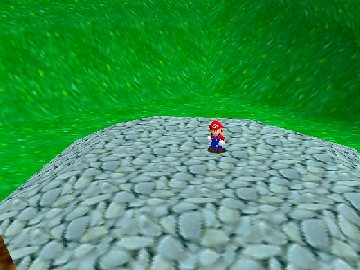
Only Up 64 is a classic Nintendo 64 game running in your browser, offering a straightforward yet tough platforming experience from the Nintendo 64 days. It’s designed for players who enjoy precise jumps, good timing, and exploring vertical levels. The game loads directly here, so no downloads or installations are needed—just click and start playing, whether for a quick session or a longer run.
Getting Into Only Up 64
The main idea of Only Up 64 is climbing a series of structures that get more difficult as you go. You control a character that must jump from platform to platform, avoiding hazards and missteps. Unlike many modern platformers that focus on complex mechanics, this game tests your timing and spatial awareness. You’ll probably find yourself retrying sections to perfect your jumps or get a feel for the patterns, making each attempt a bit different.
Usually, you pick your starting point and try to reach the highest spot before falling or hitting an obstacle. The game doesn’t have different modes—just a straightforward climb that keeps going, getting tougher along the way with narrower platforms, moving hazards, and unpredictable gaps. It’s all about quick reflexes and precise control, with no need for complicated storylines or unlockables.
Standout Features
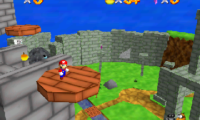
Visually, Only Up 64 sticks with the blocky, polygon look typical of Nintendo 64 games. Its simple graphics evoke nostalgia but are functional enough to keep your focus on the gameplay. The environment gradually changes as you climb, giving a sense of progress even if the levels look similar. The challenge is mastering each section to go higher, which makes you want to try again and beat your best score.
The game’s appeal comes from the desire to improve with each run—better timing, avoiding hazards more efficiently. Its mechanics are straightforward, so you can jump in quickly and start climbing without much of a learning curve. But to really get good, practice is key. Since it runs right in your browser, you can retry sections easily or challenge yourself to beat your high scores without any hassle.
Strategy and Tips
To get further in Only Up 64, focus on timing your jumps carefully. Rushing often leads to mistakes, so patience helps. Try to memorize the layout of each section to anticipate hazards. Use small, controlled jumps when precision matters and avoid over-jumping, which can cause falls. Keep an eye on moving platforms or shifting dangers—they can throw off your rhythm.
- Take your time to analyze each part before jumping—rushing usually means more mistakes.
- Make small, controlled jumps rather than big leaps that might overshoot platforms.
- Learn the patterns of hazards and moving platforms to plan your climb better.
- If you’re unsure, pause briefly to reorient—rushing can lead to errors.
- Practice often to improve your timing and memorize tricky sections.
- Stay calm after falls; each attempt teaches you more about the layout and timing.
Quick Questions
How do I get started with Only Up 64?
Just load the game in your browser and start climbing. There are no menus—just jump right in and begin your ascent.
What’s a common mistake for beginners?
Many new players rush their jumps without paying attention to timing, which leads to frequent falls. Taking your time usually improves your success rate.
Can I play Only Up 64 on mobile or touch devices?
Yes, since it runs directly in your browser, you can play on mobile devices with touch screens. Just be aware that precise control might be trickier than using a keyboard.
This version of Only Up 64 offers a simple challenge that’s easy to start but hard to master. Its nostalgic look and straightforward mechanics make it a good quick-play game here, giving you a satisfying climb each time you try.
Related games: you can also try Hexen (Japan) and Conker's Bad Fur Day Uncensored, or browse all other games in the Nintendo 64 category.
How to Play Only Up 64?
Jump from platform to platform, avoiding hazards and climbing higher to beat your best score. Time your jumps carefully and memorize the level layout to progress further in this challenging platformer.
Game Controls
Arrow keys act as the D-pad; Enter is Start; on-screen mapped keys handle the action buttons.
You may be interested in:
-
 Nintendo 64
♥ 6
Super Melee Adventure 64 – NESS
Nintendo 64
♥ 6
Super Melee Adventure 64 – NESS -
 Nintendo 64
♥ 43
Super Melee Adventure 64 – Luigi
Nintendo 64
♥ 43
Super Melee Adventure 64 – Luigi -
 Nintendo 64
♥ 8
Super Melee Adventure 64 – FOX
Nintendo 64
♥ 8
Super Melee Adventure 64 – FOX -
 Nintendo 64
♥ 7
Super Melee Adventure 64 – C.FALCON
Nintendo 64
♥ 7
Super Melee Adventure 64 – C.FALCON -
 Nintendo 64
♥ 1
Super Mario The Power Star (Christmas Special)
Nintendo 64
♥ 1
Super Mario The Power Star (Christmas Special) -
 Nintendo 64
♥ 18
Super Mario Star Road Multiplayer (v1.2.1)
Nintendo 64
♥ 18
Super Mario Star Road Multiplayer (v1.2.1) -
 Nintendo 64
♥ 7
Super Mario Star Road – Enhanced
Nintendo 64
♥ 7
Super Mario Star Road – Enhanced -
 Nintendo 64
♥ 6
Super Mario In Crash Bandicoot
Nintendo 64
♥ 6
Super Mario In Crash Bandicoot
Comments (0)
No comments yet. Be the first to comment!