Overtime 64 (WIP)
0 2 0
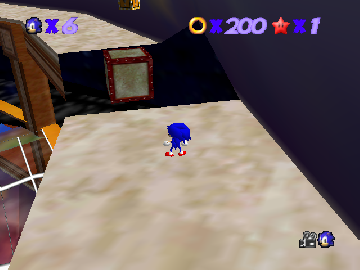
Overtime 64 (WIP) offers a look back at the Nintendo 64 era, providing a classic gaming experience you can play directly in your browser. Its faded graphics and straightforward mechanics remind you of a time when games were simple but fun. The pixelated visuals and nostalgic sound effects set a familiar tone, inviting players to spend a few minutes exploring its digital corridors.
Step Into the World of Overtime 64
This game drops you into a pixelated universe that feels like late 90s 3D titles, with blocky textures and minimalistic environments. The visuals reflect the console’s style, with a colorful but intentionally low-res palette that sparks nostalgia. The soundtrack features looping melodies reminiscent of classic Nintendo 64 titles, complemented by sound effects that punctuate actions with a satisfying retro punch. The atmosphere keeps things simple but engaging, capturing the feel of an early 3D adventure with an emphasis on gameplay rather than graphical polish.
As you move through the game, you’ll notice the straightforward design: geometric shapes, basic lighting, and a limited draw distance. Despite this, the audio cues and pacing add a rhythmic quality. The in-browser emulator makes it easy to jump right in, offering instant access to something rooted in the Nintendo 64’s golden age. It’s a clean, unpretentious environment that prioritizes gameplay flow, perfect for those craving a taste of classic Nintendo 64 in a browser format.
How the Gameplay Hooks You
Overtime 64 has a simple loop that balances challenge and progress. Its pacing relies on quick bursts of action, encouraging players to complete objectives efficiently before moving on. The mechanics are accessible but require focus to master, making short sessions satisfying without feeling overwhelming. Its straightforward structure means you can jump in, play for a few minutes, then step away without losing your place.
The game advances through levels or objectives within a time limit or score system, keeping tension high. Repeated attempts help sharpen skills and improve your performance each time. This cycle makes it easy to pick up and pause, which is great for players looking for quick challenges wrapped in a retro package. The simplicity leaves room for focusing on core mechanics and reacting quickly to in-game situations.
Pro Tips for Overtime 64
If you want to get the most out of your time with the game, here are some helpful tips:
- Listen for sound cues—they often hint at upcoming obstacles or opportunities.
- Pay attention to enemy movement patterns to improve your reaction times.
- Complete levels quickly to boost your score or move forward faster.
- Practice small sections repeatedly to build muscle memory and timing.
- Use the in-browser controls to try different strategies without penalty.
- Stick to short, focused play sessions to keep things fresh and avoid frustration.
Frequently Asked Questions
Does Overtime 64 have multiple levels or stages?
The game is built around short, self-contained segments, making it ideal for quick, repeatable attempts rather than long campaigns.
Is the gameplay repetitive or does it offer variety?
The core mechanics stay the same, but each level or challenge introduces new patterns or goals, keeping the experience fresh over short sessions.
Can I play Overtime 64 in a short session without losing progress?
Yes, it’s easy to pick up where you left off, making it a good choice for casual play in your browser without long commitments.
While updates might add more features later, even in its current form, Overtime 64 offers a compact, nostalgic trip that captures the essence of classic Nintendo 64 gaming, all playable instantly online.
Related games: you can also try GameBooster 64 (Europe) (v1.1) (Unl) and All-Star Baseball 99 (Europe), or browse all other games in the Nintendo 64 category.
How to Play Overtime 64 (WIP)?
Move through levels quickly, complete objectives before time runs out, and improve your score with each attempt. Focus on reacting fast and mastering the simple controls for a satisfying retro challenge.
Game Controls
Arrow keys act as the D-pad; Enter is Start; other keys handle action buttons.
You may be interested in:
-
 Nintendo 64
♥ 3
Zool – Majuu Tsukai Densetsu (Japan)
Nintendo 64
♥ 3
Zool – Majuu Tsukai Densetsu (Japan) -
 Nintendo 64
♥ 3
Zero The Jackal 64
Nintendo 64
♥ 3
Zero The Jackal 64 -
 Nintendo 64
♥ 5
Zelda’s Birthday
Nintendo 64
♥ 5
Zelda’s Birthday -
 Nintendo 64
♥ 5
Zelda: The Sealed Palace 1.3
Nintendo 64
♥ 5
Zelda: The Sealed Palace 1.3 -
 Nintendo 64
♥ 6
Zelda Revival
Nintendo 64
♥ 6
Zelda Revival -
 Nintendo 64
♥ 3
Zelda Ocarina Of Time Indigo v0.1.10
Nintendo 64
♥ 3
Zelda Ocarina Of Time Indigo v0.1.10 -
 Nintendo 64
♥ 17
Zelda Ocarina Of Time Indigo v0.1.0
Nintendo 64
♥ 17
Zelda Ocarina Of Time Indigo v0.1.0 -
 Nintendo 64
♥ 10
Zelda Ocarina Of Time Indigo Chapter 2
Nintendo 64
♥ 10
Zelda Ocarina Of Time Indigo Chapter 2
Comments (0)
No comments yet. Be the first to comment!