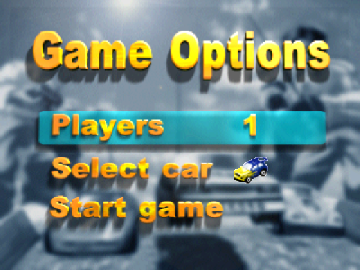
Tamiya Racing 64 (USA) (Proto)
0 14 0
Tamiya Racing 64 (USA) (Proto) is a nostalgic Nintendo 64 racing game that captures the excitement of miniature car competitions. It offers a simple, arcade-style experience that’s perfect for quick, enjoyable races right in your browser. As a title from the Nintendo 64 era, it brings back memories for fans of that time, emphasizing easy-to-understand gameplay over complex simulations. If you like racing games with straightforward controls and a focus on fun, Tamiya Racing 64 fits right into your gaming time.
Getting Into Tamiya Racing 64
The game revolves around racing small Tamiya-style cars on various tracks. The main idea is to pick your vehicle, select a track, and race against AI opponents or challenge the clock. Races are short, often just a few minutes, making it easy to jump in whenever you have a moment. Success relies on steering, accelerating, and managing your car’s handling to stay ahead.
Most sessions begin with choosing a race mode. You can go for quick races or more organized championships, depending on what you prefer. The controls are simple enough for beginners to pick up easily. As you play, you can unlock new tracks or cars, but the focus stays on getting better at the racing mechanics. The quick pace encourages multiple attempts, helping you improve with each run.
Standout Features
Visually, Tamiya Racing 64 has basic but colorful graphics that give off a nostalgic late 90s arcade vibe. Tracks are designed with clear layouts and minimal clutter, making it easy to follow the racing. The progression system provides a sense of achievement as you unlock new tracks and cars, encouraging you to keep trying to beat your best times and improve your rankings.
The game’s replay value comes from its focus on racing and the desire to top your previous performances. Races are quick, so you can fit several into a single session, testing your skills across different tracks and conditions. While it doesn’t include complex customization or mechanics, the straightforward racing keeps players coming back, especially those who enjoy a simple, no-frills racing experience.
Strategy and Tips
Getting the most out of Tamiya Racing 64 means understanding how your car handles and learning each track. Practice gentle steering and braking to avoid losing control on tight turns. Maintaining a steady pace rather than rushing is often more effective, especially on unfamiliar circuits.
- Familiarize yourself with each track’s layout to prepare for turns and find the best racing line.
- Use smooth acceleration out of corners to prevent skidding or spinning out.
- Keep an eye on your opponents’ positions to plan overtakes or defend your spot.
- Try different cars to see which one matches your driving style best.
- Use boost zones or shortcuts if they’re available on certain tracks.
- Focus on clean, controlled laps rather than risky moves that could lead to mistakes.
Quick Questions
How do I get started if I’ve never played before?
Pick a race mode and your car; the controls are simple, making it easy for new players to jump right in.
What’s a common mistake for beginners?
Trying to take corners too fast often causes loss of control—practice smooth, controlled turns instead.
Can I play Tamiya Racing 64 on mobile or touch devices?
Since it runs directly in your browser here, it works on most devices with a browser, including touchscreen devices, with no extra setup required.
For fans of classic racing games, Tamiya Racing 64 offers quick, accessible fun that captures the spirit of miniature car racing. Its simple approach makes it perfect for casual play or short bursts of competitive racing right in your browser.
Related games: you can also try Super Mario & Planet Stardust's Rampage (v1.0) and Rockman Dash – Hagane no Boukenshin (Japan), or browse all other games in the Nintendo 64 category.
How to Play Tamiya Racing 64 (USA) (Proto)?
Choose your car and track, then race against AI or the clock to beat your best times. Steer, accelerate, and manage your car to stay ahead through short, fun races.
Game Controls
Arrow keys control steering and acceleration; other keys handle braking and actions.
You may be interested in:
-
 Nintendo 64
♥ 2
Tom Clancy’s Rainbow Six (Europe)
Nintendo 64
♥ 2
Tom Clancy’s Rainbow Six (Europe) -
 Nintendo 64
♥ 56
Tom and Jerry in Fists of Furry (USA)
Nintendo 64
♥ 56
Tom and Jerry in Fists of Furry (USA) -
 Nintendo 64
♥ 26
Tom and Jerry in Fists of Furry (Europe) (En,Fr,De,Es,It,Nl)
Nintendo 64
♥ 26
Tom and Jerry in Fists of Furry (Europe) (En,Fr,De,Es,It,Nl) -
 Nintendo 64
♥ 4
Tigger’s Honey Hunt (USA)
Nintendo 64
♥ 4
Tigger’s Honey Hunt (USA) -
 Nintendo 64
♥ 2
Tigger’s Honey Hunt (Europe) (En,Fr,De,Es,It,Nl,Da)
Nintendo 64
♥ 2
Tigger’s Honey Hunt (Europe) (En,Fr,De,Es,It,Nl,Da) -
 Nintendo 64
♥ 15
Through The Ages v1.1
Nintendo 64
♥ 15
Through The Ages v1.1 -
 Nintendo 64
♥ 2
Thousand-Year Door 64
Nintendo 64
♥ 2
Thousand-Year Door 64 -
 Nintendo 64
♥ 14
The Super Mario Bros. Super Show 64 (v1.1)
Nintendo 64
♥ 14
The Super Mario Bros. Super Show 64 (v1.1)
Comments (0)
No comments yet. Be the first to comment!