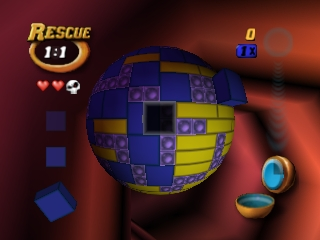
Tetrisphere (Europe)
0 1 0
Tetrisphere (Europe) is a classic Nintendo 64 game that offers a fresh take on the falling-block puzzle genre. Originally designed for the Nintendo 64 console, you can now play it directly in your browser through this emulator. If you enjoy puzzles that test your spatial awareness and strategic thinking, Tetrisphere might catch your interest. Its gameplay mechanics differ from traditional Tetris titles, providing a different kind of challenge for fans of retro puzzles online.
Getting Into Tetrisphere
The main focus of Tetrisphere is manipulating layers of interconnected blocks arranged in a sphere. The goal is to clear these layers by matching and removing blocks based on their colors and shapes. Unlike classic Tetris, where blocks fall vertically, here you rotate and shift parts of the sphere to access the pieces you need. The game usually starts with a spherical puzzle in front of you, and your task is to clear all the blocks before time runs out or the sphere gets too crowded.
The game offers different modes, like a time attack and puzzle challenges. Progress involves clearing more complex layers, which often require some planning to complete efficiently. The pace encourages players to develop a rhythm—rotating, matching, and removing blocks while managing the shape of the sphere. Since it runs directly in your browser, you can jump into a game quickly and fit in a few puzzle rounds whenever you have a moment.
Standout Features
Visually, Tetrisphere features a distinctive 3D look that was quite advanced for its time, with colorful blocks and smooth rotation mechanics. The spherical shape adds depth to the puzzle, and the interface makes it easy to spot matches and plan your moves. As you play, new block types and configurations are introduced, keeping the challenge engaging and varied.
Progression feels rewarding, with each cleared layer unlocking new levels that offer different layouts and difficulty spikes. The replay value comes from mastering the timing and rotation mechanics, as well as aiming for high scores or completing puzzles within tight constraints. The variety of modes and increasing complexity encourage repeated play, helping you improve your skills and strategic thinking over time.
Strategy and Tips
Getting started is straightforward, but becoming skilled at the game requires some planning. Focus on creating clear lines of matching blocks before they pile up. Keep an eye on the overall shape of the sphere to avoid getting trapped.
- Remove blocks that give you access to more layers or hard-to-reach areas.
- Think ahead when rotating—consider where blocks will land after your move.
- Balance the sphere’s shape; don’t concentrate all matches in one spot, as that can cause instability.
- Recognize patterns quickly to chain matches efficiently and clear layers faster.
- If the game mode has power-ups or special moves, use them wisely but don’t rely on them too much.
Quick Questions
How do I get started with Tetrisphere?
Just click to load the game. The spherical puzzle will be ready to manipulate with your mouse or keyboard controls—no downloads needed.
What’s a common mistake for beginners?
Many new players try to remove blocks randomly without considering the overall shape of the sphere, which can lead to getting stuck early on.
Can I play Tetrisphere on mobile or touch devices?
This version is optimized for mouse and keyboard, so gameplay might be less smooth or responsive on mobile or touch screens.
Playing Tetrisphere here means you can enjoy a challenging puzzle right in your browser, wherever you are. Its clever mechanics and layered complexity keep things interesting, offering a good mental workout for puzzle fans. Whether you’re just starting out or already familiar with the game, practicing this tetrisphere can sharpen your spatial skills and strategic planning in a fun, accessible way.
Related games: you can also try All-Star Baseball 2000 (Europe) and Deadly Arts (USA), or browse all other games in the Nintendo 64 category.
How to Play Tetrisphere (Europe)?
Rotate and shift the spherical layers to match and remove blocks of the same color before the sphere gets too crowded or time runs out.
Game Controls
Arrow keys for rotation and movement; spacebar or enter to select and remove blocks.
You may be interested in:
-
 Nintendo 64
♥ 3
Zool – Majuu Tsukai Densetsu (Japan)
Nintendo 64
♥ 3
Zool – Majuu Tsukai Densetsu (Japan) -
 Nintendo 64
♥ 3
Zero The Jackal 64
Nintendo 64
♥ 3
Zero The Jackal 64 -
 Nintendo 64
♥ 5
Zelda’s Birthday
Nintendo 64
♥ 5
Zelda’s Birthday -
 Nintendo 64
♥ 5
Zelda: The Sealed Palace 1.3
Nintendo 64
♥ 5
Zelda: The Sealed Palace 1.3 -
 Nintendo 64
♥ 6
Zelda Revival
Nintendo 64
♥ 6
Zelda Revival -
 Nintendo 64
♥ 3
Zelda Ocarina Of Time Indigo v0.1.10
Nintendo 64
♥ 3
Zelda Ocarina Of Time Indigo v0.1.10 -
 Nintendo 64
♥ 17
Zelda Ocarina Of Time Indigo v0.1.0
Nintendo 64
♥ 17
Zelda Ocarina Of Time Indigo v0.1.0 -
 Nintendo 64
♥ 10
Zelda Ocarina Of Time Indigo Chapter 2
Nintendo 64
♥ 10
Zelda Ocarina Of Time Indigo Chapter 2
Comments (0)
No comments yet. Be the first to comment!