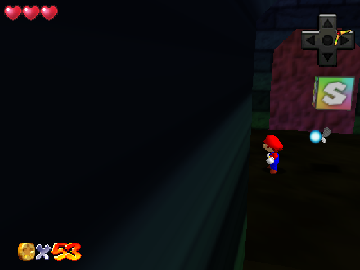
The Hole to Hyrule
0 3 0
The Hole to Hyrule is a classic Nintendo 64 game that runs right in your browser, giving a taste of a beloved era of 3D gaming. As a puzzle-platformer with adventure elements, it combines simple mechanics with a nostalgic feel that appeals to both retro fans and newcomers alike. Its straightforward design makes it easy to pick up, but paying attention to environmental cues and logical challenges adds depth for those who want to explore more thoroughly. Playing this way means no downloads—just instant access to a piece of Nintendo 64 history that’s fun to try out.
Why The Hole to Hyrule Is Worth Playing
This game from the Nintendo 64 era features minimalistic yet charming visuals that reflect the early days of 3D platforming and puzzle-solving. The environments are simple but thoughtfully designed, emphasizing clear navigation and logical progression. The atmosphere is lighthearted, with a sense of curiosity that encourages exploration of each area. The core gameplay involves solving spatial puzzles—finding ways through the hole to Hyrule and moving on to the next stage—which keeps things engaging without feeling overly complicated or frustrating.
What makes players want to keep playing is the balance between challenge and clarity. It’s not too difficult, but it does require careful observation and some trial and error. The controls are intuitive, so new players can jump right in, but there’s enough subtlety for more experienced players to get some satisfaction out of it. The browser emulator keeps the original experience intact, so you can focus on the puzzles instead of messing around with setup. It’s a short, satisfying experience—great for quick sessions or a relaxed playthrough that captures the charm of Nintendo 64’s style.
Tips to Get Ahead
Here are some practical ideas to help you navigate The Hole to Hyrule more easily:
- Keep an eye out for visual clues in each environment that point to the right path or solution.
- If you get stuck, try different routes; sometimes a change in perspective does the trick.
- Notice small environmental changes—they might show where to go next.
- Take your time exploring each area fully before moving forward.
- Remember, trial and error are part of the process—don’t get discouraged.
- If you’re unsure, go back to earlier sections to see if you missed a hint, or try a different approach.
Things to Know Before You Start
Question?
Is The Hole to Hyrule a long game?
Not really. It’s meant for short, manageable sessions focused on puzzle-solving rather than hours of gameplay. You might spend a few minutes or up to half an hour per session, depending on how quickly you solve each part.
Question?
Is the difficulty suitable for casual players?
Yes. Its simple mechanics and gentle learning curve make it accessible, though some puzzles may need patience and logical thinking, which can appeal to more dedicated players too.
Question?
Will I need prior experience with similar games to enjoy this one?
Not at all. The mechanics are straightforward enough for newcomers, and clear clues help guide your progress without any prior knowledge of complex controls or storylines.
Question?
Does the browser version support offline play or multiple modes?
This version runs directly in your browser, so you can play anytime without needing an internet connection. It’s focused on exploration and puzzles, with no extra modes or multiplayer options.
Give the browser version a try—The Hole to Hyrule offers a compact, charming challenge that rewards careful observation and patience. Its simplicity and nostalgic vibe make it a good pick for quick gaming sessions or just a relaxed walk through a classic Nintendo 64 puzzle landscape.
Related games: you can also try Smash Remix 1.4.0 and Iggy's Reckin' Balls (USA), or browse all other games in the Nintendo 64 category.
How to Play The Hole to Hyrule?
Navigate through environments, solve spatial puzzles by observing clues, and progress through each stage to reach Hyrule. Explore carefully and try different routes if stuck.
Game Controls
Arrow keys move the character; action buttons are mapped to keyboard keys.
You may be interested in:
-
 Nintendo 64
♥ 1
Top Gear Overdrive (Europe)
Nintendo 64
♥ 1
Top Gear Overdrive (Europe) -
 Nintendo 64
♥ 4
Top Gear Hyper-Bike (USA)
Nintendo 64
♥ 4
Top Gear Hyper-Bike (USA) -
 Nintendo 64
♥ 1
Top Gear Hyper-Bike (Japan)
Nintendo 64
♥ 1
Top Gear Hyper-Bike (Japan) -
 Nintendo 64
♥ 1
Top Gear Hyper-Bike (Europe)
Nintendo 64
♥ 1
Top Gear Hyper-Bike (Europe) -
 Nintendo 64
♥ 2
Toon Panic (Japan) (Proto)
Nintendo 64
♥ 2
Toon Panic (Japan) (Proto) -
 Nintendo 64
♥ 4
Tony Hawk’s Skateboarding (Europe)
Nintendo 64
♥ 4
Tony Hawk’s Skateboarding (Europe) -
 Nintendo 64
♥ 8
Tony Hawk’s Pro Skater 2 (Europe)
Nintendo 64
♥ 8
Tony Hawk’s Pro Skater 2 (Europe) -
 Nintendo 64
♥ 7
Tony Hawk’s Pro Skater (USA) (Rev A)
Nintendo 64
♥ 7
Tony Hawk’s Pro Skater (USA) (Rev A)
Comments (0)
No comments yet. Be the first to comment!