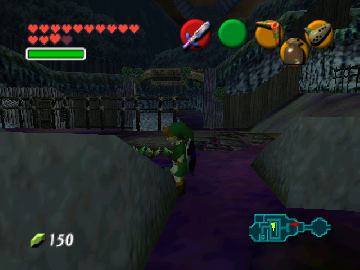
The Legend of Zelda: Nightmare
0 9 0
The Legend of Zelda: Nightmare is a classic Nintendo 64 game that runs directly in your browser, giving you a nostalgic look at one of the console’s adventure-filled titles. Its straightforward gameplay and familiar controls make it easy for new players to pick up and enjoy without any prior experience. Whether you want to play for a quick break or spend more time exploring, it offers a taste of the Zelda series’ signature puzzle-solving and exploration, all accessible through this browser-based emulator.
What Is The Legend of Zelda: Nightmare?
This game falls into the action-adventure genre, focusing on exploration, puzzles, and combat. As with many Zelda games, your main goal involves navigating different environments, uncovering secrets, and overcoming obstacles. The design keeps things interesting with platforming, item collection, and enemy encounters, set in a fantasy world that rewards curiosity and strategic thinking.
The core gameplay revolves around solving puzzles and defeating enemies to access new areas. While it sticks to the classic Zelda formula, it adds its own twists to keep things fresh. Its simple objectives and manageable difficulty make it suitable for players of all ages who want to experience a vintage Nintendo 64 adventure on their modern browsers.
What Keeps You Coming Back
The game offers replay value through its layered puzzles and hidden areas, encouraging thorough exploration. Players often revisit sections to find hidden items or unlock different paths, adding more depth beyond the main story. The variety of enemies and challenges also invites trying out different strategies, making each playthrough a little different from the last.
Plus, the nostalgia and straightforward mechanics make it easy to enjoy short gaming sessions or longer ones. Its intuitive design means you can jump right in and pick up where you left off, making it easy to return whenever you want a quick adventure. The mix of familiar gameplay and some surprises helps keep things interesting over multiple plays.
Handy Tips
To get started smoothly, explore every corner early on—hidden items often reveal useful upgrades. Keep an eye out for clues and interact with your surroundings to move forward faster. Managing your inventory carefully can save you from backtracking later. If you get stuck, revisiting earlier areas might reveal new solutions or shortcuts. Patience is key when solving puzzles or taking on tougher enemies.
- Take your time exploring each area; many secrets are hidden behind environmental clues.
- Save often if the game allows, especially before tough battles or tricky puzzles.
- Try different approaches to combat and puzzles to find shortcuts.
- Pay attention to item upgrades—they can make progress easier.
- Use the environment—certain objects or terrain may be crucial for advancing.
Player FAQ
Is The Legend of Zelda: Nightmare easy for newcomers?
Yes, the controls and mechanics are straightforward, making it accessible for players new to the series or action-adventure games in general.
Can younger players enjoy The Legend of Zelda: Nightmare?
In most cases, yes. The puzzles aren’t overly complicated, and the combat is mild, so it can be suitable for younger audiences with some guidance.
Do I need an internet connection to play The Legend of Zelda: Nightmare?
No, once it loads in your browser, you can play without an internet connection, making it convenient for quick access anytime.
Playing The Legend of Zelda: Nightmare offers a compact, enjoyable experience rooted in a beloved franchise. Its mix of exploration, puzzles, and light combat makes it a memorable part of the Nintendo 64 lineup, now easily playable through this browser emulator. Whether revisiting a classic or discovering it for the first time, it’s a simple, fun way to experience gaming history.
Related games: you can also try ProjectA95 (Luigi) and Elmo's Number Journey (USA), or browse all other games in the Nintendo 64 category.
How to Play The Legend of Zelda: Nightmare?
Explore the world, solve puzzles, and defeat enemies to find new areas and progress through the story. Collect items and uncover secrets to help you on your adventure.
Game Controls
Arrow keys for movement; space or Enter for actions; other keys for items and menu navigation.
You may be interested in:
-
 Nintendo 64
♥ 3
Zool – Majuu Tsukai Densetsu (Japan)
Nintendo 64
♥ 3
Zool – Majuu Tsukai Densetsu (Japan) -
 Nintendo 64
♥ 3
Zero The Jackal 64
Nintendo 64
♥ 3
Zero The Jackal 64 -
 Nintendo 64
♥ 5
Zelda’s Birthday
Nintendo 64
♥ 5
Zelda’s Birthday -
 Nintendo 64
♥ 5
Zelda: The Sealed Palace 1.3
Nintendo 64
♥ 5
Zelda: The Sealed Palace 1.3 -
 Nintendo 64
♥ 6
Zelda Revival
Nintendo 64
♥ 6
Zelda Revival -
 Nintendo 64
♥ 3
Zelda Ocarina Of Time Indigo v0.1.10
Nintendo 64
♥ 3
Zelda Ocarina Of Time Indigo v0.1.10 -
 Nintendo 64
♥ 17
Zelda Ocarina Of Time Indigo v0.1.0
Nintendo 64
♥ 17
Zelda Ocarina Of Time Indigo v0.1.0 -
 Nintendo 64
♥ 10
Zelda Ocarina Of Time Indigo Chapter 2
Nintendo 64
♥ 10
Zelda Ocarina Of Time Indigo Chapter 2
Comments (0)
No comments yet. Be the first to comment!