The Magical Lands
0 6 0
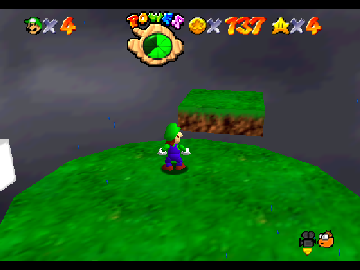
The Magical Lands is a classic Nintendo 64 game that runs right in your browser on this site. Its simple mechanics and charming style make it easy for new players to pick up and enjoy without any complicated instructions. Being from the Nintendo 64 era, it feels familiar to those who grew up with 3D platformers and adventure games from the late ’90s, offering a nostalgic vibe with instant access. No downloads or installations are needed—just click and start playing, making it great for quick sessions or casual gaming.
What Is The Magical Lands?
This Nintendo 64 favorite is part of the adventure genre, focusing on exploration and straightforward puzzles. The game invites players to explore a whimsical world full of colorful environments and accessible challenges. Core gameplay involves moving through different areas, collecting items, and completing tasks that are designed to be approachable for a wide range of ages. The controls and perspective are familiar to anyone who’s played 3D platformers from that time, providing an intuitive experience that doesn’t require prior experience with complex mechanics.
While it doesn’t have a heavy story or intricate combat, it offers a satisfying sense of progress through discovery. Its design encourages casual exploration rather than high-stakes competition, making it suitable for players looking for a light, engaging adventure. The goals are straightforward, and the difficulty remains gentle, helping to keep players motivated without frustration. It’s a good pick for younger audiences or newcomers to the genre.
What Keeps You Coming Back
One of the appealing aspects of The Magical Lands is its changing environments, which keep exploration interesting. Each area has its own visual style and simple puzzles, encouraging players to revisit and find secrets or hidden paths. The game also features collectible items that reward thorough exploration, giving added reasons to explore every corner of the world.
It’s easy to jump back into different levels thanks to the smooth operation of this browser emulator. You can pick up right where you left off without any trouble. Its relaxed pace and gentle difficulty make it a good choice for quick play sessions or longer adventures. Plus, its cheerful atmosphere makes it accessible and fun to revisit multiple times.
Handy Tips
To enjoy The Magical Lands fully, keep these tips in mind:
- Explore each area carefully—hidden items and shortcuts can help your journey.
- Notice visual cues for clues to puzzles or secrets.
- If you get stuck, revisit earlier spots; sometimes the answer is nearby.
- Use the pause feature to plan your next move or take a break without losing progress.
- Gather all items you come across—some might be needed to move forward or unlock extras.
- Stay aware of your objectives to avoid wandering aimlessly; the game highlights your main goals.
Player FAQ
Is The Magical Lands suitable for young children?
Yes, it’s designed with simple controls and accessible gameplay, making it a good choice for younger players, especially those familiar with basic platforming.
Do I need an internet connection to play The Magical Lands?
No, once the game loads in your browser, you can play offline. It’s quick to access whenever you want.
Can I play The Magical Lands on mobile devices?
While it works on mobile browsers that support emulation, controls might be less comfortable than using a keyboard or controller. Still, it’s playable on many devices.
Playing The Magical Lands right in your browser offers a simple, nostalgic adventure through a colorful, accessible world. Its easy mechanics and charming visuals make it a good choice for casual players and fans of retro Nintendo 64 games alike. Just click, and your adventure begins.
Related games: you can also try Play as Ganondorf in Ocarina of Time and Dezaemon 3D (Japan), or browse all other games in the Nintendo 64 category.
How to Play The Magical Lands?
Explore colorful worlds, collect items, and solve simple puzzles to progress through different areas in this nostalgic 3D adventure.
Game Controls
Arrow keys move the character; other keys handle actions and interactions.
You may be interested in:
-
 Nintendo 64
♥ 3
Zool – Majuu Tsukai Densetsu (Japan)
Nintendo 64
♥ 3
Zool – Majuu Tsukai Densetsu (Japan) -
 Nintendo 64
♥ 3
Zero The Jackal 64
Nintendo 64
♥ 3
Zero The Jackal 64 -
 Nintendo 64
♥ 5
Zelda’s Birthday
Nintendo 64
♥ 5
Zelda’s Birthday -
 Nintendo 64
♥ 5
Zelda: The Sealed Palace 1.3
Nintendo 64
♥ 5
Zelda: The Sealed Palace 1.3 -
 Nintendo 64
♥ 6
Zelda Revival
Nintendo 64
♥ 6
Zelda Revival -
 Nintendo 64
♥ 3
Zelda Ocarina Of Time Indigo v0.1.10
Nintendo 64
♥ 3
Zelda Ocarina Of Time Indigo v0.1.10 -
 Nintendo 64
♥ 17
Zelda Ocarina Of Time Indigo v0.1.0
Nintendo 64
♥ 17
Zelda Ocarina Of Time Indigo v0.1.0 -
 Nintendo 64
♥ 10
Zelda Ocarina Of Time Indigo Chapter 2
Nintendo 64
♥ 10
Zelda Ocarina Of Time Indigo Chapter 2
Comments (0)
No comments yet. Be the first to comment!