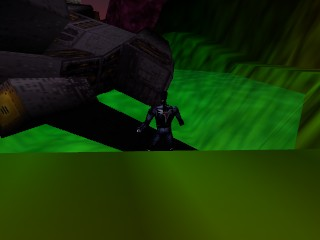
Tommy Thunder (USA) (Proto)
0 1 0
Tommy Thunder (USA) (Proto) is a rare Nintendo 64 classic that mixes platforming with action. As a prototype, it offers a look at early ideas for a game that combines fast movement with inventive gameplay mechanics. The design focuses on quick reflexes and tight controls, making it fun for anyone who enjoys classic platformers from the Nintendo 64 era. Running directly in your browser, this emulated version lets you play Tommy Thunder without downloads or installations, giving instant access to a nostalgic title that captures the spirit of 1990s gaming.
Tommy Thunder: Gameplay Overview
At its heart, Tommy Thunder is a platformer where players move through side-scrolling levels packed with obstacles, enemies, and hazards. The game requires precise timing and quick decisions, with you controlling the titular character as they dash, jump, and dodge through tougher stages. The mechanics are simple but demand skill, requiring mastery of movement and the use of any available power-ups or abilities to move forward.
The main loop involves completing levels efficiently, avoiding damage, and collecting items or bonuses. It rewards quick reactions and good spatial awareness. The controls respond well, allowing fluid movement that’s key to dodging hazards and keeping momentum. Overall, Tommy Thunder offers a classic platforming experience that emphasizes skill and timing, much like many Nintendo 64 titles in the genre.
Modes, Levels and Progression
The game has a series of levels arranged in a straight line, each with its own layout and challenges. While there isn’t much detail about extra modes, it seems to focus on single-player progression through increasingly tough levels. As you move forward, new enemies and challenges appear, encouraging mastery of movement and timing to beat each stage.
The design shows different themes or environments, which influence the hazards and platforming challenges. Progression depends on completing levels to unlock the next ones, with difficulty increasing to test reflexes and problem-solving skills. The straightforward setup makes replaying appealing, as players often try to beat their best times and scores on each level.
Winning Strategies
Staying alert and timing jumps carefully is key to doing well in Tommy Thunder. Watching enemy patterns helps you navigate tricky sections more safely.
- Practice quick reflexes and familiarize yourself with level layouts to avoid mistakes.
- Pick up power-ups or bonuses that boost movement or offer protection.
- Maintain momentum; stopping often can make avoiding hazards harder.
- Use the environment, like jumping from higher spots or using obstacles as cover.
- Pay attention to where enemies spawn so you can plan your approach and avoid surprises.
Common Questions About Tommy Thunder
How does the difficulty change as you go?
It gets tougher as enemies become faster, levels get more complex, and timing windows narrow, requiring sharper reflexes and better planning.
Are there multiple modes or just one path?
This game seems to follow a straightforward path through levels, with no mention of extra modes, focusing on single-player progress and score chasing.
How replayable is Tommy Thunder?
You can replay levels to improve times or scores, and learning enemy patterns and level layouts helps with mastery, keeping it interesting even with its simple structure.
Tommy Thunder offers a compact, skill-focused platforming experience that rewards precision and quick reflexes. Its simple design and emphasis on timing make it a fun addition to your collection of browser-based classic games.
Related games: you can also try Getter Love!! Cho Renai Party Game (Japan) and Super Robot Spirits (Japan), or browse all other games in the Nintendo 64 category.
How to Play Tommy Thunder (USA) (Proto)?
Move Tommy through side-scrolling levels by jumping and dodging enemies, aiming to complete each stage quickly and avoid hazards. Collect items and master timing to progress and improve your score.
Game Controls
Arrow keys control movement; spacebar jumps; other keys handle actions.
You may be interested in:
-
 Nintendo 64
♥ 3
Zool – Majuu Tsukai Densetsu (Japan)
Nintendo 64
♥ 3
Zool – Majuu Tsukai Densetsu (Japan) -
 Nintendo 64
♥ 3
Zero The Jackal 64
Nintendo 64
♥ 3
Zero The Jackal 64 -
 Nintendo 64
♥ 5
Zelda’s Birthday
Nintendo 64
♥ 5
Zelda’s Birthday -
 Nintendo 64
♥ 5
Zelda: The Sealed Palace 1.3
Nintendo 64
♥ 5
Zelda: The Sealed Palace 1.3 -
 Nintendo 64
♥ 6
Zelda Revival
Nintendo 64
♥ 6
Zelda Revival -
 Nintendo 64
♥ 3
Zelda Ocarina Of Time Indigo v0.1.10
Nintendo 64
♥ 3
Zelda Ocarina Of Time Indigo v0.1.10 -
 Nintendo 64
♥ 17
Zelda Ocarina Of Time Indigo v0.1.0
Nintendo 64
♥ 17
Zelda Ocarina Of Time Indigo v0.1.0 -
 Nintendo 64
♥ 10
Zelda Ocarina Of Time Indigo Chapter 2
Nintendo 64
♥ 10
Zelda Ocarina Of Time Indigo Chapter 2
Comments (0)
No comments yet. Be the first to comment!